
Die meisten Ihrer Spender geben von einem Telefon aus, und auf einem Telefon ist die schwierigste Aufgabe bei jeder Spende die Eingabe einer Kartennummer. Jedes zusätzliche Feld ist eine Chance, einen Unterstützer zu verlieren, der eigentlich spenden wollte.
Mit Charitable Mollie 1.1.0 können Ihre Spender all das überspringen.
✨ Apple Pay und Google Pay werden jetzt über den gehosteten Checkout von Mollie unterstützt! ✨
Ihre Spender können eine Spende mit einem Fingerabdruck, einem Gesichtsscan oder einem einzigen Tipp bestätigen.
Wenn Sie Mollie verwenden oder darüber nachdenken, darauf umzusteigen, sind Apple Pay und Google Pay jetzt direkt in Ihren Checkout integriert.
Hier erfahren Sie, wie es funktioniert und warum es sich lohnt, es noch heute zu aktivieren.
Warum One-Tap-Wallets das Ergebnis verändern
Stellen Sie sich eine Spenderin vor, die an einem Samstagmorgen durch Instagram scrollt. Sie sieht den Jahresend-Beitrag einer lokalen Tierrettungsorganisation, tippt auf den Link und landet auf der Spendenseite. Sie ist bereit, sofort 25 $ zu spenden, während sie daran denkt.
Dann fragt das Formular nach einer Kartennummer, einem Ablaufdatum und einem CVC. Sie beginnt zu tippen, ihr Telefon vibriert mit einer Nachricht, sie schaut kurz weg und kommt nie wieder zurück. Das ist keine Spenderin, die nicht spenden wollte. Das ist eine Spenderin, die die Geduld mit dem Formular verloren hat, das zwischen ihr und dem Anliegen stand.
Apple Pay und Google Pay beseitigen diese Reibung vollständig.
Die Karte ist bereits auf dem Gerät des Spenders gespeichert, verschlüsselt und verifiziert, sodass nichts eingegeben und nichts nachgeschlagen werden muss.
Sie tippt auf den Apple Pay-Button, bestätigt mit Face ID, und die Spende ist in Sekundenschnelle erledigt. 🎉
Für eine mobile Spenderbasis ist dieser Unterschied der entscheidende Faktor zwischen einer abgeschlossenen und einer abgebrochenen Spende.
Dies ist am wichtigsten überall dort, wo ein Spender spontan spendet, anstatt sich hinzusetzen, um ein Formular auszufüllen: Links in sozialen Medien, Peer-to-Peer-Spendenkampagnen, die von einem Unterstützer geteilt werden, Text-to-Give-Kampagnen und die kurzen, stark frequentierten Zeitfenster um die Jahresendspenden oder den GivingTuesday.
Überall dort, wo ein Spender unterwegs ist und schnell handelt, verhindert ein One-Tap-Wallet, dass er abbricht.
Wann Sie den Unterschied spüren werden
Wenn der meiste Ihrer Traffic bereits von Desktop-Spendern stammt, die ein Formular in ihrem eigenen Tempo ausfüllen, ist dieses Update ein nettes Extra. Wenn Ihre Spender von Social Shares, E-Mails auf ihrem Handy, Peer-to-Peer-Seiten oder einem QR-Code auf einem Flyer kommen, ist es viel mehr als das.
- Peer-to-Peer- und Botschafterkampagnen: Unterstützer teilen Links direkt mit Freunden und Familie, die sie fast immer auf dem Handy öffnen.
- Giving Tuesday und Jahresend-Aktionen: Der Traffic steigt schnell an, und jede Sekunde, die ein Spender mit Tippen verbringt, ist eine Sekunde, in der er den Tab schließen könnte.
- QR-Code-Kampagnen: Diese Spender halten ihr Handy bereits in der Hand. Ein Wallet-Button trifft sie genau dort, wo sie sind.
- Akquise von wiederkehrenden Spendern: Eine schnellere erste Spende bedeutet mehr Spender, die lange genug dabei bleiben, um wiederkehrende Spender zu werden.
Was die Unterstützung von Apple Pay und Google Pay leisten kann
Hier ist ein kurzer Überblick über alles, was dieses Update hinzufügt, das meiste davon, ohne dass Sie ein einziges Spendenformular anfassen müssen.
- ⚡ Einmaliges Bestätigen: Spender bestätigen mit Face ID, Touch ID oder einem Fingerabdruck, anstatt Kartendetails einzugeben.
- 🎯 Automatische Gerätezuordnung: Apple Pay erscheint in Safari und iOS, Google Pay in Chrome und Android, ohne dass Sie etwas in Ihren Formularen konfigurieren müssen.
- 👁️ Live-Status-Panel: Ein neues Apple Pay & Google Pay-Panel in Ihren Mollie-Gateway-Einstellungen zeigt genau an, welche Wallets auf Ihrem Konto aktiv sind.
- 🧩 Ein Hinweis, wenn etwas nicht stimmt: Wenn eine Wallet noch nicht aktiviert ist, erhalten Sie direkt von Charitable aus einen Link, um sie in Ihrem Mollie Dashboard zu aktivieren.
- 🔄 Aktualisierung nach Bedarf: Ein Link „Von Mollie aktualisieren“ überprüft jederzeit den Status Ihres Kontos, sodass Sie niemals veraltete Informationen sehen.
- 🤝 Vorhersehbare Stornierungen: Ein Spender, der eine Mollie-Zahlung abbricht, landet nun auf Ihrer Spendenziel-Stornierungsseite anstatt an einem unerwarteten Ort.
- 🛠️ Benutzerdefinierte Stornierungsweiterleitung für Entwickler: Der neue Filter
charitable_mollie_cancel_urlermöglicht es Ihnen, stornierende Spender zu jeder beliebigen URL zu senden, wobei das Spendenobjekt als Kontext verfügbar ist. - 💰 Keine zusätzliche PCI-Belastung: Da die Wallets über den gehosteten Checkout von Mollie laufen, gibt es für Sie keine zusätzlichen Compliance-Aufwände oder Domain-Einrichtungen.
Erste Schritte: Apple Pay und Google Pay aktivieren
Hier ist alles, was Sie brauchen, und nichts davon berührt Ihr Spendenformular.
- Gehen Sie zu Charitable » Einstellungen » Zahlungs-Gateways und aktivieren Sie das Mollie-Gateway.
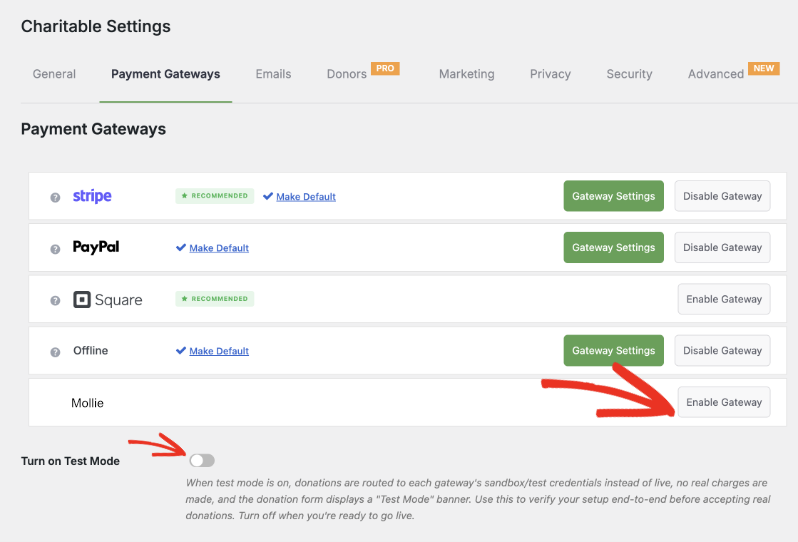
Öffnen Sie die Gateway-Einstellungen von Mollie, geben Sie Ihre Mollie API-Schlüssel ein und stellen Sie die Verbindung her. Verwenden Sie den Testmodus, während Sie dies einrichten, damit Sie bestätigen können, dass alles funktioniert, bevor Sie eine Live-Spende annehmen.
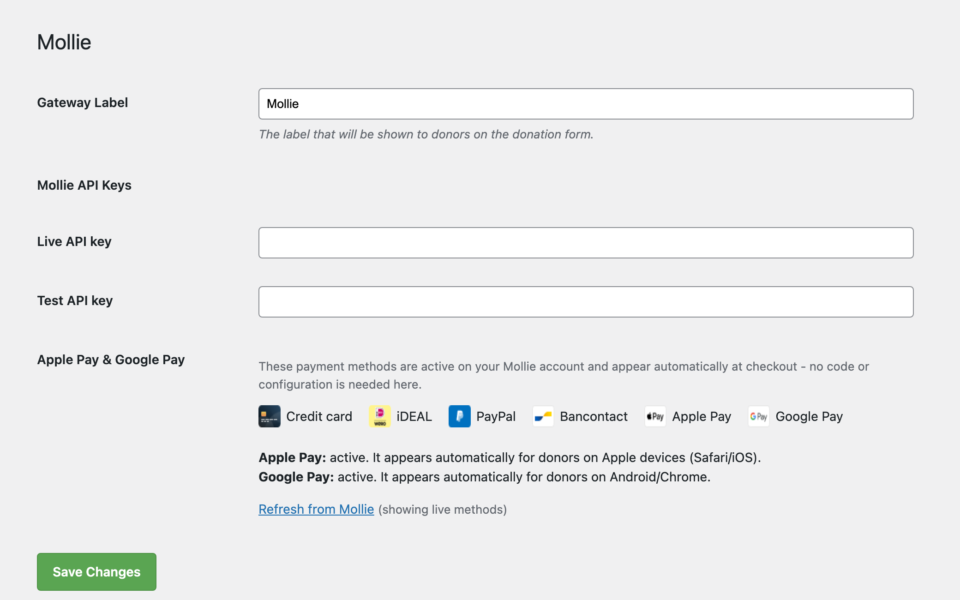
Melden Sie sich in Ihrem Mollie Dashboard an und aktivieren Sie Apple Pay und Google Pay unter Ihren Zahlungsmethoden. Dies ist der Teil, der klar verstanden werden sollte: Apple Pay und Google Pay sind aktiviert und werden auf der Seite von Mollie angezeigt. Mollie kümmert sich um die Anzeige des Wallet-Buttons und die Verifizierung des Spenders; die Aufgabe von Charitable ist es lediglich, die Spende an Mollie zu übermitteln, sobald diese bestätigt wurde. Sie fügen nichts zu Ihrem Spendenformular hinzu, damit dies funktioniert.
Zurück in Charitable » Einstellungen » Zahlungs-Gateways » Mollie, überprüfen Sie das neue Apple Pay & Google Pay-Panel, um zu bestätigen, dass beide Wallets als aktiv angezeigt werden. Wenn eine noch nicht live ist, klicken Sie auf den angegebenen Link, um direkt zu dieser Einstellung in Ihrem Mollie Dashboard zu gelangen.
Sobald beide Wallets in diesem Panel als aktiv angezeigt werden und Sie eine Testspende erfolgreich getestet haben, schalten Sie den Testmodus aus. Apple Pay und Google Pay werden nun automatisch für die richtigen Besucher angezeigt: kein Entwickler erforderlich und nichts weiter zu konfigurieren.
Warum Sie das lieben werden
Die Einrichtung dauert Minuten. Die Auswirkung nicht.
🧭 Sie wissen immer, was live ist, direkt aus dem Charitable-Dashboard, mit einem Link, um alles zu beheben, was es nicht ist.
🚀 Weniger abgebrochene Spenden von mobilen Besuchern, die keine Kartennummer eingeben möchten.
🔒 Spender vertrauen Wallet-Zahlungen, die sie bereits täglich nutzen, daher schließen mehr von ihnen den Vorgang ab.
🕐 Die Einrichtung erfolgt in Ihrem Mollie Dashboard und den Charitable-Einstellungen, an Ihrem Spendenformular ändert sich nichts.
Für Agenturen und Entwickler
Benutzerdefinierte Abbruchseite
Müssen abgebrochene Zahlungen an einen bestimmten Ort weitergeleitet werden, z. B. an eine maßgeschneiderte Seite „Wir würden uns immer noch über Ihre Unterstützung freuen“? Der neue Filter charitable_mollie_cancel_url ermöglicht es Ihnen, eine benutzerdefinierte Abbruch-URL pro Spende festzulegen, wobei das Spendenobjekt für den Kontext verfügbar ist.
Aufbauend auf Mollies gehostetem Checkout
Da Apple Pay und Google Pay über den gehosteten Checkout von Mollie laufen, gibt es keine zusätzliche PCI-Belastung und keine Geräte- oder Domain-Einrichtung auf Ihrer Seite. Mollie kümmert sich um die Wallet-Infrastruktur, und Charitable zeigt den Status an, sodass Sie die Kontrolle behalten.
Häufig gestellte Fragen
Muss ich meine Spendenformulare ändern, um Apple Pay und Google Pay zu unterstützen?
Nein. Sobald die Wallets in Ihrem Mollie Dashboard aktiviert sind, erscheinen sie automatisch beim Checkout für das richtige Gerät. Es gibt nichts, was Sie in Ihrem Spendenformular-Builder hinzufügen oder konfigurieren müssen.
Welche Browser und Geräte zeigen Apple Pay im Vergleich zu Google Pay an?
Apple Pay wird für Besucher auf Safari und iOS angezeigt. Google Pay wird für Besucher auf Chrome und Android angezeigt. Mollie erkennt das Gerät und zeigt die richtige Option an; ein Spender mit einem nicht unterstützten Browser sieht stattdessen einfach Ihre anderen Zahlungsmethoden.
Ist zusätzliche PCI-Compliance-Arbeit erforderlich?
Nein. Apple Pay und Google Pay laufen vollständig über den gehosteten Checkout von Mollie, sodass Kartendaten niemals Ihren Server berühren. Es ist keine zusätzliche Compliance-Arbeit oder Domain-Verifizierung auf Ihrer Seite erforderlich.
Kann ich dies testen, bevor ich Live-Spenden annehme?
Ja. Nutzen Sie den Testmodus in Ihren Mollie-Gateway-Einstellungen, während Sie alles einrichten, bestätigen Sie, dass die Wallets im Apple Pay & Google Pay-Panel als aktiv angezeigt werden, und führen Sie eine Testspende durch, bevor Sie zu Live-Zahlungen wechseln.
Was passiert, wenn ein Spender eine Wallet-Zahlung abbricht?
Er wird stattdessen auf Ihre Spendenabbruchseite weitergeleitet und nicht an ein unerwartetes Ziel, sodass die Erfahrung auch dann vorhersehbar bleibt, wenn ein Spender seine Meinung während des Vorgangs ändert.
Können Entwickler anpassen, wo abgebrochene Spender landen?
Ja. Der Filter charitable_mollie_cancel_url ermöglicht es Ihnen, abgebrochene Spender zu jeder von Ihnen gewählten URL zu senden, wobei das Spendenobjekt für den Kontext verfügbar ist.
Erste Schritte mit Apple Pay und Google Pay
Mollie ist als Zahlungs-Gateway in allen Charitable Pro-Plänen, Basic, Plus, Pro und Elite verfügbar.
Wenn Sie bereits Mollie verwenden, aktualisieren Sie auf Version 1.1.0, fügen Sie Ihre API-Schlüssel in den Gateway-Einstellungen hinzu und aktivieren Sie Apple Pay und Google Pay in Ihrem Mollie Dashboard.
Lesen Sie die Dokumentation zur Einrichtung von Apple Pay & Google Pay »
Lesen Sie die Dokumentation zum Mollie Gateway »
Noch nicht auf Charitable Pro? Sie können bis zu 50 % Rabatt erhalten, wenn Sie sich für Charitable Pro anmelden oder ein Upgrade durchführen. Wir möchten sicherstellen, dass Sie die erweiterten Fundraising-Funktionen wie wiederkehrende Spenden, Spendenwiederherstellung und mehr zu deutlich reduzierten Kosten ausprobieren können.
Schließen Sie sich noch heute über einer Million zufriedenen Charitable Pro-Nutzern an. Jeder Kauf beinhaltet eine 14-tägige Geld-zurück-Garantie, die sicherstellt, dass Sie auf jedem Schritt unterstützt werden.
Wenn Sie Fragen haben oder Hilfe benötigen, steht Ihnen unser Support-Team zur Verfügung, um Ihnen zu helfen, das Beste aus diesen neuen Funktionen herauszuholen.
Bleiben Sie verbunden für weitere Ressourcen für gemeinnützige Organisationen
Für weitere Tutorials und Videos, die auf gemeinnützige Organisationen zugeschnitten sind, abonnieren Sie unseren YouTube-Kanal. Wir veröffentlichen regelmäßig Expertentipps, Schritt-für-Schritt-Anleitungen zu Online-Spenden, Fundraising-Strategien und praktische Ressourcen, die Ihrer Organisation zum Erfolg verhelfen.
🗞️ Erhalten Sie wöchentliche Tipps und exklusive Anleitungen in Ihrem Posteingang
Melden Sie sich für unseren Newsletter an →
🎥 Sehen Sie sich Schritt-für-Schritt-Tutorials und Erfolgsgeschichten an
Abonnieren Sie unseren YouTube-Kanal →
👩🏽💻 Vernetzen Sie sich mit unserer Community und erhalten Sie tägliche Einblicke in gemeinnützige Organisationen
Folgen Sie uns auf LinkedIn →
🥳 Lustige Reels und Einblicke in gemeinnützige Organisationen
Folgen Sie uns auf Instagram →
👀 Aufschlussreiche & unterhaltsame Videos, die Ihnen helfen, Ihre Sache voranzubringen
Folgen Sie uns auf TikTok→
🌎 Abonnieren und folgen Sie uns für allgemeine Fundraising-Tipps
Holen Sie sich Fundraising-Tipps auf TikTok →
Leistungsstarke Fundraising-Ressourcen
🤖 Nutzen Sie Charitable mit Ihrem KI-Assistenten
Erfahren Sie mehr über Charitable + KI →
⬇️ Laden Sie bewährte Strategien, Kampagnenideen und Experten-Tools herunter
Holen Sie sich das Fundraising-Kit →
💸 Holen Sie sich kostenlose Fundraising-Ressourcen
Besuchen Sie den Charitable Fundraising Hub →
🤔 Haben Sie Fragen zu Charitable?
Charitable FAQs →
🏎️ Probieren Sie Charitable aus
Erstellen Sie Ihre Charitable Demo →
Verstehen Sie Begriffe und Jargon von gemeinnützigen Organisationen
Glossar für gemeinnützige Organisationen→
% Suchen Sie nach Angeboten und Rabatten für gemeinnützige Organisationen?
Beste Angebote und Rabatte für gemeinnützige Organisationen →
Charitable hat über 1 Million Downloads!
Millionen vertrauen auf Charitable für erfolgreiche Spendenkampagnen. Probieren Sie Charitable noch heute risikofrei aus.
✅ 14-tägige Geld-zurück-Garantie
✅ Transparente Preisgestaltung
✅ Einrichtung ohne Code









Hinterlassen Sie eine Antwort