
Charitable Razorpay ermöglicht es Ihrer gemeinnützigen Organisation, Spenden über Razorpay, das führende indische Zahlungs-Gateway, mit integrierter Unterstützung für UPI und Kampagnen-QR-Codes, anzunehmen. Es wurde speziell für Organisationen entwickelt, die indische Spender betreuen, unterstützt aber dennoch internationale Währungen für globale Kampagnen.
Verfügbar als kostenloses Add-on. Erfordert Charitable Pro 1.8.13.5 oder neuer. Die Version 1.0.0-beta-1 befindet sich derzeit exklusiv für Inhaber von Charitable Pro (Plugin) und dem Pro-Plan im Beta-Stadium. Ihr Feedback in dieser Zeit hilft, die allgemeine Veröffentlichung zu gestalten.
Hauptmerkmale
- Razorpay-Spenden in Live- und Testmodi über ein einziges Einstellungsfeld akzeptieren
- UPI als erstklassige Zahlungsmethode für INR-Kampagnen im Spendenformular anbieten
- Pro Kampagne generierte QR-Codes erstellen, die Spender scannen, um von jeder UPI-App aus zu spenden
- Wiederkehrende Spenden über das Charitable Recurring Add-on abwickeln
- Rückerstattungen direkt aus dem Charitable-Spendendatensatz bearbeiten
- Zahlungen über Razorpay-Webhooks mit HMAC-Signaturprüfung verifizieren
- Das Razorpay-Popup mit Ihrem eigenen Bild und Ihrer Akzentfarbe branden
- Unterstützt acht Währungen: INR, USD, EUR, GBP, SGD, AED, CAD, AUD
Warum Charitable Razorpay verwenden?
Razorpay ist das dominierende Gateway für Wohltätigkeitsorganisationen und Spender in Indien, und UPI treibt dort mittlerweile die Mehrheit der digitalen Spenden an. Mit Charitable Razorpay können Sie UPI-Geschenke, Scan-to-Give-QR-Spenden und Kredit- und Debitkartenzahlungen erfassen, ohne ein Drittanbieter-Plugin zu verwenden oder Spender zu einer externen Kasse zu leiten. Webhook-gesteuerte Statusaktualisierungen bedeuten, dass Ihr Dashboard die Wahrheit bei Razorpay widerspiegelt, selbst wenn ein Spender den Browser vor der Weiterleitung schließt.
Voraussetzungen
- Charitable Pro 1.8.13.5 oder neuer
- WordPress 6.2 oder neuer
- PHP 7.4 oder neuer
- Ein Razorpay-Händlerkonto (Live- und/oder Testmodus)
- Für wiederkehrende Spenden: das Charitable Recurring Add-on
Erste Schritte
Aktivierung
Laden Sie das Charitable Razorpay-Plugin hoch und aktivieren Sie es unter Plugins » Neu hinzufügen.
Gehen Sie zu Charitable » Einstellungen » Zahlungs-Gateways.
Klicken Sie auf Gateway aktivieren neben Razorpay. Wir empfehlen, den Testmodus zu aktivieren, während Sie dies einrichten. Dies stellt sicher, dass keine Live-Transaktionen durchgeführt werden, solange Sie nicht bereit dafür sind.
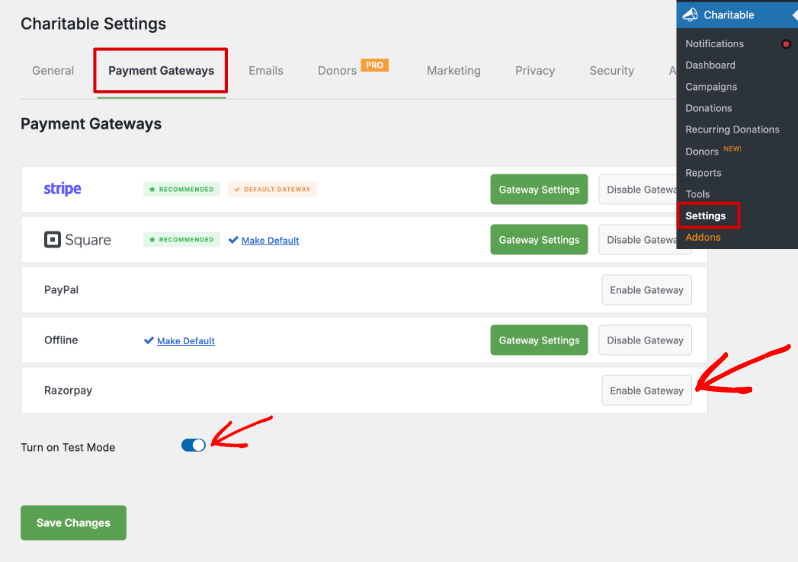
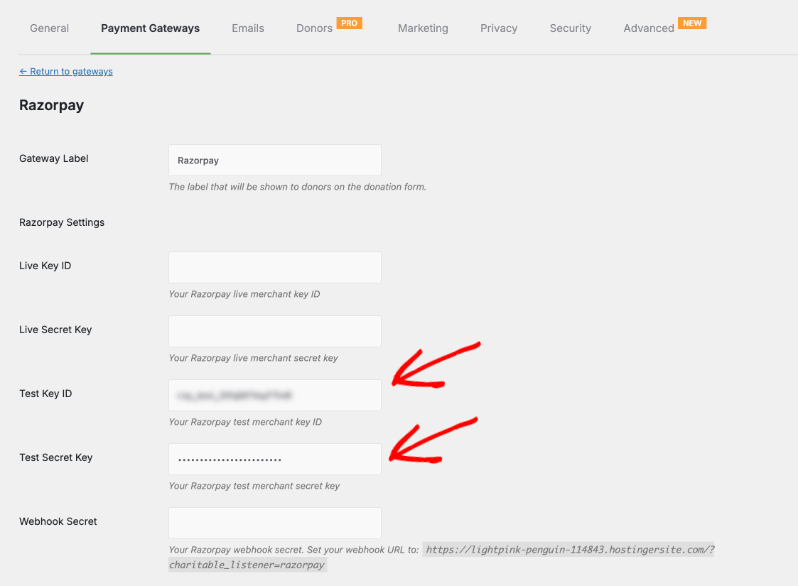
Wenn Sie das Gateway aktivieren, sehen Sie eine neue Schaltfläche Gateway-Einstellungen. Diese führt Sie zur Einstellungsseite, auf der Sie Ihre API-Anmeldeinformationen eingeben können. Sie können entweder Ihre Live-Schlüssel oder Testschlüssel verwenden.
Konfiguration
- Generieren Sie in Ihrem Razorpay-Dashboard API-Schlüssel für den Live-Modus (und den Testmodus, wenn Sie zuerst testen möchten).
- Fügen Sie den Live Key ID und Live Secret Key in den Razorpay-Einstellungen-Tab in Charitable ein.
- Erstellen Sie in Razorpay einen Webhook, der auf die URL zeigt, die im Hilfetext Webhook Secret auf demselben Einstellungs-Tab angezeigt wird. Kopieren Sie das Webhook-Geheimnis zurück in Charitable.
- Einstellungen speichern. Senden Sie eine kleine Testspende im Testmodus, um zu bestätigen, dass die Rundreise reibungslos funktioniert.
Wie Spender Razorpay im Spendenformular sehen
Auf Ihrer Kampagnenseite sehen Spender, wenn sie auf Spenden klicken, nun Razorpay als Option in Ihrem Spendenformular.
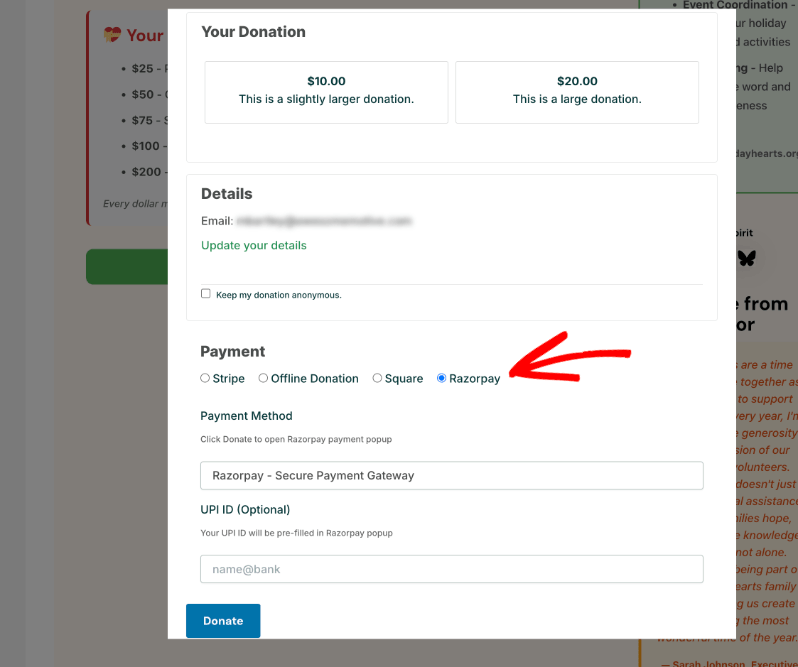
Sie können ihre UPI-ID in dieses Formular eingeben, die dann im Razorpay-Zahlungsformular vorausgefüllt wird.
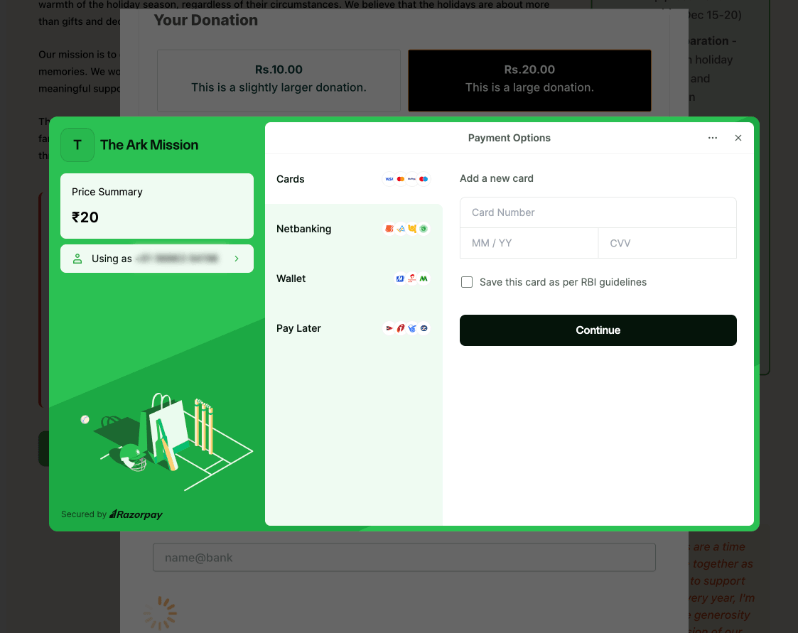
Wenn ein Spender auf die Schaltfläche Spenden klickt, öffnet Charitable das Razorpay-Popup mit dem gespendeten Betrag, dem Namen und der E-Mail-Adresse des Spenders sowie Ihrem markenspezifischen Bild und Ihrer Theme-Farbe.
Karten-, Netbanking-, Wallet-, Pay Later- und UPI-Optionen werden im Popup angezeigt, basierend auf dem, was in Ihrem Razorpay-Händlerkonto aktiviert ist.
QR-Codes auf Kampagnenseiten
Wenn Sie QR-Code-Generierung aktivieren, erhält jede veröffentlichte Kampagne einen scanbaren QR-Code, der auf der Kampagnenseite (und eine kleinere Version im Kampagnen-Sidebar-Layout) angezeigt wird. Der QR-Code kodiert einen UPI-Deep-Link zu Ihrer Händler-ID, wobei der Kampagnenzielbetrag vorausgefüllt wird, wenn QR-Code-Betrag vorausfüllen aktiviert ist. Spender können mit jeder UPI-App scannen, um eine Spende direkt an Ihr Konto zu senden.
Sie können dies auf derselben Seite Charitable » Einstellungen » Zahlungs-Gateways » Gateway-Einstellungen für Razorpay aktivieren.
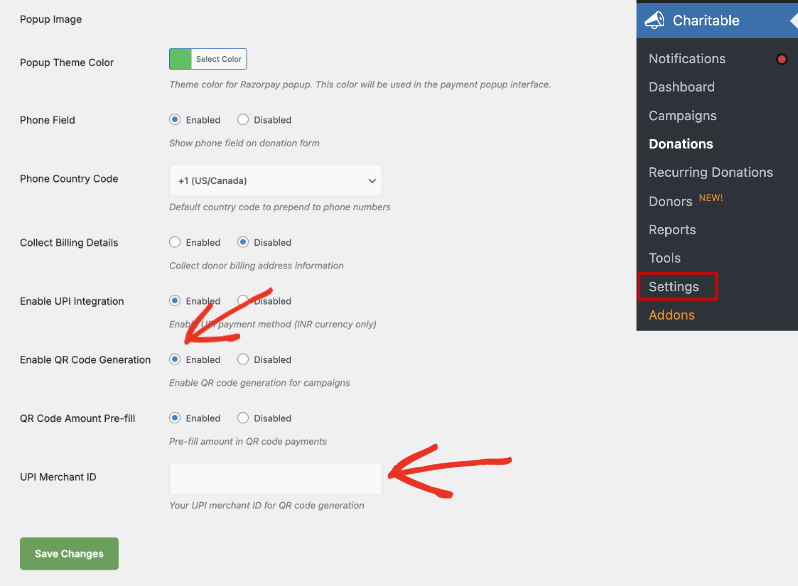
Das war's! Sie sind bereit, Spenden mit Razorpay anzunehmen.
Razorpay-Transaktionen in Charitable anzeigen
Sobald Spenden über das Razorpay-Gateway eingehen, können Sie diese unter Charitable » Spenden einsehen. Hier sehen Sie eine Liste der Spenden zusammen mit dem gespendeten Betrag, der Kampagne, dem Datum und dem Zahlungsstatus. In der Spalte „Gespendeter Betrag“ sehen Sie das verwendete Zahlungs-Gateway.
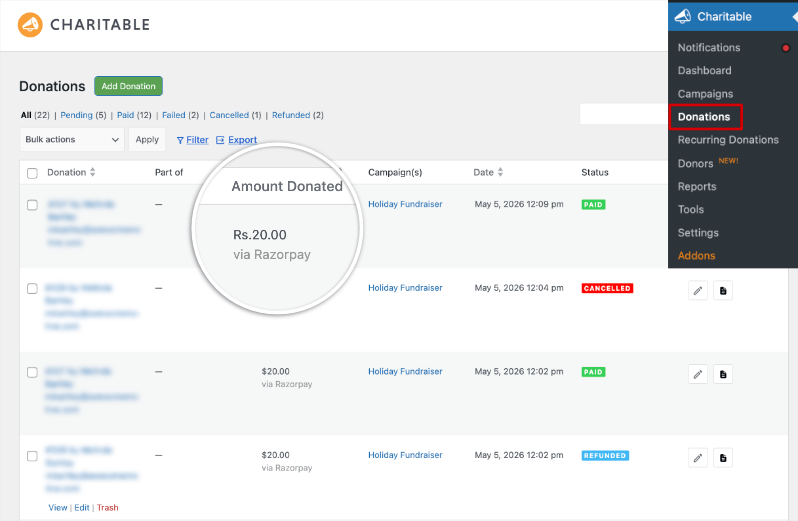
Sie können hier jeden Datensatz anzeigen oder bearbeiten. Darunter sehen Sie auch Details zum Razorpay-Zahlungsdatensatz.
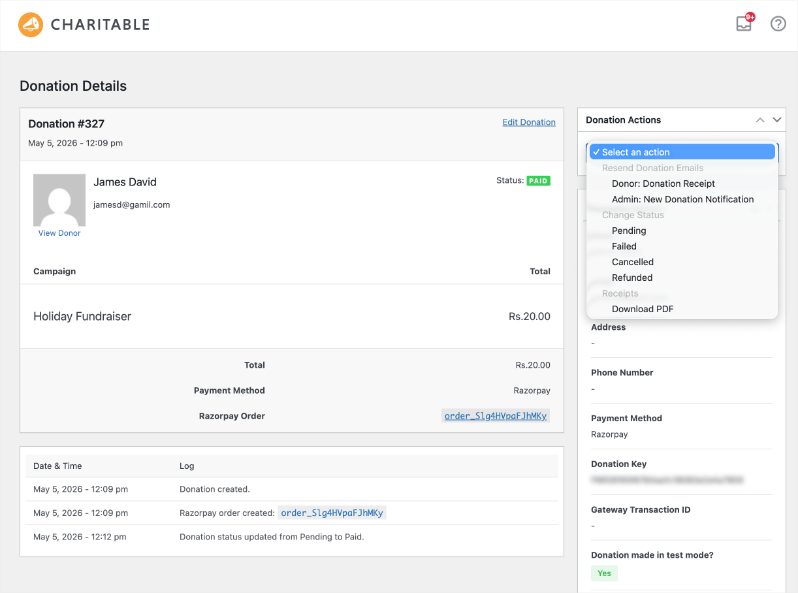
Im Folgenden besprechen wir weitere Konfigurationsoptionen, die Ihnen zur Verfügung stehen, wenn Sie Razorpay aktivieren.
Konfigurationsoptionen für Razorpay
Die Razorpay-Einstellungen befinden sich unter Charitable » Einstellungen » Zahlungs-Gateways » Razorpay.
API- & Webhook-Anmeldeinformationen
| Einstellung | Typ | Standard | Beschreibung |
|---|---|---|---|
| Live-Schlüssel-ID | Text | — | Ihre Razorpay Live-Händler-Schlüssel-ID. |
| Live-Geheimschlüssel | Passwort | — | Ihr Razorpay Live-Händler-Geheimschlüssel. |
| Testschlüssel-ID | Text | — | Ihre Razorpay Test-Händler-Schlüssel-ID. |
| Test-Geheimschlüssel | Passwort | — | Ihr Razorpay Test-Händler-Geheimschlüssel. Wird verwendet, wenn der Charitable-Testmodus aktiviert ist. |
| Webhook-Geheimnis | Passwort | — | Das gemeinsame Geheimnis, das Sie in der Razorpay-Webhook-Konfiguration erstellen. Ohne dieses werden Zahlungsbestätigungen und Abonnement-Updates stillschweigend abgelehnt. |
Spendererlebnis
| Einstellung | Typ | Standard | Beschreibung |
|---|---|---|---|
| Popup-Bild | Bild | — | Bild, das oben im Razorpay-Popup angezeigt wird. 80x80px empfohlen. |
| Popup-Designfarbe | Farbauswahl | #2bc253 | Akzentfarbe, die in der Razorpay-Popup-Oberfläche verwendet wird. |
| Telefonfeld | Radio | Aktiviert | Zeigt ein Telefonnummernfeld im Spendenformular an. |
| Telefon-Ländercode | auswählen | +1 | Standard-Ländercode, der dem Telefonfeld vorangestellt wird. Enthält +1, +91, +44, +61, +65, +971, +33, +49, +81, +86. |
| Abrechnungsdetails erfassen | Radio | Deaktiviert | Erfasst die Rechnungsadressinformationen des Spenders zusammen mit der Zahlung. |
UPI & QR-Codes
| Einstellung | Typ | Standard | Beschreibung |
|---|---|---|---|
| UPI-Integration aktivieren | Radio | Aktiviert | Fügt die UPI-Zahlungsmethode zum Spendenformular für INR-Kampagnen hinzu. |
| QR-Code-Generierung aktivieren | Radio | Aktiviert | Rendert einen scanbaren QR-Code auf jeder öffentlichen Kampagnenseite. |
| QR-Code-Betrag vorab ausfüllen | Radio | Aktiviert | Enthält den Zielbetrag der Kampagne im QR-Code, sodass die UPI-App des Spenders mit diesem Wert geöffnet wird. |
| UPI-Händler-ID | Text | — | Ihre registrierte UPI-Händler-ID (VPA). Erforderlich für die QR-Code-Generierung. |
Anpassung
Vorlagenüberschreibungen
Die beiden Frontend-Vorlagen können überschrieben werden, indem Sie sie in Ihr Theme kopieren:
templates/donation-form/upi-fields.php→your-theme/charitable/donation-form/upi-fields.phptemplates/qr-code/qr-code-display.php→your-theme/charitable/qr-code/qr-code-display.php
Währungsbehandlung
Razorpay unterstützt INR, USD, EUR, GBP, SGD, AED, CAD, AUD. Wenn Ihre Charitable-Währung außerhalb dieser Liste eingestellt ist, greift die Integration auf INR zurück. UPI- und QR-Code-Funktionen sind nach Razorpay-Richtlinien auf INR-Kampagnen beschränkt.
Fehlerbehebungsleitfaden für Razorpay + Charitable
Der Razorpay-Tab fehlt bei den Zahlungsgateways
Bestätigen Sie, dass das Add-on unter Plugins aktiviert ist. Wenn ja, deaktivieren und reaktivieren Sie es. Der Tab wird beim Charitable-Bootstrap registriert, sodass eine erneute Aktivierung ihn zum Erscheinen zwingt.
Spenden werden im Popup abgeschlossen, bleiben aber in Charitable als „Ausstehend“
Der Webhook erreicht Ihre Website nicht, oder das Webhook-Geheimnis fehlt. Überprüfen Sie, ob die Webhook-URL in Ihrem Razorpay-Dashboard mit der im Hilfetext der Razorpay-Einstellungen angezeigten übereinstimmt und ob das Feld Webhook-Geheimnis ausgefüllt ist. Machen Sie eine Testspende über 1 INR und beobachten Sie den Tab Charitable → Tools → Logs, um zu bestätigen, dass der Webhook angekommen ist.
UPI-Felder erscheinen nicht auf dem Spendenformular
UPI ist auf INR-Kampagnen beschränkt. Stellen Sie sicher, dass Charitable → Einstellungen → Allgemein → Währung auf Indische Rupie eingestellt ist und dass UPI-Integration aktivieren eingeschaltet ist.
QR-Code fehlt auf der Kampagnenseite
Stellen Sie sicher, dass QR-Code-Generierung aktivieren eingeschaltet ist, dass UPI-Händler-ID eine gültige VPA hat und dass die Kampagnenwährung INR ist.
Rückerstattungen werden nicht mit Razorpay synchronisiert
Rückerstattungen, die innerhalb von Charitable initiiert werden, werden über die API an Razorpay gesendet. Rückerstattungen, die im Razorpay-Dashboard vorgenommen werden, kommen über den Webhook zurück. Wenn eine über das Dashboard initiierte Rückerstattung nicht reflektiert wird, ist der Webhook das Problem (siehe den zweiten Fehlerbehebungseintrag oben).
Entwicklerressourcen
Hooks & Filter
charitable_razorpay_start(Aktion) — Wird einmal ausgelöst, nachdem das Razorpay-Addon vollständig geladen wurde. Nützlich für das Einbinden zusätzlicher Integrationen.charitable_razorpay_languages_directory(Filter) — Filtert das Verzeichnis, das zum Laden von Übersetzungsdateien verwendet wird.charitable_payment_gateway_supports(Filter) — Charitable-Kernfilter; das Addon greift hier ein, um Unterstützung für wiederkehrende Spenden zu deklarieren.
AJAX-Endpunkte
Das Addon registriert mehrere interne AJAX-Aktionen für den Spendenfluss. Sie sind keine öffentliche API und werden hier zur Transparenz dokumentiert:
charitable_razorpay_create_order— Erstellt eine Razorpay-Bestellung vor der Zahlung.charitable_razorpay_verify_payment— Überprüft die vom Popup zurückgegebene Signatur.charitable_razorpay_process_upi— Verarbeitet eine direkte UPI-Einreichung vom Formular.charitable_razorpay_generate_qr— Generiert bei Bedarf einen Kampagnen-QR-Code.charitable_razorpay_download_qr— Gibt eine herunterladbare PNG-Datei des Kampagnen-QR-Codes zurück.
Webhook-URL
Die Webhook-URL, die Charitable von Razorpay aufrufen lässt, wird inline im Hilfetext für Webhook-Geheimnis angezeigt. Sie verwendet das Standard-Listener-Muster von Charitable: https://your-site.com/?charitable_listener=razorpay.
Wie man Fragen und Feedback teilt
Wir verbessern uns ständig, und Ihre Erfahrungen mit unseren neuesten Funktionen helfen uns, alles richtig zu machen. Es dauert nur eine Minute.
Füllen Sie unser Feedback-Formular aus »
Charitable hat über 1 Million Downloads!
Millionen vertrauen auf Charitable für erfolgreiche Spendenkampagnen. Probieren Sie Charitable noch heute risikofrei aus.
✅ 14-tägige Geld-zurück-Garantie
✅ Transparente Preisgestaltung
✅ Einrichtung ohne Code
Bleiben Sie verbunden für weitere Ressourcen für gemeinnützige Organisationen
Für weitere Tutorials und Videos, die auf gemeinnützige Organisationen zugeschnitten sind, abonnieren Sie unseren YouTube-Kanal. Wir veröffentlichen regelmäßig Expertentipps, Schritt-für-Schritt-Anleitungen zu Online-Spenden, Fundraising-Strategien und praktische Ressourcen, die Ihrer Organisation zum Erfolg verhelfen.
🗞️ Erhalten Sie wöchentliche Tipps und exklusive Anleitungen in Ihrem Posteingang
Melden Sie sich für unseren Newsletter an →
🎥 Sehen Sie sich Schritt-für-Schritt-Tutorials und Erfolgsgeschichten an
Abonnieren Sie unseren YouTube-Kanal →
👩🏽💻 Vernetzen Sie sich mit unserer Community und erhalten Sie tägliche Einblicke in gemeinnützige Organisationen
Folgen Sie uns auf LinkedIn →
🥳 Lustige Reels und Einblicke in gemeinnützige Organisationen
Folgen Sie uns auf Instagram →
👀 Aufschlussreiche & unterhaltsame Videos, die Ihnen helfen, Ihre Sache voranzubringen
Folgen Sie uns auf TikTok→
🌎 Abonnieren und folgen Sie uns für allgemeine Fundraising-Tipps
Holen Sie sich Fundraising-Tipps auf TikTok →
Leistungsstarke Fundraising-Ressourcen
⬇️ Laden Sie bewährte Strategien, Kampagnenideen und Experten-Tools herunter
Holen Sie sich das Fundraising-Kit →
💸 Holen Sie sich kostenlose Fundraising-Ressourcen
Besuchen Sie den Charitable Fundraising Hub →
🤔 Haben Sie Fragen zu Charitable?
Charitable FAQs →
🏎️ Probieren Sie Charitable aus
Erstellen Sie Ihre Charitable Demo →
Verstehen Sie Begriffe und Jargon von gemeinnützigen Organisationen
Glossar für gemeinnützige Organisationen→
% Suchen Sie nach Angeboten und Rabatten für gemeinnützige Organisationen?
Beste Angebote und Rabatte für gemeinnützige Organisationen →


