
CHARITABLE VS ZEFFY
Behalten Sie 100 % Ihrer Spenden.
Jedes Mal.
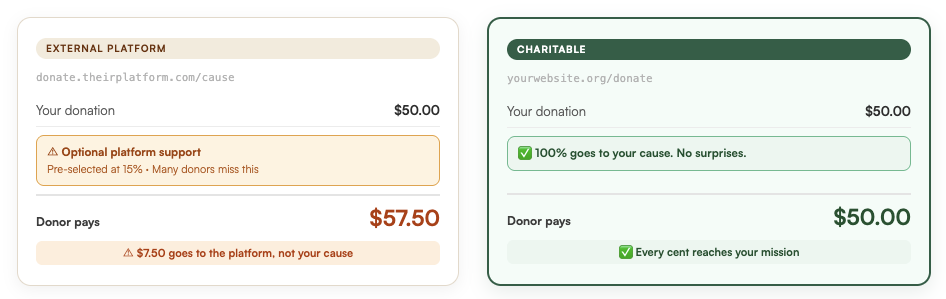
Zeffy nennt sich „kostenlos“, aber Ihren Spendern wird heimlich ein vorausgewählter Tipp berechnet, um ihre Plattform zu finanzieren. Dieses Geld erreicht Ihre Mission nicht, und Spender sind nicht glücklich, wenn sie es herausfinden.
Charitable Pro ist anders: Spender bleiben auf Ihrer Website und Sie besitzen Ihre Daten. Unsere Preise beginnen bei 69 US-Dollar pro Jahr. Das ist alles. Sie behalten 100 % jeder Spende.






Das erhalten Sie mit Charitable
Null Plattformgebühren für immer
Charitable Pro beginnt bei 69 US-Dollar im ersten Jahr, dann 149 US-Dollar/Jahr. Das ist alles. Keine Transaktionsgebühren, keine versteckten Tipps, kein Prozentsatz von Ihren Spenden.
Jeder Dollar, den Ihre Spender für Ihre Mission bestimmt haben, erreicht Ihre Mission.
Keine „Tipps“ oder versteckten Gebühren
Charitable Pro berechnet Ihnen oder Ihrem Spender keine versteckten Gebühren. Es gibt eine transparente Jahresgebühr, und danach gehört Ihnen alles, was Sie sammeln.
Keine überraschenden Gebühren. Keine vorausgewählten Tipps. Keine unangenehmen Gespräche mit verwirrten Spendern
Kein Mittelsmann. Kein Zurückhalten.
Mit Charitable Pro gehen Ihre Spenden direkt auf Ihr Bankkonto – Punkt. Wir halten Ihr Geld nicht zurück, bündeln es nicht und geben es nicht nach einem Zeitplan frei, der für uns, aber nicht für Sie funktioniert.
Keine Wartezeiten und keine E-Mails wie „in Überprüfung“, wenn Sie Ihre Gelder am dringendsten benötigen.

Was Ihnen niemand über Zeffy erzählt
„Kostenlos“ leistet in deren Marketing Schwerstarbeit. Zeffy berechnet Ihrer gemeinnützigen Organisation nichts, aber jemand zahlt. Dieser Jemand ist Ihr Spender. An der Kasse fügt Zeffy einen vorausgewählten Plattform-Tipp hinzu, oft 15 % oder mehr. Spender können sich abmelden, aber viele bemerken es nicht rechtzeitig.
Wenn diese zusätzliche Gebühr auf der Abrechnung eines Spenders erscheint, schieben sie Zeffy nicht die Schuld in die Schuhe. Sie geben Ihnen die Schuld. Diese Verwirrung untergräbt das Vertrauen, das Sie sich hart erarbeitet haben. Es führt zu negativen Bewertungen, ohne dass Sie etwas dafür können, und macht aus einmaligen Spendern Leute, die nicht wiederkommen.
Charitable kostet 69 US-Dollar im ersten Jahr, dann 149 US-Dollar/Jahr. Ihre Spender zahlen keinen einzigen Cent, um unsere Plattform zu finanzieren. Kein Tipp. Keine Gebühr. Niemals. Spender bleiben glücklich, weil der Checkout unkompliziert ist: Sie sind nie verwirrt, überrascht oder dazu gedrängt, für etwas zu bezahlen, dem sie nicht bewusst zugestimmt haben.
Das ist der Kompromiss, der sich lohnt.


David Bisset
Projektmanager, Charitable
Die tatsächlichen Kosten von Zeffy vs. Charitable
Zeffy kostet gemeinnützige Organisationen nichts. Charitable beginnt im ersten Jahr bei 69 US-Dollar. Das ist der oberflächliche Vergleich. Hier sehen Sie, wie es tatsächlich für die Spender aussieht, die Ihre Mission finanzieren.
| Monatlich gesammelte Spenden | Zeffy: Spender-Tipps an Plattform / Jahr | Jährliche Kosten von Charitable | Ihre Spender sparen |
|---|---|---|---|
| 1.000 $/Monat | 1.800 $/Jahr | $69 | $1,731+ |
| 5.000 $/Monat | 9.000 $/Jahr | $69 | $8,931+ |
| 10.000 $/Monat | 18.000 $/Jahr | $69 | $17,931+ |
*Schätzungen basierend auf einer Standard-Trinkgeldrate von 5 %. · Charitable: 69 $ im ersten Jahr, danach 149 $/Jahr.
Charitable beginnt bei 69 $ für Ihr erstes Jahr und verlängert sich für 149 $/Jahr. Ihre Spender zahlen 0 $, um unsere Plattform zu finanzieren. Die Frage ist nicht, ob Charitable es wert ist. Die Frage ist, ob Sie sich damit wohlfühlen, was Zeffy die Menschen kostet, die sich für Ihre Sache einsetzen.
Was Nutzer von Charitable sagen
Charitable hat über 200 5-Sterne-Bewertungen von echten Nutzern! Hier sind nur einige Erfahrungen von echten Organisationen, die teure, verwirrende Plattformen hinter sich gelassen haben – und was sich geändert hat, als sie es taten.

@mikisdad
„Ich habe viele ausprobiert – das ist eines der besten. Charitable ist einfach zu bedienen. Es verwirrt nicht mit einer Million Einstellungen und Optionen. Es lässt sich schnell und ohne Drama installieren. Vor allem ist der Service hervorragend.“

„Nach Jahren der Zusammenarbeit mit teuren Spendenmanagement-Unternehmen habe ich mich entschieden, Charitable auszuprobieren. Es bietet nicht nur fast jede Funktion, die ich gesucht habe, zu einem Bruchteil dessen, was ich zuvor bezahlt habe, sondern als ich nach dem Fehlen einer Funktion fragte, wurde sie innerhalb einer Woche implementiert und als Update veröffentlicht.“

„Ich habe vor diesem Plugin „Give“ ausprobiert, aber ich konnte es wirklich nicht verstehen und fand es frustrierend. Ich hatte keine der Probleme, die ich mit Charitable hatte.“

Steven Bauwens
„Ich habe zuerst das Plugin ‚Give‘ ausprobiert, aber ich konnte es einfach nicht zum Laufen bringen, es hat mein WP-Dashboard eingefroren. Ich habe dieses Plugin gefunden, das die gleiche Funktion hat, dass ich Kampagnen mit einer bestimmten Spendenoption hinzufügen kann, die ich zu meinen Seiten hinzufügen kann.“
Zeffy vs. Charitable: Funktionsvergleich
Ein ehrlicher Blick darauf, wie die beiden Plattformen im Vergleich abschneiden. Wo Zeffy eine Funktion hat, haben wir sie markiert. Jedes ❌ ist eine echte Lücke.
| Funktion | Charitable | Zeffy |
|---|---|---|
| Spender bleiben auf IHRER Website | ✅ Immer | ❌ Spender verlassen Ihre Website |
| SEO-Vorteile für Ihre Domain | ✅ Keine. Jemals. | ⚠️ Trinkgeld für Spender (optional) |
| Sie besitzen Ihre Spenderdaten | ✅ 100 % auf Ihrem Server | ❌ Daten liegen auf Zeffys Plattform |
| Risiko von Plattform-Lock-in | ✅ Keine – selbst gehostet | ⚠️ Abhängig von Zeffys Richtlinien |
| Preismodell | 69 $ im 1. Jahr, danach 149 $/Jahr | Transaktions-/Plattformgebühren |
| WordPress-natives Plugin | ✅ Ja | ❌ Extern gehostete Plattform |
| Vollständiges Branding & Anpassung | ✅ Vollständige Kontrolle | ⚠️ Begrenzt |
| SEO-Vorteil für Ihre Domain | ✅ Kampagnen auf Ihrer Website | ❌ Traffic geht an Zeffy |
| Wiederkehrende Spenden | ✅ Integriert (Pro) | ✅ Ja |
| Peer-to-Peer-Fundraising | ✅ Integriert (Pro) | ✅ Ja |
| Spenderverwaltung / CRM | ✅ Vollständiges integriertes System | ⚠️ Basis |
| Zahlungsgateways | ✅ Stripe, PayPal, Square + mehr | ⚠️ Nur Stripe |
| PDF-Belege & Steuerbescheinigungen | ✅ Automatisiert (Pro) | ✅ Ja |
| Dedizierter menschlicher Support | ⭐ 5-Sterne-Team | ⚠️ KI-gestützter Assistent |
| 14-tägige Geld-zurück-Garantie | ✅ Ja | N/A (kostenloses Produkt) |
Das Problem ist nicht die Spitze. Es ist, dass Spender es nicht wissen.
Zeffy ist, ehrlich gesagt, kostenlos für gemeinnützige Organisationen. Keine monatliche Gebühr, kein Upgrade-Plan. Ihr Geschäftsmodell ist anders aufgebaut: Anstatt Ihnen etwas zu berechnen, fügen sie dem Checkout Ihrer Spender einen vorausgewählten „optionalen Tipp“ hinzu. Wenn ein Spender 50 US-Dollar für Ihre Sache spendet, sieht er ein Dropdown-Menü, das auf 15 % voreingestellt ist – zusätzliche 7,50 US-Dollar gehen an Zeffy, nicht an Ihre Organisation. Spender können es entfernen. Viele bemerken es nicht.
Echte Spender haben es bemerkt. Und sie sind nicht glücklich – nicht mit Zeffy, sondern mit den Organisationen, an die sie gespendet haben. Wenn jemand von einer unerwarteten Abbuchung auf seinem Konto überrascht wird, gibt er der Sache die Schuld, die er unterstützen wollte. Die verärgerte E-Mail kommt in Ihrem Posteingang an. Der Spender, der sich getäuscht fühlte, wird nicht zu dem wiederkehrenden Unterstützer, den Sie brauchen.
Hier ist, was echte Spender über die Zeffy-Erfahrung geschrieben haben:
Zeffy-Bewertungen

Ich habe eine Spende über Zeffy getätigt, indem ich…
Ich habe eine Spende über Zeffy getätigt, indem ich den Betrag eingegeben habe, den ich spenden wollte, und den Zahlungsvorgang abgeschlossen habe. Zu keinem Zeitpunkt vor dem Klicken auf „Bezahlen“ wurde klar offengelegt, dass meiner Spende eine Gebühr von 15 % hinzugefügt würde. Ich habe diese Gebühr erst nach Abschluss der Transaktion entdeckt. Dieser Mangel an klarer, vorheriger Offenlegung ist irreführend und hat mich daran gehindert, eine informierte Entscheidung über den Gesamtbetrag zu treffen, zu dessen Zahlung ich zugestimmt habe. Ich werde nie wieder über Zeffy spenden, da sich die Erfahrung bewusst täuschend anfühlt.

17 % Zusatzgebühr !!
Es tut mir leid, dass die Organisation, an die ich spenden möchte, Zeffy benutzt [zum ersten Mal, dass ich davon höre]. Ich konnte nicht glauben, dass sie eine Zusatzgebühr von 17 % [!!] auf die ursprüngliche Spende erheben. Das ist ein lächerlicher Betrag an zusätzlichem Geld, der verlangt wird. Ich werde einen anderen Weg finden, um an Save the Ridglan Beagles zu spenden.

Meiner Spende wurden 17 % zusätzlich hinzugefügt…
Meiner Spende wurden 17 % zusätzlich hinzugefügt, ohne jegliche Vorwarnung. Kein Hinweis auf ein Dropdown-Menü oder eine Auswahl – einfach abgezogen, und der erste Hinweis auf eine Gebühr war in der Bestätigungs-E-Mail. In der Bestätigungs-E-Mail gibt es einen Link zur Option, die Gebühr erstatten zu lassen, was zwei Wochen dauert. Das fühlt sich für mich nach sehr unseriöser Geschäftspraktik an, und ich werde nicht wieder an eine Organisation spenden, die Zeffy benutzt.

Zeffy versteckt eine Spende an Zeffy, wenn…
Zeffy versteckt eine Spende an Zeffy, wenn Sie eine Spende tätigen – ich fand die 15 % Spendengebühr, die sie sich selbst geben, sehr hinterhältig!
Wir vergleichen normalerweise nicht auf diese Weise. Aber wenn es um etwas geht, das das Vertrauen Ihrer Spender direkt beeinflusst – und den Ruf Ihrer Organisation –, finden wir, dass Sie das vollständige Bild verdient haben.
Was passiert, wenn Sie auf der Plattform eines anderen aufbauen
Plattformabhängigkeit ist leicht zu ignorieren, wenn alles funktioniert. Sie wird sichtbar, sobald sich etwas ändert. Zeffy kontrolliert, ob Ihr Konto aktiv bleibt, wann Ihre Gelder freigegeben werden und was mit Ihren Kampagnen passiert, wenn sie ihre Richtlinien ändern oder den Dienst einstellen. Mehrere Spendenplattformen haben genau das mit wenig Vorwarnung getan und gemeinnützige Organisationen in Schwierigkeiten gebracht.
Es gibt auch die Frage, was Sie hinterlassen. Wenn Sie Kampagnen auf Zeffy ausführen, befindet sich jede Kampagnen-URL auf der Domain von Zeffy. Jeder Link, den Sie teilen, jede Erwähnung in Ihrem Newsletter – er sendet Traffic an Zeffy, nicht an Ihre Website. Wenn Sie jemals gehen, folgen Ihnen diese Links nicht. Ebenso wenig die Suchautorität, die Sie aufgebaut haben.
Mit Charitable gibt es keine Plattform dazwischen. Ihre Kampagnen leben unter Ihrer URL. Ihre Spenderdatenbank lebt auf Ihrer WordPress-Website. Ihr Zahlungsanbieter zahlt Sie direkt aus. Wenn Sie sich jemals entscheiden, Charitable nicht mehr zu verwenden, nehmen Sie alles mit.
📁 Ihre Daten, Ihre Regeln
Spenderdatensätze, Kampagnendaten, Spendenhistorie – alles in Ihrer eigenen WordPress-Datenbank gespeichert. Exportieren Sie es jederzeit, sichern Sie es oder integrieren Sie es in Ihr CRM. Keine Plattform kann Sie aussperren.
🌐 Kampagnen auf Ihrer Domain
Jede Kampagnen-URL, jeder Social-Media-Link, jede Newsletter-Erwähnung – leitet Traffic auf Ihre Website. Ihre SEO-Autorität baut sich auf Ihrer Domain auf, nicht auf der von Zeffy.
💳 Direkte Auszahlungen
Ihr Zahlungsanbieter (Stripe, PayPal oder Square) zahlt Sie direkt aus, ohne Warteschlange für die Plattformgenehmigung. Keine Sperren. Keine Richtlinienprüfungen. Ihr Geld, nach Ihrem Zeitplan.
Importieren Sie Ihre Zeffy-Spender in weniger als einem Tag
Der Wechsel der Plattformen fühlt sich riskant an. Die Daten, die Kampagnen, die Spenderhistorie – all das fühlt sich zerbrechlich an. Der Migrationspfad ist einfacher als die meisten Leute erwarten, und Zeffy ermöglicht es Ihnen, Ihre Spenderdaten als CSV-Datei aus Ihrem Dashboard zu exportieren.
Die meisten Organisationen schließen die vollständige Migration in wenigen Stunden ab:
- Exportieren Sie Ihre Spenderdaten von Zeffy: Laden Sie eine CSV-Datei Ihrer Spenderliste und Spendenhistorie von Ihrem Zeffy-Dashboard herunter.
- Installieren Sie Charitable auf Ihrer WordPress-Website: Kostenlos auf WordPress.org verfügbar. Beide Plugins können während der Umstellung gleichzeitig laufen.
- Führen Sie den Importeur aus: Laden Sie Ihre CSV-Datei in das integrierte Import-Tool von Charitable hoch. Es importiert Spenderdatensätze und Spendenhistorie.
- Verbinden Sie Ihr Zahlungs-Gateway: Verbinden Sie Stripe, PayPal, Square oder Ihren bevorzugten Zahlungsabwickler. Sie kontrollieren, wann Gelder auf Ihrem Konto eingehen.
- Gehen Sie live: Starten Sie Ihre erste Charitable-Kampagne auf Ihrer eigenen Domain. Spender durchlaufen das gesamte Erlebnis auf Ihrer Website, ohne einen einzigen Trinkgeld-Hinweis.
Wenn Sie an irgendeinem Punkt nicht weiterkommen, hilft Ihnen unser Support-Team kostenlos bei der Migration. Wir haben das schon einmal gemacht und sind bereit, es mit Ihnen zu tun.
Noch nicht überzeugt?
Sehen Sie, was WPBeginner über Charitable zu sagen hat:
Charitable vs Zeffy –
Häufig gestellte Fragen
Haben Sie eine Frage zu Charitable im Vergleich zu Zeffy? Sehen Sie sich die folgende Liste mit unseren häufigsten Fragen an. Wenn Ihre Frage hier nicht aufgeführt ist, kontaktieren Sie uns bitte.
Nimmt Charitable einen Prozentsatz jeder Spende?
- Pro-Version: Charitable Pro hat keinerlei Plattformgebühren. Sie zahlen nur die Standard-Jahresabonnementgebühr (ab 69 $ pro Jahr) + eventuelle Gebühren Ihres Zahlungs-Gateways.
- Lite-Version: Charitable Lite ist kostenlos. Es fallen keine jährlichen Abonnementgebühren an. Wir berechnen nur eine geringe 3% Pauschalgebühr für jede Spende. Möglicherweise fallen auch Transaktionsgebühren von Ihrem Zahlungs-Gateway an, die direkt an dieses gehen.
Gibt es Einschränkungen hinsichtlich der Anzahl von Kampagnen oder Spendenformularen mit Charitable?
Nein. Mit Charitable können Sie vom ersten Tag an unbegrenzt Spendenkampagnen und -formulare erstellen – ohne kostenpflichtige Upgrades oder Einschränkungen.
Kann ich wiederkehrende Spenden mit Charitable verwalten?
Ja! Charitable bietet robuste Funktionen für wiederkehrende Spenden, sodass Ihre Unterstützer wöchentlich, monatlich oder nach einem benutzerdefinierten Zeitplan spenden können – und Ihnen so helfen, ein zuverlässiges, stetiges Einkommen zu erzielen.
Lässt sich Charitable mit meinen bevorzugten Tools und Diensten integrieren?
Charitable arbeitet nahtlos mit vielen beliebten Plattformen zusammen, darunter MailChimp, ActiveCampaign, Constant Contact, HubSpot, MailPoet, Zapier und mehr.
Ist Charitable einfach einzurichten und zu verwenden?
Ja. Charitable ist so konzipiert, dass es für jeden einfach zu bedienen ist – ohne Programmierung und anfängerfreundlich. Wir haben einen Einrichtungsassistenten integriert, der Sie durch den Prozess führt, damit Sie Ihre erste Kampagne in Minuten statt Stunden oder Tagen einrichten und starten können!
Welche Art von Support bietet Charitable an?
Lite-Benutzer können Fragen im WordPress-Supportforum stellen. Kunden des Charitable Pro-Plugins können uns über den Support-Kanal erreichen. Sie erhalten freundlichen, reaktionsschnellen Support von einem Team, das Erfahrung darin hat, gemeinnützigen Organisationen zum Erfolg zu verhelfen. Wir sind hier, um Fragen zu beantworten und alle Probleme schnell zu lösen.
Hostet Charitable meine Kampagnen auf seiner Plattform?
Nein. Alle Ihre Spendenkampagnen laufen zu 100 % auf Ihrer eigenen WordPress-Website. Sie haben die volle Kontrolle über Ihr Branding, Ihre Spenderdaten und Ihre Inhalte.


