
Viele gemeinnützige Organisationen neigen dazu, den billigsten oder kostenlosen Webhoster zu wählen, und das ist verständlich, da die Budgets normalerweise knapp sind.
Aber hier ist die Sache: Ihr Webhosting ist eigentlich das Fundament Ihrer gesamten Website.
Betrachten Sie Webhosting wie den Boden, auf dem Ihre Website aufgebaut ist. Es beeinflusst, wie schnell Ihre Seite geladen wird und wie reibungslos sie läuft. Das ist sehr wichtig, da es beeinflusst, wie Menschen Ihre Website erleben. Für gemeinnützige Organisationen kann dies sogar einen Unterschied machen, ob jemand beschließt zu spenden oder nicht.
Deshalb ist die Wahl des richtigen Webhosts so wichtig. Sie brauchen etwas, das erschwinglich ist, aber trotzdem sehr gut funktioniert.
In diesem Artikel stelle ich Ihnen meine Top 3 Webhoster vor. Diese sind beliebt, zuverlässig und bieten einen großartigen Service – und das alles, ohne zu viel zu kosten. Sie bieten wirklich, was gemeinnützige Organisationen brauchen, und geben Ihnen ein gutes Preis-Leistungs-Verhältnis.
Ich werde mich aber nicht damit begnügen. Ich werde Ihnen auch 5 weitere Webhoster vorstellen, die es wert sind, in Betracht gezogen zu werden. Diese Optionen schneiden ebenfalls gut ab und sind zu guten Preisen erhältlich, was Ihnen mehr Auswahlmöglichkeiten bietet, die Ihren spezifischen Bedürfnissen und Ihrem Budget entsprechen könnten.
Top 3 Webhoster für gemeinnützige Organisationen und Spenden-Websites
1. Bluehost

Bluehost ist einer der beliebtesten Webhosting-Anbieter und das aus gutem Grund. Sie bieten eine solide Mischung aus Funktionen, Leistung und Erschwinglichkeit, die sie zu einer ausgezeichneten Wahl für gemeinnützige Websites macht.
Warum Bluehost großartig für gemeinnützige Organisationen ist:
Die Benutzerfreundlichkeit von Bluehost ist perfekt für gemeinnützige Organisationen, die möglicherweise kein dediziertes IT-Team haben. Die Ein-Klick-WordPress-Installation macht es einfach, Ihre Website schnell einzurichten und einsatzbereit zu machen.
Mit einer Uptime-Garantie von 99,98 % können Sie darauf vertrauen, dass die Website Ihrer gemeinnützigen Organisation zugänglich ist, wenn Unterstützer sie am dringendsten benötigen.
Ihr Kundensupport ist rund um die Uhr verfügbar, was eine Rettung sein kann, wenn Sie außerhalb der regulären Geschäftszeiten an Ihrer Website arbeiten.
Die kostenlose Domain und das kostenlose SSL-Zertifikat helfen, die Anfangskosten niedrig zu halten, was für budgetbewusste Organisationen entscheidend ist. Außerdem bietet ihr Basistarif genügend Ressourcen für die meisten kleinen bis mittelgroßen gemeinnützigen Organisationen.
Wenn Ihre gemeinnützige Organisation wächst, macht es Bluehost einfach, Ihren Plan ohne Ausfallzeiten oder komplizierte Migrationen zu aktualisieren.
Mögliche Nachteile:
Während Bluehost wettbewerbsfähige Einführungspreise anbietet, steigen die Preise bei Verlängerung. Außerdem erlaubt ihr Basistarif nur eine Website. Wenn Sie mehrere Websites benötigen, müssen Sie auf einen höherwertigen Plan upgraden.
Insgesamt bietet Bluehost eine zuverlässige, benutzerfreundliche Hosting-Lösung, die mit Ihrer gemeinnützigen Organisation mitwachsen kann.
Wichtige Funktionen von Bluehost:
- Kostenlose Domain für das erste Jahr
- Ein-Klick-WordPress-Installation
- 24/7-Kundensupport
- Kostenloses SSL-Zertifikat
- Benutzerfreundliches Control Panel
Preise von Bluehost:
Der Basistarif von Bluehost beginnt bei 1,99 $/Monat, wenn Sie sich für eine Laufzeit von 36 Monaten anmelden.
2. Hostinger

Hostinger ist eine ausgezeichnete Hosting-Option, wenn Sie Ihr Budget maximieren möchten, ohne auf Qualität zu verzichten. Der günstigste Tarif ermöglicht es Ihnen, 100 Websites zu hosten und so viele E-Mail-Konten zu erstellen, wie Sie benötigen.
Warum Hostinger großartig für Non-Profits ist:
Trotz der geringen Kosten geht es keine Kompromisse bei der Geschwindigkeit ein und nutzt die LiteSpeed Web Server-Technologie, um die Leistung Ihrer Website erheblich zu steigern. Das individuell erstellte hPanel ist intuitiv und einfach zu bedienen, was es perfekt für Non-Profits ohne umfassende technische Kenntnisse macht.
Wenn Ihre Organisation wächst, bietet Hostinger nahtlose Upgrades auf leistungsfähigere Tarife ohne komplizierte Migrationen.
Sicherheit hat Priorität, mit kostenlosen SSL-Zertifikaten und wöchentlichen Backups, um die Daten und Spenderinformationen Ihrer Non-Profit zu schützen. Dank ihres globalen Netzwerks von Rechenzentren kann Ihre Website für Besucher unabhängig von ihrem Standort schnell geladen werden.
Darüber hinaus bietet Hostinger eine Fülle von Tutorials und Anleitungen, die Ihnen helfen, das Beste aus Ihrem Hosting-Erlebnis herauszuholen und Ihre Non-Profit zu befähigen, ihre Online-Präsenz effektiv zu verwalten.
Mögliche Nachteile:
Telefonischer Support ist nicht verfügbar, was ein Problem darstellen könnte, wenn Sie diese Kommunikationsmethode bevorzugen.
Insgesamt bietet Hostinger ein beeindruckendes Gleichgewicht zwischen Erschwinglichkeit und Leistung. Sein niedriger Einstiegspreis und die benutzerfreundliche Oberfläche machen es zu einer attraktiven Option, wenn Sie Ihre Online-Präsenz aufbauen oder verbessern möchten, ohne das Budget zu sprengen. Stellen Sie jedoch sicher, dass Sie Ihre Bedürfnisse sorgfältig abwägen, um sicherzustellen, dass der Basistarif für Ihre Organisation ausreichend ist.
Hauptmerkmale von Hostinger:
- Kostenloser Domainname (bei Jahresabschluss)
- Benutzerfreundliches, benutzerdefiniertes Control Panel
- Ein-Klick-WordPress-Installation
- Kostenloses SSL-Zertifikat, Backups, E-Mail und CDN
- 24/7 Live-Chat-Support
- 99,9% Uptime-Garantie
Hostinger Preise:
Hostingers Shared Hosting-Tarif beginnt bei unglaublichen 2,69 $/Monat mit einer Verpflichtung von 48 Monaten. Sie erhalten 2 Monate kostenlos.
3. SiteGround
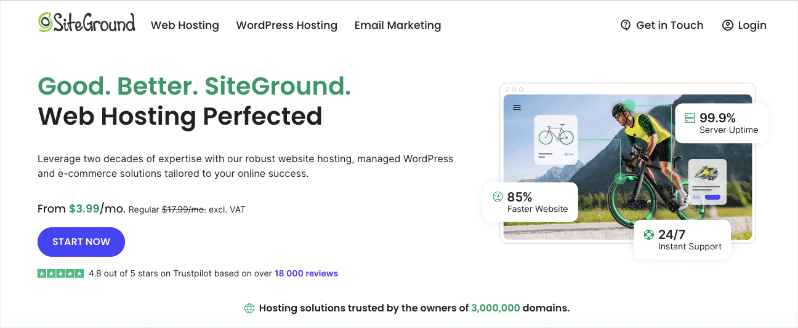
SiteGround ist ein beliebter Webhosting-Anbieter, der sich einen Ruf für hervorragende Leistung und erstklassigen Kundensupport erworben hat. Sie sind nicht die billigsten, aber viele Non-Profits stellen fest, dass sich die zusätzlichen Kosten für die Sicherheit und die bessere Leistung lohnen.
Warum SiteGround großartig für Non-Profits ist:
SiteGround bietet robuste Hosting-Dienste, die schnell und sicher sind, sodass Sie sicher sein können, dass Ihre gemeinnützige Website optimal funktioniert. Es eignet sich hervorragend für kleine und mittelgroße Websites.
Wenn Sie technische Aspekte Ihrer Website wie Einrichtung, Migration, Updates und Sicherheit auslagern möchten, können Sie einen der Managed WordPress-Hosting-Pläne von SiteGround wählen.
Was SiteGround auszeichnet, ist die Funktion des unbegrenzten Datenverkehrs. Das bedeutet, dass es keine Obergrenze für die Menge der Besucher oder Datenübertragungen gibt, die Ihre Website empfangen kann. Ihre Website kann plötzliche Traffic-Spitzen während der Hauptsaison wie Weihnachten oder dem Giving Tuesday bewältigen, ohne zusätzliche Kosten zu verursachen oder gedrosselt zu werden. Beachten Sie, dass „unbegrenzt“ im absoluten Sinne nicht „unendlich“ bedeutet. SiteGround hat, wie die meisten Hoster, immer noch Richtlinien zur akzeptablen Nutzung, um den Missbrauch seiner Dienste zu verhindern.
Ein großer Pluspunkt ist, dass Sie als Kunde der Dienste von SiteGround erfreut feststellen werden, dass die Energie, die für das Hosting ihrer Websites verwendet wird, aus erneuerbaren Quellen stammt.
Der Haupt-Datacenter-Partner von SiteGround – Google Cloud – gleicht 100 % der Energie, die von seinen globalen Betrieben verbraucht wird, mit erneuerbarer Energie aus und verpflichtet sich zur Klimaneutralität.
Mögliche Nachteile:
Die Preise von SiteGround sind höher als die einiger Wettbewerber, insbesondere nach der anfänglichen Aktionszeit. Außerdem hat der Einstiegsplan relativ wenig Speicherplatz, was für einige gemeinnützige Organisationen einschränkend sein kann.
Insgesamt bietet SiteGround eine hochwertige Hosting-Lösung mit außergewöhnlichem Support und Leistung. Obwohl es teurer sein mag als einige Alternativen, kann der Mehrwert in Bezug auf Geschwindigkeit, Sicherheit und Support es zu einer lohnenden Investition für gemeinnützige Organisationen machen, die die Leistung ihrer Website priorisieren und die Kosten in ihrem Budget unterbringen können.
SiteGround Hauptmerkmale:
- Kostenlose Website-Migration
- Kostenloses SSL-Zertifikat
- Tägliche Backups
- Unbegrenzter Traffic
- 24/7-Kundensupport
- Automatische WordPress-Updates
- Benutzerdefinierte Website-Tools
SiteGround Preise:
Der StartUp-Plan von SiteGround beginnt bei 3,99 $/Monat für das erste Jahr.
Ich habe unsere drei Top-Picks für Webhosting für gemeinnützige Organisationen vorgestellt: Bluehost, Hostinger und SiteGround. Die Welt des Webhostings ist jedoch groß, und es gibt andere Unternehmen, die großartige Funktionen und Preise anbieten, die für Ihre gemeinnützige Organisation gut funktionieren könnten.
Werfen wir einen Blick auf einige andere Hoster, die es wert sind, genauer betrachtet zu werden. Sie kombinieren Erschwinglichkeit, gute Leistung und spezielle Funktionen, die genau das sein könnten, was Sie brauchen.
Denken Sie daran, dass der beste Hoster für Sie davon abhängt, was Ihre Organisation benötigt, wie technikaffin Sie sind und wie Ihr Budget aussieht. Lassen Sie uns also diese anderen Optionen erkunden, um sicherzustellen, dass Sie über alle guten verfügbaren Auswahlmöglichkeiten informiert sind.
Weitere Web-Hoster für Websites gemeinnütziger Organisationen
1. DreamHost: Bekannt für Zuverlässigkeit und Engagement für Open-Source. Bietet einen kostenlosen Shared-Hosting-Plan für 501(c)(3)- oder 501(c)(19)-gemeinnützige Organisationen, einschließlich einer kostenlosen Domain, unbegrenztem Traffic und unbegrenztem Speicherplatz. Ihr benutzerfreundliches Control Panel und der Ein-Klick-WordPress-Installer machen es für gemeinnützige Organisationen einfach, schnell loszulegen.
2. A2 Hosting: Schnelles Hosting mit Fokus auf Geschwindigkeit und Leistung. Bietet eine Geld-zurück-Garantie jederzeit und schnelle Ladezeiten. Ihre Turbo-Server bieten bis zu 20-mal schnellere Seitenladezeiten im Vergleich zu konkurrierenden Hosts. Sie bieten auch kostenlose Website-Migration und 24/7/365 Guru-Crew-Support, was für gemeinnützige Organisationen mit begrenzten technischen Ressourcen wertvoll sein kann.
3. HostGator: Benutzerfreundliches Hosting mit erschwinglichen Tarifen. Bietet einen Rabatt von 45 % für gemeinnützige Organisationen auf alle Hosting-Tarife. Ihre Tarife beinhalten unbegrenzte Bandbreite, kostenlose SSL-Zertifikate und eine kostenlose Domain für das erste Jahr. Der Drag-and-Drop-Website-Builder von HostGator kann besonders nützlich für gemeinnützige Organisationen sein, die eine professionell aussehende Website ohne Programmierkenntnisse erstellen möchten.
4. InMotion Hosting: Geschäftsorientiertes Hosting mit exzellentem Support. Bietet kostenlose Datensicherungen und starke Uptime-Garantien. Ihre Tarife beinhalten kostenloses SSL, kostenlose E-Mail-Konten und eine Sicherheitssuite zum Schutz der Website Ihrer gemeinnützigen Organisation. InMotion bietet außerdem eine 90-tägige Geld-zurück-Garantie, die gemeinnützigen Organisationen ausreichend Zeit gibt, ihre Dienste zu testen.
5. GreenGeeks: Umweltfreundliches Hosting, das mit erneuerbarer Energie betrieben wird. Sie gleichen das 3-fache der von ihrem Betrieb verbrauchten Energie mit Windenergiegutschriften aus. Bietet kostenlose nächtliche Backups, kostenloses CDN und kostenlose Website-Migration. Ihr Engagement für Nachhaltigkeit kann gut zu den Werten und Leitbildern umweltbewusster gemeinnütziger Organisationen passen.
Nachdem wir nun die Liste der besten Webhosting-Anbieter für gemeinnützige Organisationen und Spenden-Websites durchgegangen sind, verrate ich Ihnen meine Tipps, wie Sie den richtigen Webhost auswählen und worauf Sie achten sollten.
Bonus: Tipps zur Auswahl des richtigen Webhosting-Anbieters für Ihre gemeinnützige Organisation oder Ihre Fundraising-Website
Berücksichtigen Sie bei der Auswahl eines Webhosts für Ihre gemeinnützige Organisation oder Ihre Fundraising-Website die folgenden Schlüsselfaktoren:
- Erschwinglichkeit: Suchen Sie nach Hosts, die Rabatte für gemeinnützige Organisationen anbieten oder budgetfreundliche Tarife haben. Denken Sie daran, dass die billigste Option nicht immer die beste ist, aber Ihr Hosting sollte auch nicht Ihr Budget sprengen.
- Zuverlässigkeit und Uptime: Ihre Website muss verfügbar sein, wenn Unterstützer sie besuchen. Suchen Sie nach Hosts mit einer Uptime-Garantie von mindestens 99,9 %.
- Sicherheitsfunktionen: Der Schutz von Spenderdaten ist entscheidend. Wählen Sie einen Host, der SSL-Zertifikate, regelmäßige Backups und Malware-Scans anbietet.
- Skalierbarkeit: Wenn Ihre gemeinnützige Organisation wächst, können sich Ihre Hosting-Anforderungen ändern. Wählen Sie einen Host, der einfache Upgrades ermöglicht.
- Benutzerfreundliche Oberfläche: Sofern Sie kein dediziertes IT-Team haben, benötigen Sie einen Host mit einem einfach zu bedienenden Control Panel.
- Kundensupport: Achten Sie auf 24/7-Support, besonders wenn Sie nicht technisch versiert sind.
- Geschwindigkeit und Leistung: Schnell ladende Seiten verbessern die Benutzererfahrung und können die Abschlussrate von Spenden beeinflussen.
- Integrationsoptionen: Stellen Sie sicher, dass der Host die von Ihnen benötigten Tools unterstützt, wie z. B. Spendenplattformen oder E-Mail-Marketingdienste.
- Compliance: Wenn Sie sensible Daten verarbeiten, stellen Sie sicher, dass Ihr Hoster relevante Vorschriften wie PCI-DSS einhält.
- Backup-Optionen: Regelmäßige, automatisierte Backups können Ihnen später viel Ärger ersparen.
Denken Sie daran, dass der beste Hoster für Ihre gemeinnützige Organisation von Ihren spezifischen Bedürfnissen, technischen Fähigkeiten und Ihrem Budget abhängt. Nehmen Sie sich Zeit, Ihre Anforderungen zu bewerten und verschiedene Optionen zu vergleichen, bevor Sie eine Entscheidung treffen. Scheuen Sie sich nicht, Hosting-Anbieter mit Fragen zu kontaktieren – ihre Reaktionsfähigkeit kann Ihnen einen guten Eindruck von der Qualität ihres Kundenservices vermitteln.
Durch die Wahl des richtigen Webhosters legen Sie ein starkes Fundament für die Online-Präsenz Ihrer gemeinnützigen Organisation, wodurch es einfacher wird, Unterstützer zu erreichen, Ihre Mission zu teilen und Ihre Spenden-Ziele zu erreichen.
Das ist alles. Ich hoffe, dieser Leitfaden war hilfreich. Möglicherweise möchten Sie auch die besten gemeinnützigen Themes für WordPress-Websites und die 25 besten WordPress-Plugins für gemeinnützige Organisationen überprüfen.





Hinterlassen Sie eine Antwort