
Charitable 1.6 is available today, with important user privacy & GDPR-related changes among other things. Read on to find out what’s new.
Privacy & GDPR-related changes
The major focus of this release is a set of new privacy features. Driving this focus is the imminent implementation of the GDPR, Europe’s new privacy and data protection regulations. These regulations apply to any organization or business operating in Europe or serving individuals in the European Union, so it has a global impact.
If your organization is based outside of the EU and you’re not sure whether GDPR applies to you, read this to find out more.
Donation form updates: Privacy policy, terms and conditions and donor marketing consent
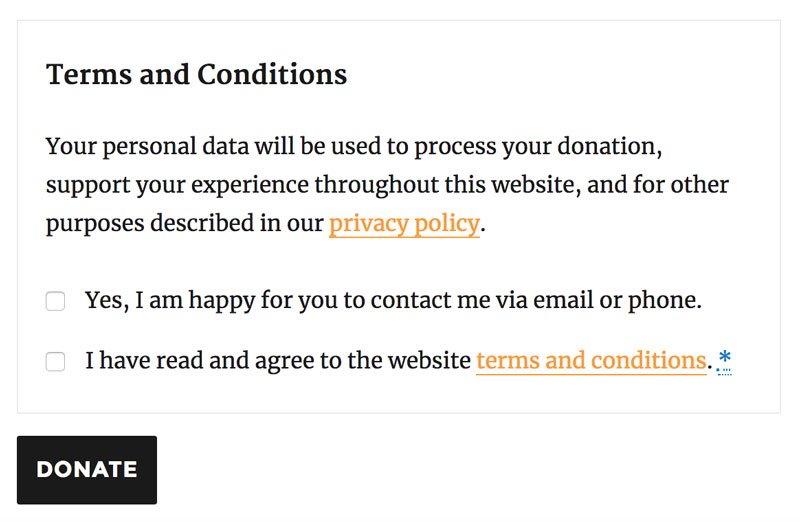
The donation form has been updated to include a new section that can include your terms and conditions, a note about how personal data is used on your website (including a link to your privacy policy) and a checkbox allowing donors to consent to being contacted in future.
The terms and conditions can be toggled to display within the donation form.
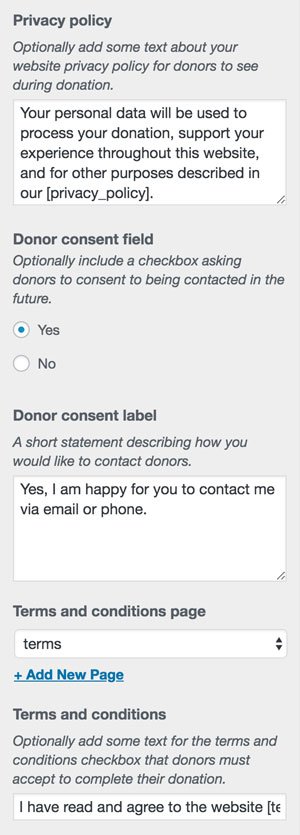
All of these settings, including the text used and the linked pages for terms and conditions and the privacy policy, are managed via Charitable panel in the WordPress Customizer. They are all disabled by default.
Bonus tip: You can now access Charitable’s Customizer settings directly by clicking on the Customize link in the Charitable dashboard menu.
Integrating with WordPress’ Privacy & Personal Data Tools
WordPress 4.9.6 was released earlier this month and included a few key tools required to help WordPress websites comply with the GDPR and respect their users’ privacy rights. Our team contributed to the WordPress 4.9.6 release and we have been steadily preparing Charitable to integrate with those tools.
The first of those tools was a Privacy Policy page builder. You can use this to build your Privacy Policy, including suggested text added by the plugins you use on your website — including Charitable.
We strongly recommend using this tool to create your website’s Privacy Policy. If you have already created a Privacy Policy you can read more about how Charitable uses data within your website in our docs: Charitable & User Privacy.
Charitable also helps you respond to your users’ requests to access the personal data held on your website by including any data collected by Charitable in the export tool (available at Tools > Export Personal Data in WordPress 4.9.6).
If users request to have their personal data erased, you can also have the data collected by Charitable erased. However, since your country may also have a legal requirement for you to retain some data related to donations for a certain amount of time, Charitable provides you with fine-grained controls over how long data is retained, and which data can be erased earlier. You will find these settings by going to Charitable > Settings > Privacy.
By default, all personal data stored for donations made within the last two years will be retained. Personal data is not automatically removed when the data retention period is passed; it is erased when a user specifically requests to have their data erased.
Other new features
Automatically refund donations in PayPal
Refunds aren’t much fun, and hopefully you don’t need to issue them very often, but with this release we have tried to make it a little less painful to issue refunds for your Charitable donations.
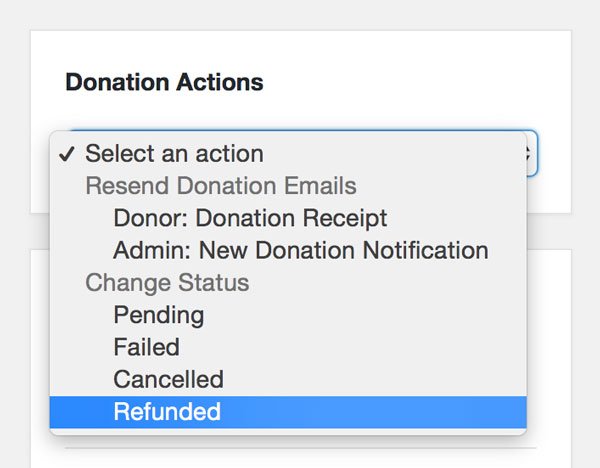
You can now mark a donation as Refunded via its details page and have it automatically refunded with PayPal. Just select “Refunded” in the Donation Actions meta box and choose to have it refunded in PayPal immediately; Charitable will take care of the rest.
Display Charitable stats anywhere
One handy little feature we added in Charitable 1.6 is the [charitable_stat] shortcode. This shortcode allows you to display fundraising totals, progress bars, or donation and donor counts. For example, to show how much money your organization has raised and how many donors it has, you could write something like this:
[charitable_stat display=donors]have raised[charitable_stat display=total]to support our work.
Click here for the full guide to using the Charitable Stat shortcode.
Campaigns Export
Charitable has long included a donations export, but we lacked a similar report for campaigns. As of Charitable 1.6, that problem is solved.
Go to Charitable > Campaigns and click on the Export button to download a CSV file with all your campaigns, optionally filtered by date and status.
Updates for Developers
This release adds a few new features and refinements for developers creating fundraising experiences with Charitable.
Register new campaign fields with the Campaign Fields API
Charitable 1.5 introduced the Donation Fields API. In this release, we added a matching Campaign Fields API. This allows you to introduce new settings and fields for campaigns:
function ed_charitable_add_campaign_field() {
    // Define a new field.
    $field = new Charitable_Campaign_Field( 'focus_country', array(
        'label' => __( 'Focus Country', 'your-namespace' ),
        'admin_form' => array(
            'type' => 'select',
            'options' => array(
                'india' => __( 'India', 'your-namespace' ),
                'thailand' => __( 'Thailand', 'your-namespace' ),
                'cambodia' => __( 'Cambodia', 'your-namespace' ),
            ),
        ),
        'show_in_export' => true,
        'email_tag' => array(
        'description' => __( 'The focus country for the campaign' , 'your-namespace' ),
    ) ) );

    // Register the field.
    charitable()->campaign_fields()->register( $field );
}

add_action( 'init', 'ed_charitable_add_campaign_field' );
The value of the field can be retrieved with the Charitable_Campaign::get() method:
$campaign = charitable_get_campaign( 123 );
$campaign->get( 'focus_country' );
Using Ambassadors? Keep an eye out for the next major release to add support for the Campaign Fields API.
Easily modify donation fields
Adding fields was already easy enough with the Donation Fields API. Changing the fields’ donation form settings was a little harder than it needed to be. You can now modify any existing donation or campaign field with the Donation Fields API. For example, to change the label of the State field to say Province instead, you can simply do this:
function ed_charitable_change_state_field_label() {
    // Get the field through the API.
    $field = charitable()->donation_fields()->get_field( 'state' );

    // Update the 'label' setting of the 'donation_form' argument.
    $field->set( 'donation_form', 'label', 'Province' );
}

add_action( 'init', 'ed_charitable_change_state_field_label' );
Upgrade Today
If you haven’t already, update Charitable via your dashboard today, and tell us what you think.
Thank you to everyone in the Charitable community who provided the feedback and feature requests that led to the changes in Charitable 1.6. User feedback has consistently played a huge part in helping us decide what to focus on in Charitable’s development, and this release has been no different.
We would love to hear your thoughts in the comments below!





Leave a Reply