
Charitable Blog

Everything you need to know about Charitable and our team.

Multilingual Fundraising Campaigns with TranslatePress

Last updated on

  • By

TranslatePress is a new translation plugin for WordPress that promises to make translating your website easier. It’s not the only translation plugin out there, but it’s the first that handles translation in a way that allows you to run fully-fledged multilingual fundraising campaigns with Charitable.

In this post, I’ll take a look at how you can create multilingual fundraising campaigns by translating your Charitable campaigns with TranslatePress.

The Problem with Multilingual Fundraising Campaigns

We hear questions like this fairly often from non-profits:

I want to use a plugin like Polylang to have campaigns in English and Spanish and share the donation amount.

Translating campaigns has always been possible with plugins like Polylang and other translation plugins like WMPL. Charitable itself fully supports translation.

But there’s a problem: When you use Polylang and WPML to translate your campaign, it treats the translated version as a separate “post” with a unique ID.

That’s an issue when you attempt to calculate the total amount donated to a campaign or show the number of donors. When you view the Spanish translation of your campaign, it will only include donations to the Spanish translation. Likewise for English. What you really want is for both the Spanish and English campaign pages to show the total raised by the campaign as a whole, regardless of which language received the specific donation.

Another way people tried to work around this was by building out multi-site networks for their non-profits. This allowed them to create targeted sites for each language, but it still didn’t solve the problem with shared donation stats. Donations to a campaign in one language were treated as completely distinct from donations to the same campaign in another language.

Enter TranslatePress

TranslatePress launched a few months ago with the goal of making it much easier to translate your website. Unlike other translation plugins, translation in TranslatePress happens on the front-end so you can see what you are translating as you translate it:
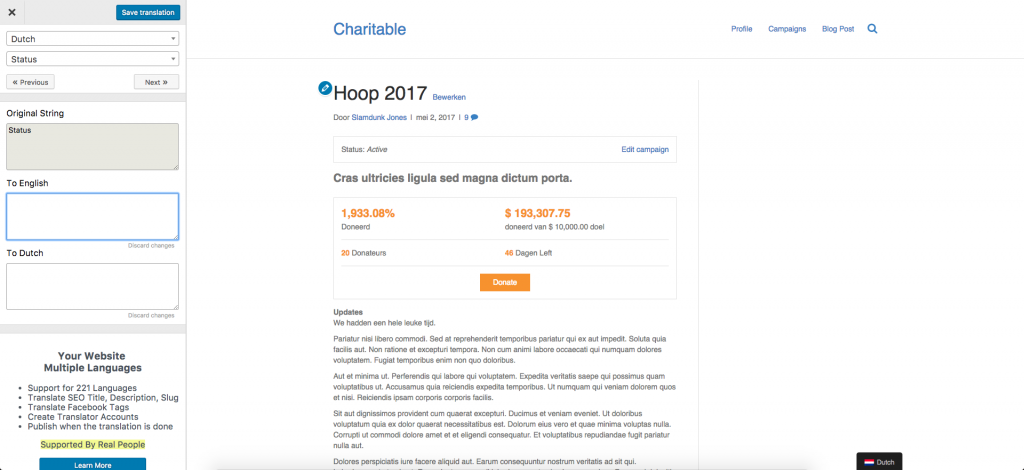
Translating a campaign page with TranslatePress

One really nice aspect of this is that it doesn’t matter what the source is of the text you’re translating — you translate everything in the same place.

Other plugins split the translation up by source. Your theme is translated here, each plugin is translated individually over here, and the content of the post is translated somewhere else again. That can lead to confusion, particularly when both your theme and plugin include some of the same phrases. For example, some people using Charitable alongside Reach experienced problems with that, as words like “goal”, “donated” and “donors” are included in both translation files. As a result, you need to have translated the words in both translation files before it takes effect everywhere.

With TranslatePress, that’s not a problem at all. All the text on the page is available for you to translate, right there in a single unified interface. It’s delightfully simple.

How TranslatePress Enables Multilingual Fundraising Campaigns

So TranslatePress is easy to use, but how does it help with our original problem of creating multilingual fundraising campaigns?

Here, TranslatePress completely sidesteps the problems that arise with other plugins. Your campaign is your campaign, and the Dutch/French/Spanish/Swahili/Hindi translation of your campaign is just that — a translation. It’s not a completely separate post, which means donations to any translations all count towards the one total. It sounds like a simple accomplishment, but it’s a good reflection of the intelligent design and choices that has gone into the plugin.

TranslatePress is still relatively young so there are the occasional rough edges, but the team are committed to improving it. When I first played around with it, I encountered a couple issues and reported those. Cristian Antohe and the rest of the team at Cozmoslabs (the company behind TranslatePress) were quick to respond and have already resolved those issues.

If you plan to run fundraising campaigns on your site in multiple languages, I definitely recommend trying out TranslatePress. The free plugin can be downloaded from WordPress.org and allows you to add one language other than the default; if you need more languages or other advanced features, their paid plans start at $79 per year. Find out more on TranslatePress.com.

What about you?

Have you tried TranslatePress? What did you think of it? How do you run multilingual fundraising campaigns on your site?


author avatar
Eric Daams

Disclosure: Our content is reader-supported. This means if you click on some of our links, then we may earn a commission. We only recommend products that we believe will add value to our readers.

Leave a Reply

Your email address will not be published. Required fields are marked *

Get free tips and resources right in your inbox, along with 60,000+ others

Join our Newsletter

We won’t spam you. We only send an email when we think it will genuinely help you. Unsubscribe at any time!

Featured Video:

Watch more videos on our YouTube channel.

What's New In Charitable

View The Latest Updates
🔔 Subscribe to get our latest updates
📧 Subscribe to Emails

Email Subscription

Join our Newsletter

We won’t spam you. We only send an email when we think it will genuinely help you. Unsubscribe at any time!

Improvement Payments

💳 New Braintree Features For Your European Donors

If your nonprofit serves international supporters, credit cards aren’t always their preferred way to give. With the release of the Braintree addon version 1.3.0, you can now empower your European donors with the payment methods they trust most.

What’s New:

🌍 Six New European Payment Methods: Seamlessly accept popular bank-based options like iDEAL (Netherlands), Bancontact (Belgium), BLIK (Poland), EPS (Austria), Przelewy24 (Poland), and MyBank (Italy/Portugal).

⚡ Frictionless Donor Experience: No manual card entries required. Donors safely authenticate directly with their own bank in a secure popup for lightning-fast contributions.

⚙️ Automatic Currency Sync: Skip complex configuration. The addon intelligently displays the correct local payment buttons based automatically on your site’s currency (EUR or PLN).

Ready to scale your global reach? Update to Braintree 1.3.0 today!

author avatar
Eric Daams
Campaigns New

⏳ Campaign Countdown: Drive Urgency and Lift Donations

Urgency is one of the most powerful tools in fundraising! Meet Campaign Countdown—a live, real-time timer built to turn procrastination into immediate generosity.

campaign_countdown_animation

What’s New:

⏱️ Live, Real-Time Urgency: Beautifully track days, hours, minutes, and seconds down to your campaign’s deadline w/ live-updating visual countdowns.

🎨 Tailored to Your Look: Choose between Boxed bordered tiles or a clean, single-line Inline display. Match your theme instantly with font and deep color controls.

🛠️ Place it Anywhere: Drop the countdown anywhere you like using the Campaign Builder field, a dedicated Gutenberg block, or a simple shortcode.

🚨 Smart Expiry Actions: Total control over the end state—choose to automatically replace the timer with a custom message, freeze it at zero, and more.

author avatar
Eric Daams
Improvement Migrations

↔️ Importing From GiveWP, Donorbox, GiveButter… even CSV!

Whether you’re migrating from another platform or consolidating your records, moving your data to Charitable is now faster and more flexible than ever. We’ve streamlined the process so you can bring over your entire fundraising history in just a few clicks.

🔄 Native GiveWP, Donorbox, & GiveButter Support: Switching from a major platform? Our dedicated migration tools handle the heavy lifting, automatically mapping your donors and donations directly into Charitable—no technical skills required.

📂 Universal CSV Import: Moving from a custom system or a specialized CRM? If you can export it to a CSV, you can import it here. Our smart mapping tool lets you align your columns to Charitable fields like names, emails, phone numbers, and addresses in seconds.

Instant Donor Profiles & Custom Tags: Automatically create rich donor profiles and bring in custom tags to keep your data organized. Segment and engage your supporters from day one with a clean, professional database structure.


Ready to make the switch?

Check out our GiveWP Migration Guide

Learn more about our Import Tools

author avatar
Eric Daams
Improvement Payments

💳 New Braintree Features For Your European Donors

With the release of Braintree addon version 1.3.0, you can now empower your European donors with the payment methods they trust and prefer, making giving seamless for international supporters.

🌍 Six New European Payment Methods: Support popular local options like iDEAL (Netherlands), Bancontact (Belgium), BLIK (Poland), and more to meet donors where they are.

⚡ Frictionless Donor Experience: These bank-based methods allow donors to authenticate directly with their own bank in a secure popup… no credit card numbers required.

⚙️ Automatic Currency Sync: No complex setup needed. The builder automatically displays the correct payment buttons based on your site’s currency (EUR or PLN), ensuring a relevant experience for every visitor.

author avatar
Eric Daams
Campaigns New

🖼️ Campaign Featured Images: Pro-Level Visuals Made Simple

With the new Campaign Featured Image setting in our visual builder, you now have a single, dedicated place to manage how your fundraisers look across your entire site and beyond.

🖼️ One Image, Everywhere: Set a primary thumbnail that automatically syncs to campaign grids, lists, and shortcodes—no more relying on layout order.

📱 Social Sharing Optimized: Easily upload images at the perfect size to ensure your campaigns look stunning and professional when shared on social media.

🔍 SEO & Accessibility Ready: Add custom alt text directly within the builder to improve search rankings and ensure your mission is accessible to every supporter.

author avatar
Eric Daams





