
En Charitable, nuestra misión es ofrecer a sus donantes la experiencia de donación más fluida y sencilla posible.
Entendemos que incluso la más mínima fricción puede impedir una donación potencial, por lo que estamos encantados de presentar el siguiente paso en nuestra evolución: garantizar que los donantes puedan donar sin salir de la página.
🎉 ¡El Botón de Donación Modal!
Sus donantes permanecen exactamente donde están: en su sitio, inmersos en su historia y comprometidos con su causa. Esta mejora minimiza las distracciones y permite que cada impulso generoso se traduzca directamente en un impacto en el mundo real.
Las pequeñas reducciones en la fricción se acumulan con el tiempo. Un camino más suave significa más donaciones completadas, más campañas financiadas, más personas a las que puede servir.
Conozca el Botón de Donación Modal
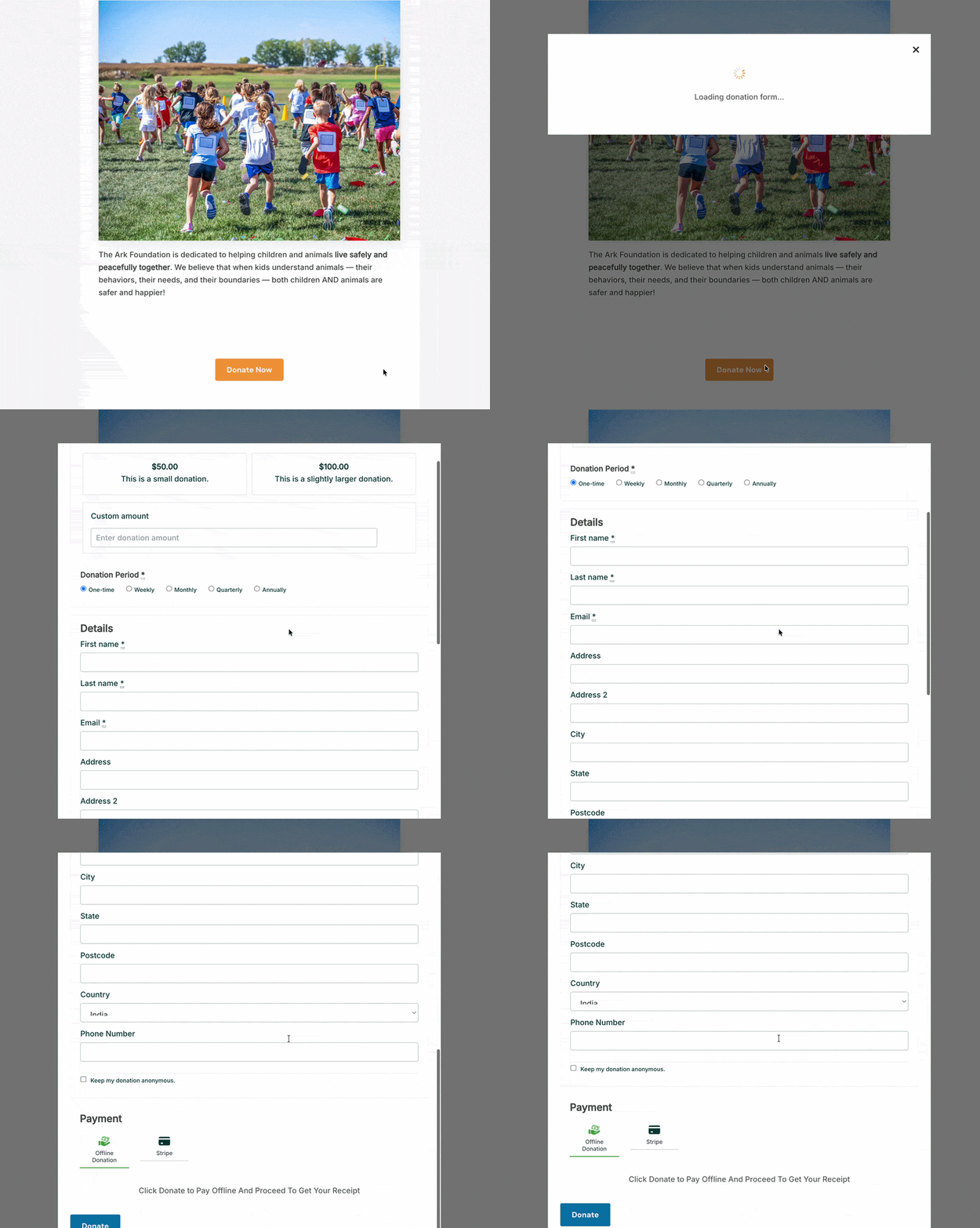
El Botón de Donación Modal es un nuevo bloque para el Editor de Bloques de WordPress. Colóquelo en cualquier página o publicación, y cuando un visitante haga clic en él, su formulario de donación aparecerá allí mismo como una superposición modal, sin carga de página nueva, sin redirección y sin interrupción de la experiencia en la que el donante ya se encontraba.
Donaciones que no llevan a sus donantes a ningún otro lugar que no sea hacia adelante.
Esto es lo que significa para su recaudación de fondos en la práctica.
Por qué cambia la experiencia
Cuando alguien está comprometido con su contenido, está en un estado mental que está listo para actuar. Han leído su llamamiento, se han conectado con su causa, han sentido algo. Enviarlos a una URL diferente en ese momento introduce una pausa pequeña pero real: un momento en el que tienen que reorientarse, procesar una página completamente nueva y volver a comprometerse con la acción para la que ya estaban listos. Algunos donantes hacen esa transición sin dudarlo. Otros no.
El Botón de Donación Modal cierra esa brecha. El donante hace clic, el formulario aparece en la misma pantalla, completa su donación y la página sigue ahí cuando se cierra la ventana modal. Es una experiencia continua en lugar de un viaje de dos pasos.
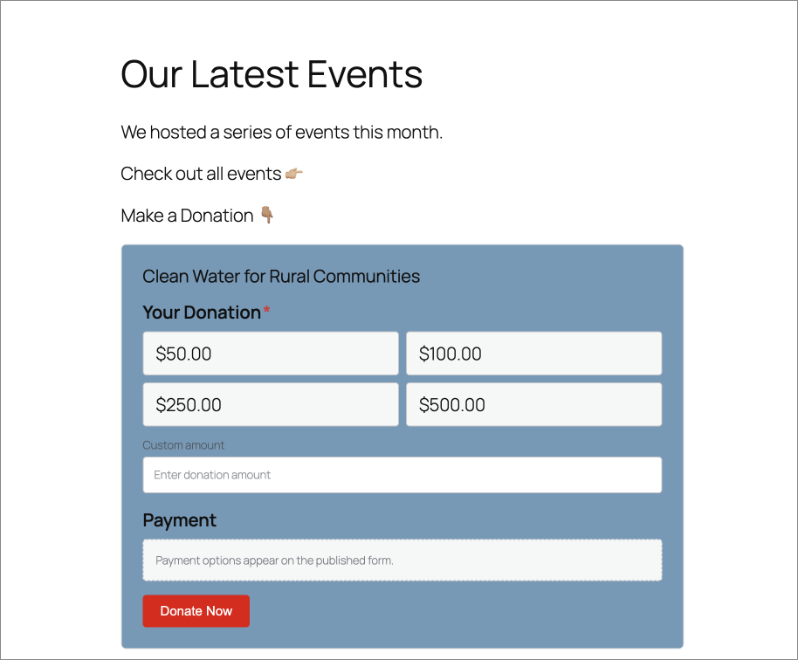
Aquí tiene un ejemplo concreto. Una iglesia publica un resumen semanal del sermón del domingo. La publicación termina con un llamado a donar. Con el Botón de Donación Modal en su lugar, hacer clic en "Donar ahora" abre el formulario de donación directamente en esa publicación del blog, sin llevar al congregante a ningún lugar nuevo. Lo completan en menos de un minuto, cierran la ventana modal y vuelven a leer. Nunca perdieron el hilo.
El mismo patrón funciona para una asociación de padres y maestros de una escuela que organiza una campaña de fin de año, un refugio de animales que comparte una historia de éxito de adopción o una organización sin fines de lucro que agrega un botón de donación directamente en la sección principal de su página de inicio. El botón va a donde sus donantes ya están, y el formulario lo sigue. Esa es toda la idea.
Véalo en acción:
Qué puede hacer el Botón de Donación Modal
Aquí tiene un vistazo de lo que puede configurar, la mayoría en menos de un minuto:
- Colóquelo en cualquier lugar de su sitio. Encabezado, pie de página, barra lateral, publicaciones de blog, páginas de campaña. Cualquier página donde pueda agregar un bloque de WordPress, puede agregar este botón. No se limita a páginas de donación dedicadas.
- Selecciona la campaña a la que apoya. Un menú desplegable sencillo en la configuración del bloque te permite seleccionar la campaña vinculada a este botón. Cada botón está conectado a una campaña, por lo que los donantes siempre saben exactamente a dónde va su donación.
- Establece el texto de tu propio botón. La etiqueta predeterminada es “Donar ahora”, pero puedes escribir lo que sea que encaje con el contexto: “Apoya nuestro trabajo”, “Dona hoy”, “Ayúdanos a alcanzar nuestro objetivo” o lo que mejor se adapte a la página en la que se encuentra.
- Elige la acción del botón. Abre una ventana modal directamente en la página o envía a los donantes a la página completa de la campaña. Ambas opciones están disponibles y son configurables por botón.
- Controla el encabezado de la ventana modal. Muestra el título de la campaña y la imagen destacada en la parte superior de la ventana modal para dar contexto visual y refuerzo, o deja el encabezado vacío para un aspecto minimalista y sin distracciones.
- Estilízalo para que coincida con tu sitio. Ajusta el color de fondo, el color del texto, los efectos de desplazamiento, el relleno, el tamaño y las clases CSS personalizadas. El botón debe parecer que fue creado para tu sitio, no insertado desde otro lugar.
Cómo configurarlo
No necesitas un desarrollador para poner esto en marcha. Esto es todo lo que necesitas:
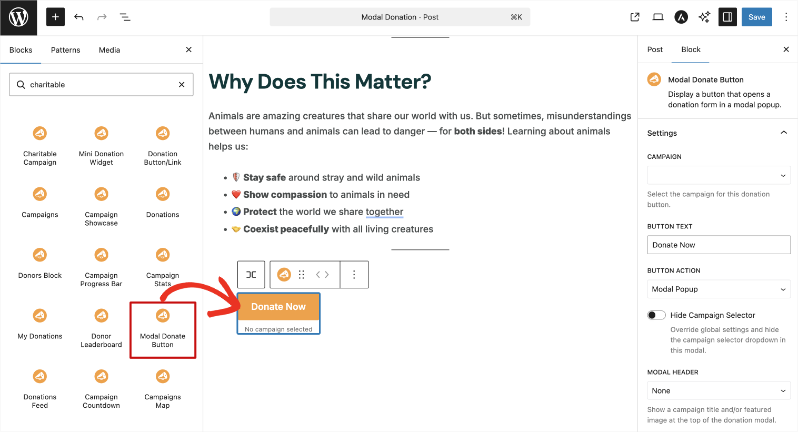
Abre cualquier página o publicación en el Editor de bloques de WordPress. Haz clic en el icono + para añadir un nuevo bloque y busca “Botón de donación modal”. Haz clic para insertarlo.
En el panel de configuración del bloque a la derecha, usa el menú desplegable Campaña para seleccionar qué campaña apoya este botón.
En el campo Texto del botón, introduce tu etiqueta preferida, o deja la predeterminada “Donar ahora” tal cual.
En Acción del botón, elige Ventana modal emergente para abrir el formulario como una superposición en la página actual, o Enlace directo para dirigir a los donantes a la página de la campaña.
En Encabezado de la ventana modal, elige si mostrar el título y la imagen de la campaña o dejar el encabezado vacío.
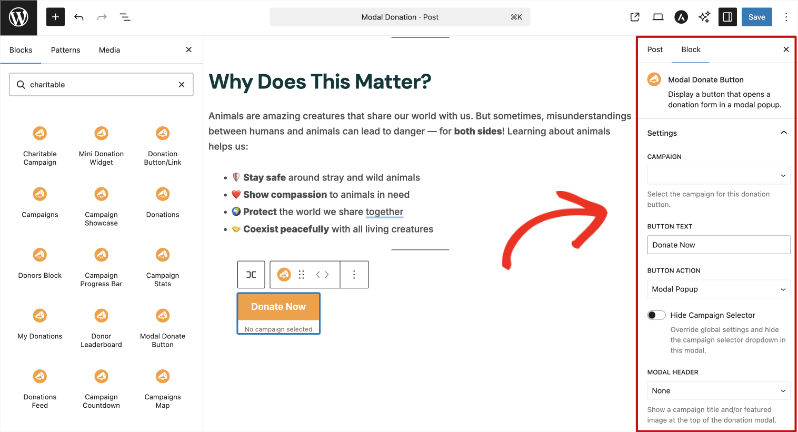
Usa los paneles Color, Tamaño y espaciado y Avanzado para estilizar el botón y que encaje con el diseño de tu sitio.
Haz clic en Actualizar o Publicar para guardar.
Eso es todo. Desde insertar el bloque hasta tener un botón de donación en vivo y estilizado en tu página, todo el proceso lleva menos de un minuto. Sin código. Sin desarrollador.
Por qué le encantará esto
La configuración es rápida. El impacto no lo es.
- 🎯 Los donantes se mantienen en el momento. Sin redirección significa sin interrupción de la intención. La decisión de donar se mantiene activa desde el primer clic hasta la pantalla de confirmación.
- ⚡ Funciona en cualquier página, no solo en las de campaña. Tu página de inicio, tus publicaciones de blog, tus resúmenes de eventos, tu barra lateral. Cualquier página puede ser ahora un lugar para donar.
- 🎨 Totalmente personalizado. El control completo del estilo significa que el botón encaja con el diseño de tu sitio sin ningún trabajo CSS adicional por tu parte.
- 📱 Totalmente adaptable. La ventana modal funciona en teléfonos, tabletas y ordenadores sin ninguna configuración adicional.
- ⏱️ En funcionamiento en menos de un minuto. No se necesita desarrollador. Sin código. Solo un bloque y algunas configuraciones.
Obtén el Botón de Donación Modal con Charitable Pro
El Botón de Donación Modal está disponible en todos los planes de Charitable Pro, a partir de 69 $/año para un solo sitio. Cada plan incluye una garantía de devolución de dinero de 14 días sin preguntas. Si no es adecuado, obtienes un reembolso completo.
¿Ya tienes Charitable Pro? El bloque está listo para usar ahora mismo. Abre el Editor de Bloques en cualquier página o publicación y busca "Botón de Donación Modal". Está ahí.
¿Aún no tienes un plan de pago? Este es un buen momento para actualizar. Obtendrás el Botón de Donación Modal además de todo lo demás incluido en tu nivel de plan, sin ningún riesgo al probarlo.
Empieza a Eliminar Fricciones Hoy Mismo
El Botón de Donación Modal es uno de esos cambios que son difíciles de notar cuando funcionan bien, porque la experiencia de donación simplemente se siente correcta. Es una pequeña adición con un efecto real en la fluidez con la que los donantes pueden completar el proceso.
¿Ya usas Charitable Pro?
Visita la documentación del Botón de Donación Modal para empezar. ¿Preguntas? Nuestro equipo de soporte está aquí para ayudarte.
Mantente conectado para más recursos para organizaciones sin fines de lucro
Para más tutoriales y vídeos adaptados a organizaciones sin fines de lucro, suscríbete a nuestro canal de YouTube. Publicamos regularmente consejos de expertos, guías paso a paso sobre donaciones en línea, estrategias de recaudación de fondos y recursos prácticos para ayudar a tu organización a tener éxito.
🗞️ Recibe consejos semanales y guías exclusivas en tu bandeja de entrada
Únete a nuestro boletín →
🎥 Mira tutoriales paso a paso e historias de éxito
Suscríbete a nuestro canal de YouTube →
👩🏽💻 Conecta con nuestra comunidad y obtén información diaria sobre organizaciones sin fines de lucro
Síguenos en LinkedIn →
🥳 Reels divertidos e información sobre organizaciones sin fines de lucro
Síguenos en Instagram →
👀 Vídeos interesantes y divertidos para ayudarte a hacer crecer tu causa
Síguenos en TikTok→
🌎 Suscríbete y sigue para recibir consejos generales de recaudación de fondos
Obtén consejos de recaudación de fondos en TikTok →
Potentes recursos de recaudación de fondos
⬇️ Descarga estrategias probadas, ideas de campañas y herramientas de expertos
Obtén el Kit de Recaudación de Fondos →
💸 Obtén recursos gratuitos de recaudación de fondos
Ve al Centro de Recaudación de Fondos de Charitable →
¿Tienes preguntas sobre Charitable?
Preguntas frecuentes de Charitable →
🏎️ Prueba Charitable
Crea tu demostración de Charitable →
Comprende la terminología y la jerga de las organizaciones sin fines de lucro
Glosario de organizaciones sin fines de lucro→
% ¿Buscas ofertas y descuentos para organizaciones sin fines de lucro?
Las mejores ofertas y descuentos para organizaciones sin fines de lucro →



Deja una respuesta