
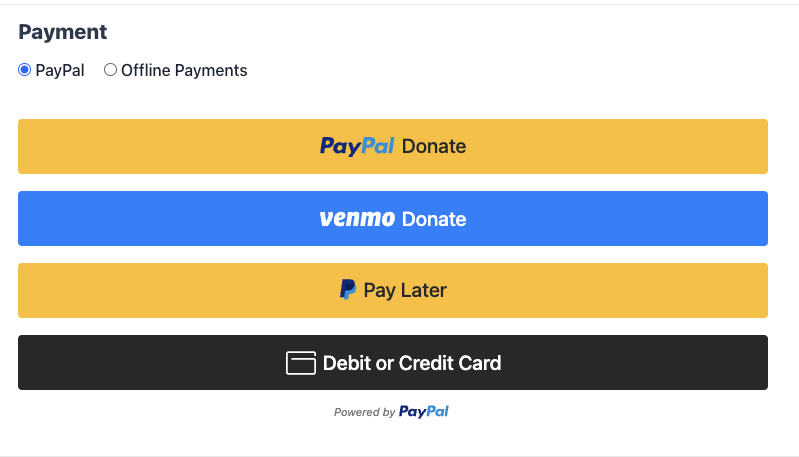
PayPal Commerce es una integración de PayPal única y moderna que permite a sus donantes pagar con PayPal, Venmo, Pay Later, tarjetas de crédito y débito, Apple Pay y Google Pay a través de una sola conexión. El botón "Conectar con PayPal" de un solo clic se encarga de la configuración, y las donaciones y los reembolsos fluyen a través de la administración de donaciones de Charitable estándar sin necesidad de iniciar sesión en PayPal.
Disponible en Charitable Pro 1.8.15+ y Charitable 1.8.11 (que actualmente no admite donaciones recurrentes / almacenamiento de datos). Ha sido probado de extremo a extremo en entornos sandbox y en vivo, y continuaremos refinando la experiencia basándonos en los comentarios de los clientes.
Características clave
- Acepte donaciones a través de PayPal, Venmo, Pay Later, tarjetas de crédito y débito, Apple Pay y Google Pay a través de una única integración.
- Conecte su cuenta comercial de PayPal con un solo clic. No se necesita desarrollador.
- Ofrezca donaciones únicas y donaciones recurrentes desde el mismo formulario.
- Elija entre dos modos recurrentes: suscripciones gestionadas por PayPal o renovaciones gestionadas por Charitable utilizando métodos de pago guardados.
- Permita que los donantes recurrentes guarden su cuenta o tarjeta de PayPal y la reutilicen en donaciones futuras.
- Reembolse y cancele donaciones directamente desde el administrador de WordPress.
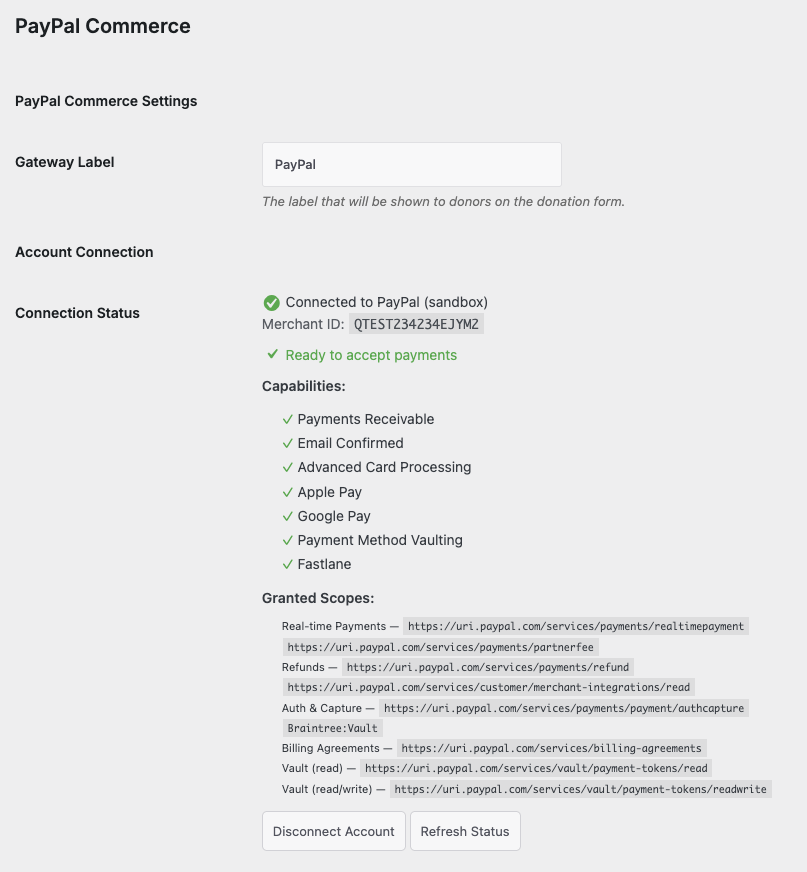
- Vea el estado de la capacidad de PayPal en tiempo real (Pagos Recibibles, Correo Electrónico Confirmado, Procesamiento de Tarjetas, Apple Pay, Google Pay, Almacenamiento de Métodos de Pago, Fastlane) en el panel de conexión.
- Los donantes que encuentran un error del lado de PayPal ven mensajes claros y amigables con una pista de recuperación en lugar de una alerta genérica del navegador.
¿Por qué usar PayPal Commerce?
PayPal Commerce brinda a sus donantes la máxima cantidad de formas de pago sin que su equipo tenga que administrar múltiples pasarelas. Una sola conexión desbloquea PayPal, Venmo, financiación Pay Later, procesamiento completo de tarjetas de crédito y débito a través de los campos de tarjeta compatibles con PCI de PayPal, y las billeteras modernas (Apple Pay, Google Pay) que todos los donantes esperan en un formulario de donación de la era 2026. En comparación con la integración anterior de Legacy PayPal, obtiene opciones de pago más ricas, un proceso de pago más rápido y herramientas administrativas para reembolsos y gestión recurrente sin salir nunca de WordPress.
Verlo en acción
Requisitos
- Charitable Lite 1.8.11 o Charitable Pro 1.8.15 o posterior
- Una cuenta comercial de PayPal (puede crear una durante el flujo de conexión)
- WordPress 6.0+ y PHP 7.4+
- La extensión PHP
gdoimagicksi planea usar la generación de PDF de recibos (ya requerida por el núcleo de Charitable)
Empezar
Activación
- En tu panel de administración de WordPress, ve a Charitable → Settings → Payment Gateways.
- Busca PayPal Commerce en la lista de pasarelas y haz clic en Enable.
- Haga clic en Configuración junto a PayPal Commerce, luego haga clic en el botón Conectar con PayPal.
- PayPal se abrirá en una nueva ventana. Inicia sesión en tu cuenta de empresa de PayPal (o crea una) y aprueba la conexión.
- PayPal lo redirige de regreso a WordPress. El panel de conexión mostrará su ID de comerciante y una lista de verificación de las capacidades otorgadas.
Eso es todo. Puede comenzar a aceptar donaciones a través de PayPal Commerce de inmediato.
Modo de prueba vs Modo en vivo
PayPal Commerce respeta el interruptor del Modo de prueba estándar de Charitable. Con el Modo de prueba activado, las donaciones se enrutan a través del entorno de pruebas de PayPal para que puedas validar el flujo completo del donante sin mover dinero real. Desactiva el Modo de prueba cuando estés listo para aceptar donaciones en vivo.
Los métodos de pago guardados están limitados por comerciante: una tarjeta que guardaste en el entorno de pruebas no aparecerá en el modo en vivo, y viceversa.
Opciones de configuración
Después de conectar, la página de Configuración de PayPal Commerce expone estas opciones. La mayoría de los valores predeterminados son sensatos para una instalación nueva, por lo que normalmente puedes dejarlos como están.
Métodos de pago
| Configuración | Tipo | Predeterminado | Descripción |
|---|---|---|---|
| Habilitar Venmo | Activar/desactivar | Desactivado | Mostrar el botón Donar con Venmo junto a PayPal. Venmo solo está disponible en EE. UU. y requiere la capacidad de Pago posterior en tu cuenta de PayPal. |
| Habilitar Pago posterior | Activar/desactivar | Desactivado | Mostrar el botón de Pago posterior de PayPal (Paga en 4, PayPal Credit). PayPal determina la elegibilidad en el momento del pago según la región del donante y el importe de la donación. |
| Habilitar Campos de Tarjeta (ACDC) | Activar/desactivar | Activado | Renderizar los campos de tarjeta de crédito y débito de PayPal, que cumplen con PCI, directamente en tu formulario de donación. Si PayPal aún no ha habilitado Campos de Tarjeta en tu cuenta, se recurrirá a un botón independiente de "Tarjeta de débito o crédito". |
| Habilitar Apple Pay | Activar/desactivar | Activado | Mostrar el botón de Apple Pay en Safari. Requiere la capacidad de Apple Pay en tu cuenta de PayPal. |
| Habilitar Google Pay | Activar/desactivar | Activado | Mostrar el botón de Google Pay en Chrome. Requiere la capacidad de Google Pay en tu cuenta de PayPal. |
| Habilitar Fastlane | Activar/desactivar | Activado | Permitir que los donantes recurrentes completen la compra con Fastlane (la opción de pago guardado de PayPal para invitados). |
| Comportamiento de Fastlane | Seleccionar | Solo invitados | Elige cuándo se ofrece Fastlane: solo para invitados, para todos los donantes o nunca. |
Métodos de pago guardados (Almacenamiento)
| Configuración | Tipo | Predeterminado | Descripción |
|---|---|---|---|
| Habilitar almacenamiento de métodos de pago | Activar/desactivar | Activado | Permitir que los donantes guarden cuentas de PayPal y tarjetas en el formulario de donación para usarlas en futuras donaciones. |
| Visualización de la opción de almacenamiento | Seleccionar | Optar por participar | Elige cómo aparece la opción "Guardar mi método de pago" en el momento del pago: optar por participar (sin marcar por defecto), optar por no participar (marcado por defecto) o guardar siempre. |
| Expiración del método guardado (Días) | Número | (vacío) | Número de días antes de que los métodos guardados no utilizados expiren automáticamente. Deja vacío para que no expiren. |
Donaciones recurrentes
| Configuración | Tipo | Predeterminado | Descripción |
|---|---|---|---|
| Almacenamiento automático para donaciones recurrentes | Activar/desactivar | Activado | Guarda automáticamente el método de pago del donante cuando elige una donación recurrente. Requerido para que el cron de renovación cobre en ciclos posteriores. |
| Modo de procesamiento recurrente | Radio | API de suscripciones de PayPal | Elige cómo se procesan las donaciones recurrentes. Vault + Cron: tu sitio almacena el token de pago y activa cada renovación. API de suscripciones de PayPal: PayPal gestiona el ciclo de renovación automáticamente (requiere licencia Pro; los sitios Lite vuelven automáticamente a Vault + Cron con una pequeña tarifa de plataforma en cada renovación). |
Profundización en el modo recurrente
PayPal Commerce admite dos formas distintas de gestionar las donaciones recurrentes. Ambas funcionan con la misma experiencia para el donante, pero el flujo interno difiere.
Vault + Cron (gestionado por el comerciante)
Cuando un donante elige una donación recurrente, tu sitio guarda su cuenta de PayPal o tarjeta como un token almacenado. En cada ciclo, el cron de Charitable activa un nuevo cargo contra ese token a través de la API de Órdenes de PayPal. Conservas el control total sobre el comportamiento de reintentos, la gestión de impagos y las cancelaciones a través de la administración de donaciones recurrentes de Charitable.
Funciona en Lite y Pro. Los sitios Lite pagan una pequeña tarifa de plataforma (3%) en cada captura de renovación; los sitios Pro no pagan tarifa de plataforma.
API de suscripciones de PayPal (gestionado por PayPal)
Cuando un donante elige una donación recurrente, tu sitio crea un plan de facturación y una suscripción de PayPal. PayPal gestiona el ciclo de renovación automáticamente y notifica a tu sitio cuando se factura cada ciclo. Los donantes también pueden ver y gestionar la suscripción en su propia cuenta de PayPal.
Disponible solo en Pro. Los sitios Lite que seleccionan este modo vuelven automáticamente a Vault + Cron, por lo que los donantes nunca ven un error.
Activación de Pro en donaciones recurrentes existentes
Si activas Pro en un sitio que ya tiene donaciones recurrentes Lite en curso, la tarifa de plataforma se elimina automáticamente en la próxima renovación. No necesitas migrar la suscripción, pedir al donante que vuelva a aprobar, ni realizar ninguna otra acción. El umbral de tarifa se comprueba en cada renovación según el estado de tu licencia actual.
Reembolsos y cancelaciones
Los reembolsos y las cancelaciones se emiten desde la administración estándar de donaciones de Charitable. No necesitas iniciar sesión en PayPal.
Reembolsar una donación
- Abre la donación en Charitable → Donaciones.
- En Acciones de donación, elige Reembolsado y marca “Reembolsar automáticamente en PayPal Commerce.”.
- Haz clic en Actualizar estado.
Si el reembolso tiene éxito, el estado de la donación pasa a Reembolsado y el ID del reembolso se registra en el registro de donaciones. Si el reembolso falla (por ejemplo, PayPal devuelve "saldo insuficiente"), el estado de la donación se revierte a Pagado para que tus registros y PayPal se mantengan sincronizados.
Cancelar una donación recurrente
- Abre la donación recurrente en Charitable → Donaciones recurrentes.
- En Acciones de donación, elige Cancelar en la pasarela.
- Haz clic en Cancelar donación recurrente.
La cancelación se envía a PayPal para que el donante no reciba más facturas, y la publicación de la donación recurrente se establece como Cancelada en WordPress.
Errores de cara al donante
Cuando PayPal no puede procesar una donación (la cuenta de comerciante está restringida, la tarjeta es rechazada, el país no es compatible, etc.), los donantes ven un aviso en línea en lenguaje claro en el formulario de donación con una pista de recuperación. Nunca ven un cuadro de diálogo de alerta genérico del navegador.
Ejemplos:
- “Las donaciones en línea a través de PayPal no están disponibles temporalmente. Por favor, intente con un método de pago diferente, o contáctenos para completar su donación.”
- “Su método de pago fue rechazado. Por favor, intente con una tarjeta diferente o use su saldo de PayPal.”
- “Las donaciones a través de PayPal no son compatibles desde su país. Por favor, intente con un método de pago diferente.”
Si el visitante actual ha iniciado sesión como administrador (capacidad manage_charitable_settings o manage_options), el aviso en línea muestra adicionalmente el texto de error subyacente de PayPal y el ID de depuración de PayPal para que pueda clasificarlo sin revisar los registros.
Registros
Cada error de la API de PayPal se registra en Charitable → Herramientas → Registros bajo la fuente paypal_commerce. Cada entrada incluye:
- El mensaje amigable que se mostró al donante
- El texto de error sin procesar de PayPal
- El código de problema de error de PayPal (por ejemplo,
PAYEE_ACCOUNT_RESTRICTED) - ID de depuración de PayPal (para tickets de soporte con PayPal)
- Contexto de la donación: importe, campaña, método de pago
Esta es la forma más rápida de diagnosticar el informe de un cliente de “PayPal no funciona”.
Solución de problemas
Los donantes ven “Las donaciones en línea a través de PayPal no están disponibles temporalmente”.
Este mensaje indica que PayPal ha restringido su cuenta de comerciante. Inicie sesión en paypal.com con su cuenta comercial, aborde cualquier elemento de verificación o cumplimiento pendiente y luego regrese a Charitable → Configuración → Pasarelas de pago → PayPal Commerce y haga clic en Actualizar estado para confirmar que la restricción se ha eliminado.
La pestaña “Pagar con tarjeta” no se renderiza; solo se muestra un botón “Tarjeta de débito o crédito”.
PayPal aún no ha habilitado la capacidad de Procesamiento Avanzado de Tarjetas (ACDC) en su cuenta. El botón de Tarjeta independiente todavía acepta donaciones a través de una ventana emergente de PayPal alojada. Para habilitar los campos de tarjeta en línea, inicie sesión en su cuenta comercial de PayPal, complete los pasos de verificación pendientes y regrese al panel de conexión y haga clic en Actualizar estado.
Después de desconectar y reconectar, la conexión todavía muestra el comerciante antiguo.
Borre la caché de objetos de WordPress (o reinicie su servicio PHP-FPM si hay una caché a nivel de host involucrada). El botón Actualizar estado fuerza una verificación de capacidad nueva desde PayPal.
Las donaciones recurrentes nunca se renuevan.
Comprueba que Auto-vault para Donaciones Recurrentes esté activado y que el cron de WordPress se esté ejecutando en tu servidor. Para el modo Vault + Cron, el cron de renovación se ejecuta diariamente y cobra cada donación recurrente debida. Busca en Charitable → Herramientas → Registros entradas de paypal_commerce para ver si se han intentado o fallado renovaciones.
El botón de reembolso muestra “No se encontró ID de captura” en una donación de suscripción.
Esto puede suceder si intentas un reembolso a los pocos segundos de que el donante apruebe la suscripción, antes de que PayPal haya registrado la primera transacción. Espera unos minutos e inténtalo de nuevo. El plugin recuperará el ID de captura del historial de transacciones de PayPal en el momento del reembolso.
Recursos para desarrolladores
Ganchos y filtros
charitable_paypal_log_platform_fee_on_donation(filtro, valor predeterminadofalse). Devuelvetruepara añadir una línea “Tarifa de plataforma” al registro de donaciones en cada captura. Útil para sitios que desean visibilidad total de las tarifas de renovación de nivel Lite.charitable_paypal_platform_fee_percentage(filtro, valor predeterminado3). Ajusta el porcentaje de la tarifa de plataforma aplicado a las donaciones de nivel Lite.charitable_donation_cancellation_page(filtro). Personaliza la página a la que llegan los donantes después de cancelar una aprobación de suscripción de PayPal.charitable_donation_cancellation_args(filtro). Personaliza los argumentos de consulta que se añaden a la URL de cancelación de donaciones.
WP-CLI
El plugin incluye un comando WP-CLI específico para PayPal:
wp charitable paypal force-commerce-tier
Úsalo si Charitable detectó tu sitio como un sitio de PayPal heredado (por ejemplo, si ha importado donaciones de una exportación heredada o una prueba de pasarela heredada abandonada) y deseas optar por PayPal Commerce. Incluye una vista previa --dry-run y un reconocimiento obligatorio --confirm-recurring-impact cuando haya donaciones recurrentes heredadas activas.
Webhooks
Una vez que te conectes, el panel de conexión mostrará la URL de webhook de tu sitio. Suscríbete a estos eventos en tu Panel de Desarrollador de PayPal:
CHECKOUT.ORDER.APPROVEDPAGO.CAPTURA.COMPLETADOPAGO.CAPTURA.DENEGADOPAGO.CAPTURA.PENDIENTEPAGO.CAPTURA.REEMBOLSADOCOMERCIO.ALTA.COMPLETADACOMERCIO.CONSENTIMIENTO-PARTNER.REVOCADO
Para cuentas de sandbox, también puedes hacer clic en Crear Webhook Automáticamente para registrarlos automáticamente.


