
Las suscripciones a plazo fijo te permiten establecer una donación recurrente para que se detenga automáticamente, ya sea después de un número determinado de pagos o en una fecha de finalización específica, en lugar de ejecutarse hasta que alguien la cancele manualmente. Cuando se alcanza el plazo, Charitable completa la suscripción por ti, detiene la facturación en la pasarela de pago y puede enviar un correo electrónico de confirmación al donante.
Disponible en el complemento Charitable Recurring Donations 2.2.0 y posteriores.
Características clave
- Establece una donación recurrente para que finalice después de un número fijo de pagos.
- O configúrala para que finalice en una fecha específica.
- Las suscripciones se completan automáticamente cuando se alcanza el plazo, sin cancelación manual.
- La suscripción de la pasarela se cancela al mismo tiempo, por lo que al donante nunca se le cobra más allá del plazo.
- El plazo se muestra en la pantalla de donaciones recurrentes del administrador, el panel del donante y el recibo de donación.
- Un indicador de progreso muestra cuántos pagos se han realizado hacia un límite de pagos.
- Funciona con el flujo de trabajo de aprobación de donantes existente, por lo que un cambio de plazo puede ser aprobado por el donante antes de que se aplique.
¿Por qué usar suscripciones a plazo fijo?
Muchas campañas piden a los patrocinadores un compromiso definido, como una promesa de 12 meses o una campaña de capital que dura un período determinado. Anteriormente, cada donación recurrente se ejecutaba indefinidamente, por lo que el personal tenía que recordar cancelar cada una manualmente cuando terminaba el compromiso. Las suscripciones a plazo fijo te permiten establecer el compromiso una vez y dejar que Charitable lo finalice según lo programado, lo que mantiene tus informes limpios y protege a los donantes de cargos inesperados.
Verlo en acción
Requisitos
- Complemento Charitable Recurring Donations 2.2.0 o posterior.
- Una suscripción de Stripe. Los plazos de suscripción se configuran a través de la pantalla Actualizar Suscripción, que actualmente admite Stripe.
- Para la aplicación del plazo de finalización exacto, Charitable Pro 1.8.16 o posterior (esto utiliza el cancel_at nativo de Stripe). En versiones anteriores, un respaldo integrado aún completa la suscripción en la primera renovación después de alcanzar el plazo.
Cómo establecer un plazo en una donación recurrente
Paso 1: Actualizar Suscripción
En tu administrador de WordPress, ve a Charitable » Donaciones y abre la donación recurrente que deseas limitar. En el panel derecho, abre el menú desplegable Acciones de Donación .
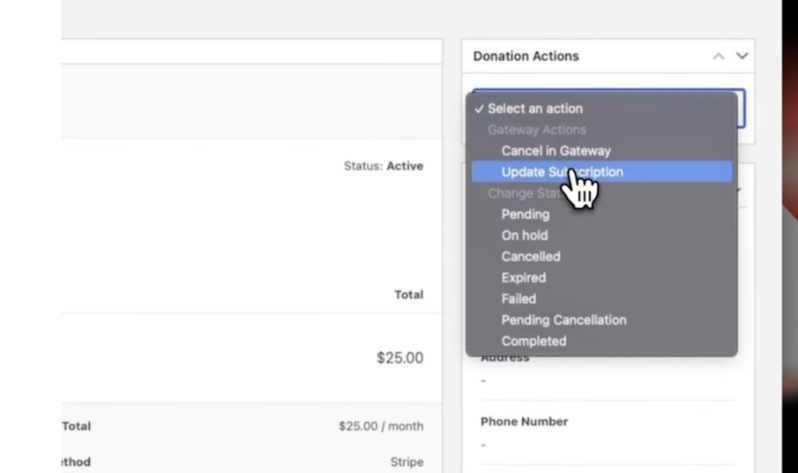
Desde aquí, haz clic en Actualizar Suscripción.
Aparecerá una ventana emergente que te permitirá cambiar el importe, el período de facturación, el plazo de la suscripción y más.
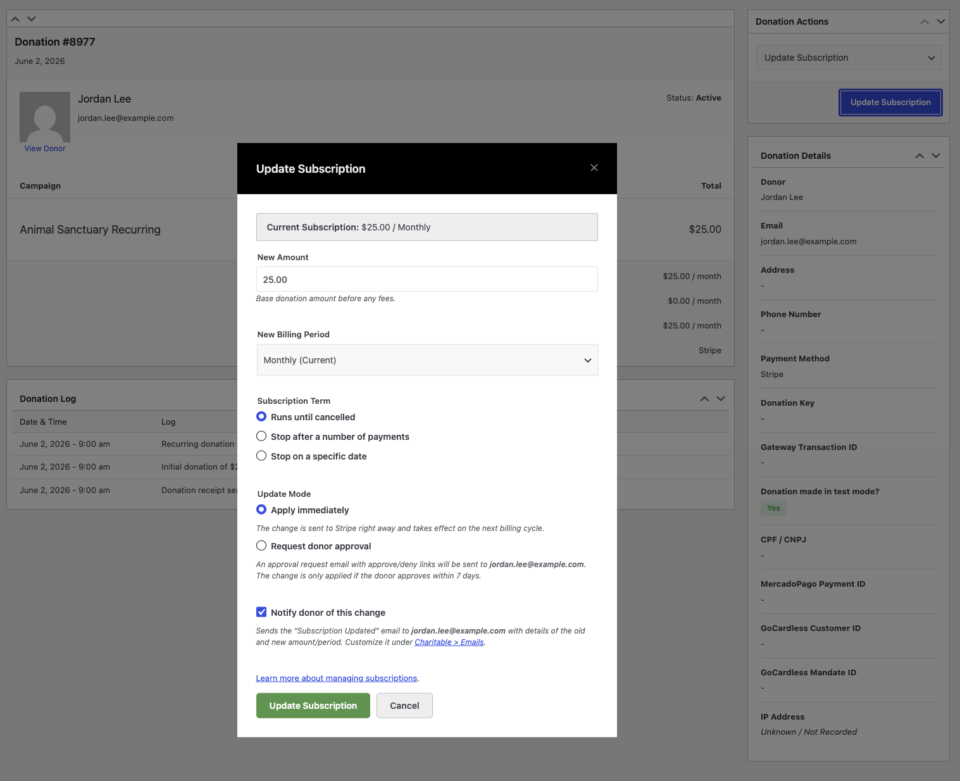
Paso 2: Establecer un plazo de suscripción
Puedes elegir una de las dos opciones para establecer el plazo:
Detener después de un número de pagos:
Introduce el número total de pagos (por ejemplo, 12). Charitable cancelará automáticamente la suscripción una vez que se completen estos cargos. Esto es ideal para campañas de promesas, campañas de aniversario y regalos a plazos.
Detener en una fecha específica:
Selecciona una fecha específica (por ejemplo, 3 de junio de 2027). Charitable cancelará la suscripción en esta fecha. Esta opción se adapta a campañas basadas en proyectos con una fecha de finalización definida.
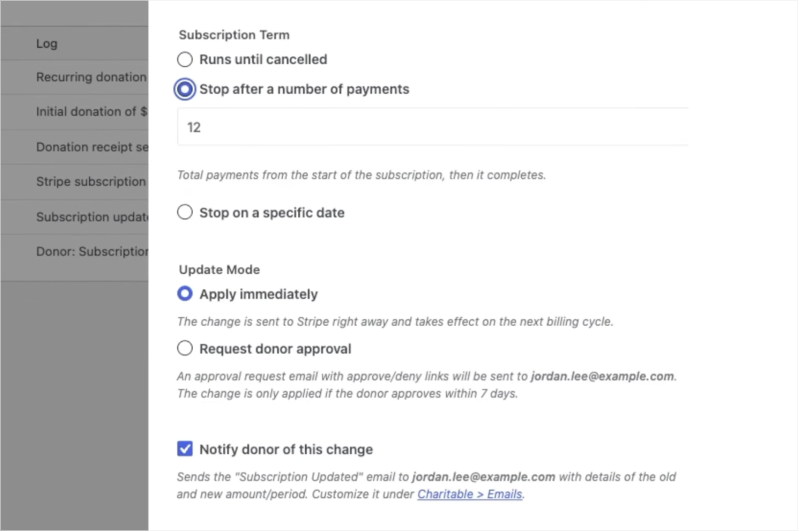
Paso 3: Guardar y confirmar
- Haz clic en Actualizar Suscripción para aplicar los cambios.
- Confirma cualquier indicación que aparezca.
- Charitable comunicará inmediatamente el nuevo plazo a Stripe. El registro de donaciones se actualizará con la confirmación, reflejando el nuevo plan y los detalles del plazo en el registro de la suscripción.
Paso 4: Opcional: Solicitar aprobación del donante para cambios
Si realiza cambios en nombre de un donante, como ajustar el importe o el plazo, puede seleccionar la opción Solicitar aprobación del donante antes de guardar.
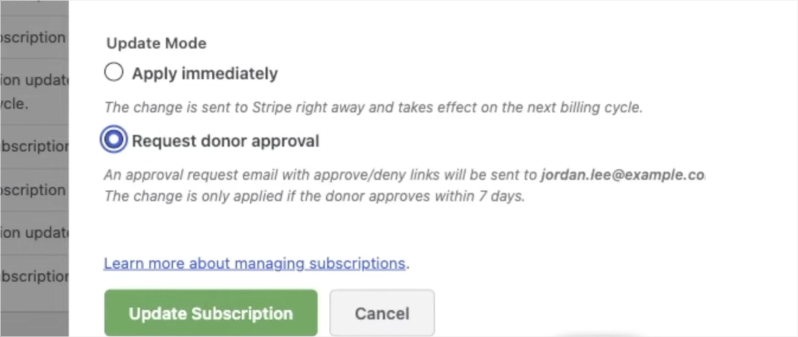
Esto envía un correo electrónico al donante con los cambios propuestos. El donante puede aprobar o rechazar los cambios directamente desde el correo electrónico, asegurando un rastro de auditoría claro y manteniendo el control del donante sobre sus donaciones.
Cuándo usar esto: Plazo Fijo vs. Indefinido
No todos los programas de donaciones recurrentes necesitan un plazo. Aquí tienes una guía rápida para ayudarte a decidir qué enfoque se adapta a cada campaña.
| Escenario | Mejor enfoque | Por qué |
|---|---|---|
| Campaña anual de donaciones ("Dona 50 €/mes durante 12 meses") | Plazo fijo: 12 pagos | El compromiso se define de antemano. Charitable lo finaliza automáticamente cuando se cumple la donación. |
| Campaña de captación de fondos con fecha límite de financiación | Plazo fijo: fecha de finalización específica | La campaña finaliza en una fecha conocida. No se cobrará a ningún donante después de que finalice la campaña. |
| Ventana de donación de contrapartida ("Igualaremos cada euro durante 6 meses") | Plazo fijo: 6 pagos | La contrapartida expira. La donación recurrente debe expirar con ella en lugar de continuar sin contrapartida. |
| Fondo conmemorativo o en homenaje vinculado a un año de aniversario | Plazo fijo: fecha de finalización específica | La campaña honra un período definido. Un plazo fijo la cierra con intención. |
| Desafío para nuevos donantes ("Realiza tus 3 primeras donaciones") | Plazo fijo: 3 pagos | Reduce la barrera para los donantes recurrentes primerizos al hacer que el compromiso parezca manejable. |
| Donantes mensuales recurrentes sin fin definido | Indefinido | El donante tiene la intención de ofrecer apoyo continuo. No se necesita plazo. |
| Soporte operativo o de programas continuo | Indefinido | La necesidad no expira. Deja que la relación continúe de forma natural. |
Opciones de configuración
Tipos de plazo de suscripción
| Opción | Lo que hace | Entrada | Notas |
|---|---|---|---|
| Ejecutar hasta cancelar | El valor predeterminado histórico. La suscripción continúa hasta que se cancela. | Ninguno | No se aplica ningún final. |
| Detener después de un número de pagos | La suscripción se completa una vez alcanzado el recuento total de pagos. | Número entero, de 1 a 1000 | La pantalla de administración muestra un indicador de progreso "X de Y pagos realizados". |
| Detener en una fecha específica | La suscripción se completa en o después de la fecha elegida. | Una fecha futura | La fecha debe ser en el futuro. Se rechaza una fecha pasada. |
Qué sucede cuando se alcanza el plazo
Cuando se realiza el último pago o pasa la fecha de finalización, Charitable: 1. Marcará la donación recurrente como Completada. 2. Cancelará la suscripción en la pasarela de pago para que no se realicen más cargos. 3. Enviará el correo electrónico de Donación recurrente completada, si dicho correo está habilitado en tu configuración.
Dónde aparece el plazo
- Pantalla de donación recurrente de administrador: una fila de Plazo, con un indicador de progreso de pago para plazos basados en recuento.
- Panel del donante: una nota corta como “para 12 pagos” o “hasta el 3 de junio de 2027”.
- Recibo de donación: la misma nota de plazo.
Solución de problemas
La suscripción no se completó en la fecha de finalización exacta
La cancelación en el día exacto depende de la cancelación nativa `cancel_at` de Stripe, que se establece en Charitable Pro 1.8.16 y versiones posteriores. En versiones anteriores, el respaldo integrado completa la suscripción en la primera renovación después de que pasa la fecha de finalización en lugar de en el día mismo. Actualiza Charitable Pro para obtener precisión día a día.
Las opciones de Plazo de suscripción no se muestran
Los controles de plazo aparecen en la pantalla Actualizar suscripción para suscripciones activas de Stripe. Las actualizaciones de suscripción son compatibles actualmente con Stripe, por lo que las opciones de plazo no aparecerán para otras pasarelas.
El correo electrónico de Donación recurrente completada no se envió
Confirma que el correo electrónico de Donación recurrente completada está habilitado en la configuración de correos electrónicos de Charitable. El correo electrónico solo se activa cuando la suscripción se completa realmente y el correo electrónico está habilitado.
Recursos para desarrolladores
Ganchos y filtros
charitable_recurring_term_type— Filtra el tipo de plazo resuelto (unlimited,countoend_date) para una donación recurrente.charitable_recurring_end_date— Filtra la marca de tiempo de la fecha de finalización (segundos Unix, UTC) para un plazo de fecha de finalización.charitable_recurring_renewal_donation_created— Se activa después de que se crea una donación de renovación. El respaldo de plazo fijo se engancha aquí para completar la suscripción una vez que se alcanza el plazo.charitable_recurring_donation_completed— Se activa cuando una suscripción se marca como completada, lo que la pasarela utiliza para cancelar la suscripción.
Funciones útiles
charitable_recurring_validate_term( $type, $value )— Valida y normaliza un plazo propuesto, devolviendo una matriz o un WP_Error.charitable_recurring_calculate_end_timestamp( $start_ts, $period, $interval, $count )— Devuelve la marca de tiempo UTC en la que debe detenerse un plazo basado en recuento. Consciente del calendario.charitable_recurring_get_term_label( $donation )— Devuelve una etiqueta legible por humanos para el plazo de una donación, como “para 12 pagos” o “hasta el 3 de junio de 2027”.
Recursos adicionales
- Cambiar importes y periodos de facturación de donaciones recurrentes
- Descripción general de donaciones recurrentes
- Correos electrónicos de donaciones recurrentes
Enlaces Útiles
🤝 Obtenga ayuda cuando la necesite
Conéctese con el Soporte al Cliente →
📑 Encuentre la guía que necesita
Explore el Centro de Documentación →
⬇️ Descarga estrategias probadas, ideas de campañas y herramientas expertas
Consigue el Kit de Recaudación de Fondos →
🔗 Deja que tu Asistente de IA haga el trabajo de recaudación de fondos por ti.
Conecta Charitable a tu asistente de IA →
💸 Obtén recursos gratuitos de recaudación de fondos
Ve al Centro de Recaudación de Fondos de Charitable →
¿Tienes preguntas sobre Charitable?
Preguntas frecuentes de Charitable →
¿Necesita ayuda para entender la terminología y la jerga de las organizaciones sin ánimo de lucro?
Consulte nuestro Glosario de organizaciones sin ánimo de lucro→



