
La función de Tabla de donantes en Charitable Pro te permite mostrar una lista clasificada de tus principales donantes, celebrando su generosidad y animando a otros a contribuir. Esta función ofrece múltiples formas de mostrar los logros de los donantes, desde sencillos códigos cortos hasta la integración completa con bloques de Gutenberg y un soporte perfecto para el creador de campañas.
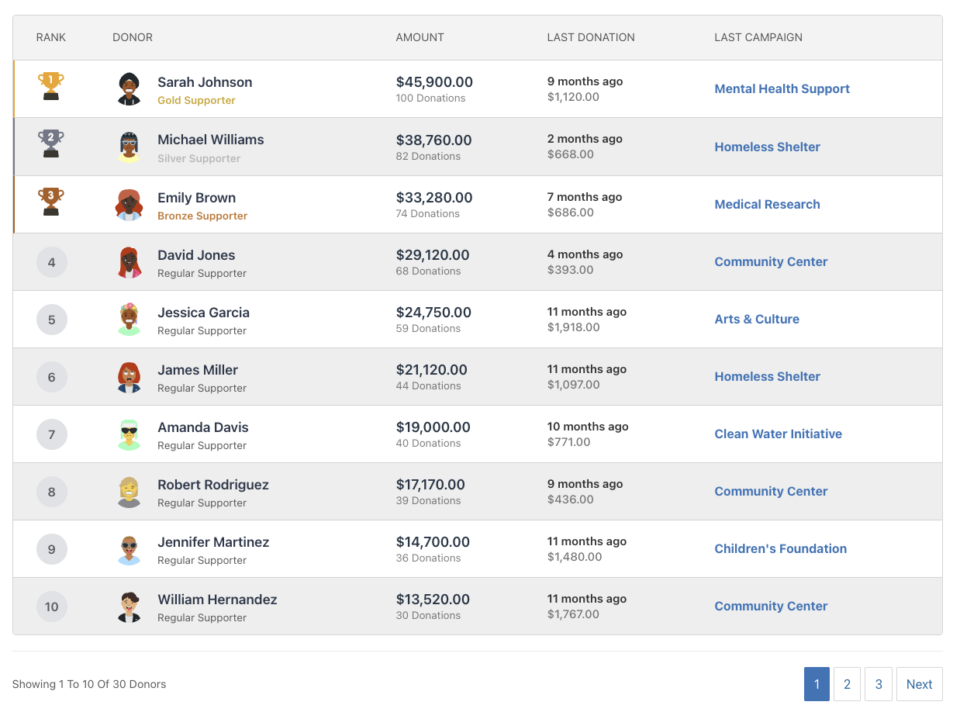
Tabla de Contenidos
Características clave
- Dos tipos de vista: Vista de lista/tabla y vista de tarjetas
- Opciones de visualización flexibles: Mostrar u ocultar avatares, importes, recuentos de donaciones, información de la última donación y más
- Específico de campaña o para todo el sitio: Mostrar donantes para una campaña específica o para todas las campañas
- Soporte de paginación: Gestiona listas largas de donantes con paginación impulsada por AJAX
- Estilo personalizable: Sobrescribe colores, iconos y títulos para que coincidan con tu marca
- Soporte de donaciones recurrentes: Incluye totales de por vida de donaciones recurrentes
- Integración de equipos: Soporte para la recaudación de fondos basada en equipos de Embajadores de Charitable
- Diseño adaptable: Diseños optimizados para móviles que se adaptan a cualquier tamaño de pantalla
- Notificaciones de administrador: Mensajes útiles para los administradores cuando no hay datos disponibles
¿Por qué usar una tabla de donantes?
Una tabla de donantes cumple varios propósitos importantes:
- Reconocimiento: Reconoce y celebra públicamente a tus donantes más generosos
- Participación: Crea un sentido de comunidad y competencia amistosa
- Transparencia: Muestra a los donantes cómo sus contribuciones se comparan con las de otros
- Motivación: Anima a realizar donaciones adicionales mostrando a los principales contribuyentes
- Gamificación: Añade un elemento de logro y estatus a la donación
Casos de uso
- Páginas de campaña: Muestra los principales donantes de una campaña de recaudación de fondos específica
- Página de inicio: Muestra los principales contribuyentes de todo el sitio
- Páginas de agradecimiento: Reconoce a los donantes después de que completen una donación
- Informes anuales: Destaca a los principales patrocinadores del año
- Páginas de eventos: Muestra tablas de clasificación para la recaudación de fondos basada en eventos
- Recaudación de fondos en equipo: Muestra clasificaciones de miembros del equipo (con Embajadores benéficos)
Verlo en acción
Empezar
Requisitos
- Plugin Charitable Pro (versión 1.8.9.3 o posterior)
- WordPress 5.0 o posterior (para compatibilidad con bloques de Gutenberg)
- PHP 7.4 o posterior
Activación
La función Tabla de clasificación de donantes está incluida en Charitable Pro y está disponible automáticamente una vez que el plugin está activado. No se requiere configuración adicional.
Métodos de uso
La Tabla de clasificación de donantes se puede agregar a su sitio de tres maneras:
Shortcode
El método más flexible, que le permite agregar tablas de clasificación en cualquier lugar donde se admitan códigos cortos.
Uso básico:
[charitable_donor_leaderboard]
Con parámetros:
[charitable_donor_leaderboard view="card" number="12" campaign="123"]
Dónde usar códigos cortos
- Contenido de página/publicación: Añadir directamente en el editor de WordPress
- Widgets: Usar en widgets de Texto o widgets de HTML
- Plantillas de temas: Añadir a través de PHP:
<?php echo do_shortcode('[charitable_donor_leaderboard]'); ?> - Constructores de páginas: La mayoría de los constructores de páginas admiten códigos cortos
- Código personalizado: Usar en cualquier archivo de plantilla PHP
Etiqueta de código corto
La etiqueta de código corto es: charitable_donor_leaderboard
Nota: Para compatibilidad con versiones anteriores, la etiqueta antigua charitable_leaderboard puede seguir funcionando, pero charitable_donor_leaderboard es la etiqueta recomendada para el futuro.
Bloque de WordPress Gutenberg
La Tabla de clasificación de donantes está disponible como un bloque nativo de WordPress, lo que facilita su adición y configuración a través del editor de bloques.
Añadir el bloque
- Abre el editor de páginas o publicaciones en WordPress
- Haz clic en el botón + para añadir un nuevo bloque
- Busca "Tabla de clasificación de donantes" o "Tabla de clasificación"
- Haz clic en el bloque Tabla de clasificación de donantes para insertarlo
Configuración del bloque
El bloque proporciona una interfaz visual para configurar todos los ajustes de la tabla de clasificación:
- Tipo de vista: Cambia entre vistas de Lista y Tarjeta
- Campaña: Selecciona una campaña específica o “Todas las campañas”
- Número de donantes: Establece cuántos donantes mostrar
- Opciones de visualización: Activa o desactiva la visibilidad de avatares, importes, recuentos, etc.
- Estilo: Personaliza colores, iconos y títulos
- Avanzado: Establece rangos de fechas, importes mínimos y más
Vista previa del bloque
El editor de bloques muestra una vista previa en vivo de tu tabla de clasificación con datos de marcador de posición, lo que te permite ver cómo se verá antes de publicarla.
Campo de Campaign Builder
La tabla de clasificación de donantes se puede añadir directamente a las páginas de campaña utilizando el Creador Visual de Campañas.
Añadir a una campaña
- Edita tu campaña en WordPress
- Navega a la pestaña Creador de campañas
- Haz clic en Añadir campos en la barra lateral izquierda
- Busca Tabla de clasificación en la sección Campos Pro (después del campo Equipo)
- Haz clic para añadir el campo a tu campaña
Configuración del campo
El Creador de campañas proporciona un panel de configuración para el campo de tabla de clasificación:
- Tipo de vista: Vista de lista o de tarjeta
- Número de donantes: Cuántos mostrar
- Paginación: Habilitar o deshabilitar paginación
- Ajustes de visualización: Controla qué información se muestra
- Ajustes de título: Personaliza o oculta títulos
- Diseño: Ajusta el ancho y la alineación
Contexto automático de campaña
Cuando se utiliza en el Creador de campañas, la tabla de clasificación se configura automáticamente para mostrar los donantes de la campaña actual. Esto se puede anular si es necesario.
Referencia completa de parámetros
Parámetros principales
ver
- Tipo: Cadena
- Predeterminado:
lista - Opciones:
lista|tarjeta - Descripción: Determina el formato de visualización
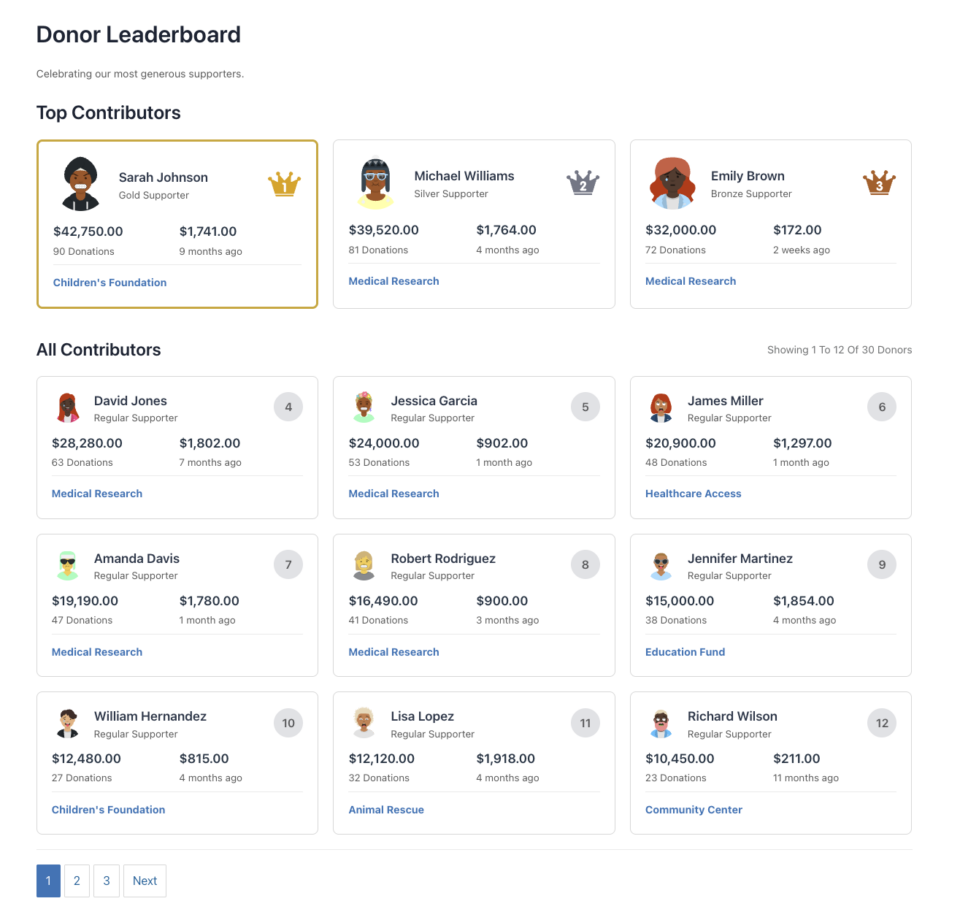
lista: Vista de tabla/lista con columnascard: Diseño de cuadrícula basado en tarjetas con las 3 principales destacadas
- Ejemplo:
view="card"
campaña
- Tipo: Cadena/Entero
- Predeterminado:
all - Opciones:
all|current| ID de campaña (entero) - Descripción: Mostrar donantes de qué campaña
all: Todas las campañas del sitiocurrent: Campaña actual (útil en el creador de campañas)123: ID de campaña específico
- Ejemplo:
campaign="123"ocampaign="current"
número
- Tipo: Entero
- Predeterminado:
10(vista de lista) |12(vista de tarjeta) - Descripción: Número de donantes a mostrar por página
- Nota: La vista de tarjeta tiene un valor predeterminado de 12 (las 3 principales + 9 en la cuadrícula) si no se especifica
- Ejemplo:
number="20"
paginación
- Tipo: Cadena/Booleano
- Predeterminado:
on - Opciones:
on|off|1|0|true|false - Descripción: Habilitar o deshabilitar la paginación
- Ejemplo:
pagination="off"
paginado
- Tipo: Entero
- Predeterminado: Detectado automáticamente desde la URL
- Descripción: Número de página actual (generalmente se establece automáticamente, pero se puede especificar manualmente)
- Ejemplo:
paged="2"
Parámetros de filtrado
importe_minimo
- Tipo: Flotante
- Predeterminado:
1 - Descripción: Monto mínimo total de donación para aparecer en la tabla de clasificación
- Ejemplo:
minimum_amount="50"
incluir_anonimos
- Tipo: Entero/Booleano
- Predeterminado:
0(falso) - Opciones:
0|1|true|false - Descripción: Incluir donantes anónimos en la tabla de clasificación
- Ejemplo:
include_anonymous="1"
rango_de_fechas
- Tipo: Cadena
- Predeterminado:
all_time - Opciones:
all_time|this_year|this_month|this_week|custom - Descripción: Período de tiempo para las donaciones
- Nota: Usar con
date_fromydate_topara rangos personalizados - Ejemplo:
date_range="this_year"
fecha_desde
- Tipo: Cadena (AAAA-MM-DD)
- Predeterminado:
"" - Descripción: Fecha de inicio para el rango de fechas personalizado
- Ejemplo:
date_from="2024-01-01"
fecha_hasta
- Tipo: Cadena (AAAA-MM-DD)
- Predeterminado:
"" - Descripción: Fecha de fin para el rango de fechas personalizado
- Ejemplo:
date_to="2024-12-31"
Parámetros de donación recurrente
incluir_recurrentes
- Tipo: Entero/Booleano
- Predeterminado:
1(verdadero) - Opciones:
0|1|true|false - Descripción: Incluir donaciones recurrentes en los totales
- Ejemplo:
include_recurring="1"
vida_recurrente
- Tipo: Entero/Booleano
- Predeterminado:
1(verdadero) - Opciones:
0|1|true|false - Descripción: Incluir totales de por vida de donaciones recurrentes
- Ejemplo:
recurring_lifetime="1"
estado_recurrente
- Tipo: Cadena
- Predeterminado:
all - Opciones:
all|active|cancelled|completed - Descripción: Qué estados de donación recurrente incluir
- Ejemplo:
recurring_status="active"
Parámetros de equipo/embajador
Requiere la extensión Charitable Ambassadors
id_equipo
- Tipo: Entero
- Por defecto:
0 - Descripción: Mostrar solo donantes de un equipo específico
- Ejemplo:
team_id="5"
campaña_padre
- Tipo: Entero
- Por defecto:
0 - Descripción: ID de la campaña principal para campañas basadas en equipos
- Ejemplo:
parent_campaign="100"
solo_miembros_del_equipo
- Tipo: Entero/Booleano
- Predeterminado:
0(falso) - Opciones:
0|1|true|false - Descripción: Mostrar solo miembros del equipo (no donantes individuales)
- Ejemplo:
team_members_only="1"
Parámetros de visualización
mostrar_avatar
- Tipo: Entero/Booleano
- Predeterminado:
1(verdadero) - Opciones:
0|1|true|false - Descripción: Mostrar avatares de donantes
- Ejemplo:
show_avatar="0"
mostrar_nombre
- Tipo: Entero/Booleano
- Predeterminado:
1(verdadero) - Opciones:
0|1|true|false - Descripción: Mostrar nombres de donantes
- Nota: Siempre se muestra, pero se puede ocultar mediante CSS
- Ejemplo:
show_name="1"
mostrar_importe
- Tipo: Entero/Booleano
- Predeterminado:
1(verdadero) - Opciones:
0|1|true|false - Descripción: Mostrar importes totales de donaciones
- Ejemplo:
show_amount="1"
mostrar_contador_donaciones
- Tipo: Entero/Booleano
- Predeterminado:
1(verdadero) - Opciones:
0|1|true|false - Descripción: Mostrar número de donaciones
- Ejemplo:
show_donation_count="1"
mostrar_ultima_donacion
- Tipo: Entero/Booleano
- Predeterminado:
1(verdadero) - Opciones:
0|1|true|false - Descripción: Mostrar fecha y importe de la última donación
- Ejemplo:
show_last_donation="0"
mostrar_ultima_campaña
- Tipo: Entero/Booleano
- Predeterminado:
1(verdadero) - Opciones:
0|1|true|false - Descripción: Mostrar última campaña donada a
- Ejemplo:
show_last_campaign="1"
mostrar_nivel_donante
- Tipo: Entero/Booleano
- Predeterminado:
1(verdadero) - Opciones:
0|1|true|false - Descripción: Mostrar nivel de colaborador (Oro, Plata, Bronce, Regular)
- Ejemplo:
show_supporter_level="1"
Parámetros de ordenación
ordenar por
- Tipo: Cadena
- Por defecto:
amount - Opciones:
amount|date|name - Descripción: Cómo ordenar a los donantes
amount: Por importe total de la donación (por defecto)date: Por donación más recientename: Alfabéticamente por nombre del donante
- Ejemplo:
orderby="date"
pedido
- Tipo: Cadena
- Por defecto:
DESC - Opciones:
DESC|ASC - Descripción: Orden de clasificación (descendente o ascendente)
- Ejemplo:
order="ASC"
Parámetros de título y texto
título
- Tipo: Cadena
- Por defecto:
"Tabla de Honor de Donantes" - Descripción: Título/encabezado principal de la tabla de honor
- Nota: Dejar en blanco para ocultar el título
- Ejemplo:
title="Nuestros Principales Colaboradores"otitle=""para ocultar
description
- Tipo: Cadena
- Por defecto:
"Celebrando a nuestros colaboradores más generosos." - Descripción: Subtítulo/texto descriptivo debajo del título
- Nota: Dejar en blanco para ocultar la descripción
- Ejemplo:
description="¡Gracias a todos los que contribuyeron!"odescription=""para ocultar
título_principales_contribuyentes
- Tipo: Cadena
- Por defecto:
"Principales Colaboradores" - Descripción: Título para la sección de los 3 mejores (solo vista de tarjeta)
- Nota: Dejar en blanco para ocultar
- Ejemplo:
top_contributors_title="Salón de la Fama"
título_todos_los_contribuyentes
- Tipo: Cadena
- Por defecto:
"Todos los Colaboradores" - Descripción: Título para la sección de donantes restantes (solo vista de tarjeta)
- Nota: Dejar en blanco para ocultar
- Ejemplo:
all_contributors_title="Todos los Patrocinadores"
Parámetros de estilo
clase_css
- Tipo: Cadena
- Predeterminado:
"" - Descripción: Clases CSS adicionales para añadir al contenedor de la tabla de clasificación
- Ejemplo:
css_class="mi-clase-personalizada otra-clase"
filas_alternas
- Tipo: Cadena/Booleano
- Predeterminado:
on - Opciones:
on|off|1|0|true|false - Descripción: Habilitar colores de fila alternos (vista de lista)
- Ejemplo:
alt_rows="off"
tarjetas_por_fila
- Tipo: Entero
- Por defecto:
3 - Descripción: Número de tarjetas por fila (solo vista de tarjeta)
- Ejemplo:
cards_per_row="4"
Parámetros de icono personalizado
trofeo_1º
- Tipo: Cadena (URL)
- Por defecto:
""(usa SVG por defecto) - Descripción: URL de imagen personalizada para el trofeo del 1er puesto (vista de lista)
- Ejemplo:
trophy_1st="https://example.com/custom-trophy-1st.png"
trofeo_2º
- Tipo: Cadena (URL)
- Por defecto:
""(usa SVG por defecto) - Descripción: URL de imagen personalizada para el trofeo del 2º puesto (vista de lista)
- Ejemplo:
trophy_2nd="https://example.com/custom-trophy-2nd.png"
trofeo_3º
- Tipo: Cadena (URL)
- Por defecto:
""(usa SVG por defecto) - Descripción: URL de imagen personalizada para el trofeo del 3er puesto (vista de lista)
- Ejemplo:
trophy_3rd="https://example.com/custom-trophy-3rd.png"
corona_1º
- Tipo: Cadena (URL)
- Por defecto:
""(usa SVG por defecto) - Descripción: URL de imagen personalizada para la corona del 1er puesto (vista de tarjeta)
- Ejemplo:
crown_1st="https://example.com/custom-crown-1st.png"
corona_2º
- Tipo: Cadena (URL)
- Por defecto:
""(usa SVG por defecto) - Descripción: URL de imagen personalizada para la corona del 2º puesto (vista de tarjeta)
- Ejemplo:
crown_2nd="https://example.com/custom-crown-2nd.png"
corona_3º
- Tipo: Cadena (URL)
- Por defecto:
""(usa SVG por defecto) - Descripción: URL de imagen personalizada para la corona del 3º puesto (vista de tarjeta)
- Ejemplo:
crown_3rd="https://example.com/custom-crown-3rd.png"
Parámetros de personalización de color
Todos los parámetros de color aceptan códigos de color hexadecimales (con o sin #).
color_primario
- Tipo: Cadena (color hexadecimal)
- Predeterminado:
#3A81C1 - Descripción: Color principal para el estado activo de paginación y los enlaces
- Ejemplo:
color_primary="#FF5733"
color_rango_oro
- Tipo: Cadena (color hexadecimal)
- Predeterminado:
#f1ac2c - Descripción: Color del borde para el rango del 1er puesto
- Ejemplo:
color_rank_gold="#FFD700"
color_rango_plata
- Tipo: Cadena (color hexadecimal)
- Predeterminado:
#7e8491 - Descripción: Color del borde para el rango del 2º puesto
- Ejemplo:
color_rank_silver="#C0C0C0"
color_rango_bronce
- Tipo: Cadena (color hexadecimal)
- Predeterminado:
#b76626 - Descripción: Color del borde para el rango del 3er puesto
- Ejemplo:
color_rank_bronze="#CD7F32"
color_texto_encabezado
- Tipo: Cadena (color hexadecimal)
- Predeterminado:
#636364 - Descripción: Color para el texto del encabezado de la tabla
- Ejemplo:
color_text_header="#333333"
color_texto_info
- Tipo: Cadena (color hexadecimal)
- Predeterminado:
#797b7c - Descripción: Color para el texto de información (p. ej., "Mostrando X a Y")
- Ejemplo:
color_text_info="#666666"
color_borde
- Tipo: Cadena (color hexadecimal)
- Por defecto:
#d9d9d9 - Descripción: Color del borde para tablas y tarjetas
- Ejemplo:
color_border="#CCCCCC"
color_fondo_rango
- Tipo: Cadena (color hexadecimal)
- Por defecto:
#e5e6e9 - Descripción: Color de fondo para los círculos de números de rango
- Ejemplo:
color_bg_rank="#F0F0F0"
color_fondo_alterno
- Tipo: Cadena (color hexadecimal)
- Por defecto:
#f0f0f0 - Descripción: Color de fondo para filas alternas
- Ejemplo:
color_bg_alt="#F5F5F5"
color_bg_hover
- Tipo: Cadena (color hexadecimal)
- Por defecto:
#f0f0f0 - Descripción: Color de fondo para el estado de pasar el ratón sobre la tarjeta
- Ejemplo:
color_bg_hover="#FAFAFA"
Ejemplos
Ejemplos básicos
Tabla de clasificación simple
[charitable_donor_leaderboard]
Muestra la tabla de clasificación por defecto con 10 donantes en vista de lista.
Vista de tarjeta
[charitable_donor_leaderboard view="card"]Muestra 12 donantes en formato de vista de tarjeta.
Específico de la campaña
[charitable_donor_leaderboard campaign="123"]
Muestra los principales donantes para la campaña con ID 123.
Campaña actual
[charitable_donor_leaderboard campaign="current"]
Muestra los donantes de la campaña actual (útil en plantillas de campaña).
Ejemplos avanzados
Top 20 Donantes, Sin Paginación
[charitable_donor_leaderboard number="20" pagination="off"]
Los principales donantes de este año
[charitable_donor_leaderboard date_range="this_year" orderby="amount" order="DESC"]
Rango de fechas personalizado
[charitable_donor_leaderboard date_range="custom" date_from="2024-01-01" date_to="2024-12-31"]
Donaciones mínimas de 100 $
[charitable_donor_leaderboard minimum_amount="100"]
Estilo personalizado
[charitable_donor_leaderboard
    title="Our Generous Supporters"
    description="Thank you for your contributions!"
    color_primary="#FF5733"
    color_rank_gold="#FFD700"
    css_class="my-leaderboard"]
Vista de tarjetas con títulos personalizados
[charitable_donor_leaderboard
    view="card"
    top_contributors_title="Hall of Fame"
    all_contributors_title="All Supporters"
    cards_per_row="4"]
Ocultar columnas específicas
[charitable_donor_leaderboard
    show_last_donation="0"
    show_last_campaign="0"
    show_supporter_level="0"]
Iconos personalizados
[charitable_donor_leaderboard
    trophy_1st="https://example.com/gold-trophy.png"
    trophy_2nd="https://example.com/silver-trophy.png"
    trophy_3rd="https://example.com/bronze-trophy.png"]
Tabla de clasificación de equipos (Requiere Embajadores)
[charitable_donor_leaderboard
    team_id="5"
    team_members_only="1"]
Solo donaciones recurrentes
[charitable_donor_leaderboard
    include_recurring="1"
    recurring_status="active"]
Casos de uso en el mundo real
Tabla de clasificación de la página de inicio
[charitable_donor_leaderboard
    view="card"
    number="12"
    title="Our Top Supporters"
    description="Celebrating those who make our mission possible"]
Tabla de clasificación de la página de campaña
[charitable_donor_leaderboard
    campaign="current"
    view="list"
    number="10"
    title="Campaign Leaders"]
Sección del informe anual
[charitable_donor_leaderboard
    date_range="this_year"
    number="50"
    pagination="on"
    title="2024 Top Donors"]
Tabla de clasificación mínima (sin extras)
[charitable_donor_leaderboard
    show_avatar="0"
    show_donation_count="0"
    show_last_donation="0"
    show_last_campaign="0"
    show_supporter_level="0"
    title=""
    description=""]
Personalización
Anulaciones de plantillas
Para personalizar la apariencia de la tabla de clasificación, copia las plantillas en tu tema:
your-theme/
└── charitable/
    └── leaderboard/
        ├── leaderboard-list.php
        └── leaderboard-cards.php
Ubicaciones de las plantillas:
- Vista de lista:
charitable-pro/templates/leaderboard/leaderboard-list.php - Vista de tarjetas:
charitable-pro/templates/leaderboard/leaderboard-cards.php
Variables de plantilla disponibles:
$donors: Matriz de objetos de donantes con datos de donaciones$total_donors: Número total de donantes que coinciden con los criterios$args: Todos los parámetros del shortcode
Personalización CSS
La tabla de clasificación incluye clases CSS completas para el estilo:
Clases del contenedor principal
.charitable-leaderboard: Contenedor principal.charitable-leaderboard-list: Vista de lista/tabla.charitable-leaderboard-cards: Vista de tarjetas.charitable-leaderboard-alt-rows: Cuando las filas alternas están habilitadas
Clases de vista de lista
.charitable-leaderboard-table: Elemento de tabla.charitable-leaderboard-rank: Columna de rango.charitable-leaderboard-donor: Columna de donante.charitable-leaderboard-amount: Columna de cantidad.charitable-leaderboard-last-donation: Columna de última donación.charitable-leaderboard-last-campaign: Columna de la última campaña
Clases de vista de tarjeta
.charitable-leaderboard-card: Tarjeta individual.charitable-leaderboard-card-top: Contenedor de las 3 mejores tarjetas.charitable-leaderboard-card-all: Contenedor de las tarjetas restantes.charitable-leaderboard-card-avatar: Imagen del avatar.charitable-leaderboard-card-info: Información del donante.charitable-leaderboard-card-stats: Sección de estadísticas
Ejemplo de CSS personalizado
/* Custom leaderboard styling */
.charitable-leaderboard {
    margin: 40px 0;
}

.charitable-leaderboard-title {
    font-size: 2em;
    color: #333;
}

.charitable-leaderboard-table {
    border: 2px solid #000;
}

.charitable-leaderboard-card {
    box-shadow: 0 4px 6px rgba(0,0,0,0.1);
}
Variables CSS
La tabla de clasificación utiliza propiedades personalizadas de CSS (variables) para la personalización del color. Estas se generan automáticamente a partir de los parámetros del shortcode:
--charitable-lb-primary: #3A81C1;
--charitable-lb-rank-gold: #f1ac2c;
--charitable-lb-rank-silver: #7e8491;
--charitable-lb-rank-bronze: #b76626;
--charitable-lb-text-header: #636364;
--charitable-lb-text-info: #797b7c;
--charitable-lb-border: #d9d9d9;
--charitable-lb-bg-rank: #e5e6e9;
--charitable-lb-bg-alt: #f0f0f0;
--charitable-lb-bg-hover: #f0f0f0;
--charitable-lb-cards-per-row: 3; /* Card view only */
Puedes anularlas en el CSS de tu tema:
.charitable-leaderboard {
    --charitable-lb-primary: #FF5733;
    --charitable-lb-rank-gold: #FFD700;
}
Filtros y ganchos de WordPress
Filtros
charitable_donor_leaderboard_shortcode
Filtra la salida completa del shortcode de la tabla de clasificación.
Parámetros:
$content(string): La salida HTML$args(array): Todos los parámetros del shortcode
Ejemplo:
add_filter( 'charitable_donor_leaderboard_shortcode', 'my_custom_leaderboard_wrapper', 10, 2 );

function my_custom_leaderboard_wrapper( $content, $args ) {
    // Add custom wrapper
    $wrapper = '<div class="my-custom-leaderboard-wrapper">';
    $wrapper .= $content;
    $wrapper .= '</div>';

    return $wrapper;
}
charitable_leaderboard_supporter_level_labels
Filtra las etiquetas de nivel de colaborador (Oro, Plata, Bronce, Regular).
Parámetros:
$labels(array): Matriz de etiquetas de nivelgold=> “Colaborador de Oro”silver=> “Colaborador de Plata”bronze=> “Colaborador de Bronce”regular=> “Colaborador Regular”
$level(string): Nivel actual que se muestra
Ejemplo:
add_filter( 'charitable_leaderboard_supporter_level_labels', 'custom_supporter_labels', 10, 2 );

function custom_supporter_labels( $labels, $level ) {
    // Change labels
    $labels['gold'] = __( 'Platinum Member', 'textdomain' );
    $labels['silver'] = __( 'Gold Member', 'textdomain' );
    $labels['bronze'] = __( 'Silver Member', 'textdomain' );
    $labels['regular'] = __( 'Friend', 'textdomain' );

    return $labels;
}
charitable_campaign_builder_leaderboard_field_display
Filtra la salida del campo del constructor de campañas.
Parámetros:
$html(string): La salida HTML$campaign_data(array): Datos y configuración de la campaña
Ejemplo:
add_filter( 'charitable_campaign_builder_leaderboard_field_display', 'custom_campaign_leaderboard', 10, 2 );

function custom_campaign_leaderboard( $html, $campaign_data ) {
    // Add custom content before leaderboard
    $custom_html = '<div class="campaign-leaderboard-intro">';
    $custom_html .= '<p>Check out our top supporters!</p>';
    $custom_html .= '</div>';

    return $custom_html . $html;
}
Acciones
Actualmente, no hay acciones específicas para la función de tabla de clasificación, pero puedes usar los ganchos estándar de WordPress:
wp_enqueue_scripts (para scripts personalizados)
add_action( 'wp_enqueue_scripts', 'my_leaderboard_scripts' );

function my_leaderboard_scripts() {
    if ( has_shortcode( get_post()->post_content, 'charitable_donor_leaderboard' ) ) {
        wp_enqueue_script( 'my-custom-leaderboard-js', 'path/to/script.js', array( 'jquery' ) );
    }
}
Solución de problemas
La tabla de clasificación no se muestra
Problema: La tabla de clasificación se muestra pero no aparecen donantes.
Soluciones:
- Comprueba si tienes donaciones en tu base de datos
- Verifica que el ID de la campaña sea correcto (si usas el parámetro
campaign) - Comprueba el parámetro
minimum_amount: podría ser demasiado alto - Asegúrate de que
include_anonymousesté configurado correctamente si tienes donaciones anónimas - Comprueba los filtros de rango de fechas: podrían excluir todas las donaciones
- Si eres administrador, verás un mensaje explicando por qué está vacío
La paginación no funciona
Problema: Los enlaces de paginación no funcionan o muestran errores.
Soluciones:
- Asegúrate de que AJAX esté habilitado (debería estarlo por defecto)
- Comprueba la consola del navegador en busca de errores de JavaScript
- Verifica que el nonce se esté pasando correctamente
- Comprueba que
pagination="on"esté configurado - Asegúrate de que jQuery esté cargado en la página
Problemas de estilo
Problema: La tabla de clasificación no coincide con tu tema.
Soluciones:
- Añade CSS personalizado para anular los estilos predeterminados
- Usa el parámetro
css_classpara añadir tus propias clases - Comprueba conflictos de CSS del tema (usa el inspector del navegador)
- Anula las plantillas en el directorio de tu tema
Problemas de rendimiento
Problema: La tabla de clasificación carga lentamente.
Soluciones:
- Habilita la caché (la tabla de clasificación usa transitorios de WordPress)
- Reduce el parámetro
numbersi muestras demasiados donantes - Usa filtros de rango de fechas para limitar el alcance de la consulta
- Borra la caché de la tabla de clasificación: Ajustes > Avanzado > Borrar caché
- Considera usar paginación para listas de donantes grandes
Formato de moneda
Problema: Los importes de moneda no se muestran correctamente.
Soluciones:
- Comprueba la configuración de moneda de Charitable: Configuración > General
- Asegúrate de que el símbolo y el formato de la moneda estén configurados correctamente
- La tabla de clasificación utiliza la función
charitable_format_money()
Donaciones recurrentes no mostradas
Problema: Los totales de donaciones recurrentes no se incluyen.
Soluciones:
- Asegúrate de que
include_recurring="1"esté configurado - Comprueba el parámetro
recurring_status - Verifica que la extensión Charitable Recurring esté activa
- Comprueba que existan donaciones recurrentes en la base de datos
Preguntas frecuentes
¿Puedo usar varias tablas de clasificación en una página?
¡Sí! Puedes añadir varias tablas de clasificación con diferentes parámetros en la misma página.
¿La tabla de clasificación funciona con constructores de páginas?
Sí, el shortcode funciona con la mayoría de los constructores de páginas (Elementor, Beaver Builder, Divi, etc.). El bloque de Gutenberg funciona de forma nativa en el editor de bloques.
¿Puedo personalizar los niveles de donantes?
Sí, utiliza el filtro charitable_leaderboard_supporter_level_labels para cambiar las etiquetas.
¿Cómo se clasifican los donantes?
Por defecto, los donantes se clasifican por el importe total de la donación (descendente). Puedes cambiar esto con el parámetro orderby.
¿Qué pasa si hay empates?
Los donantes con el mismo importe total se clasifican por fecha de donación (la más reciente primero), y luego alfabéticamente.
¿Puedo mostrar solo donantes recurrentes activos?
Sí, usa include_recurring="1" recurring_status="active".
¿Cómo borro la caché de la tabla de clasificación?
Ve a Configuración > Avanzado > Varios y haz clic en “Borrar caché”. Esto borrará todos los transitorios de la tabla de clasificación.
¿Puedo usar imágenes personalizadas para trofeos/coronas?
Sí, utiliza los parámetros trophy_1st, trophy_2nd, trophy_3rd, crown_1st, crown_2nd, y crown_3rd con URLs de imágenes.
¿La tabla de clasificación funciona en móviles?
Sí, la tabla de clasificación es totalmente adaptable. La vista de lista se convierte en un diseño similar a tarjetas en dispositivos móviles.
¿Puedo ocultar la tabla de clasificación para los no administradores cuando está vacía?
Sí, este es el comportamiento predeterminado. Solo los administradores ven un mensaje cuando no hay datos. Los usuarios normales no ven nada.
¿Cómo me integro con los equipos de Embajadores de Charitable?
Utilice los parámetros team_id y team_members_only. Requiere la extensión Charitable Ambassadors.
¿Puedo filtrar por estado de donación?
La tabla de clasificación excluye automáticamente las donaciones fallidas y reembolsadas. Solo se incluyen las donaciones completadas.
¿Con qué frecuencia se almacena en caché la tabla de clasificación?
Las consultas de la tabla de clasificación se almacenan en caché durante 24 horas por defecto. La caché se borra cuando se realizan donaciones o cuando se borra manualmente.
Recursos adicionales
Soporte
- Documentación: Documentación de Charitable
- Foros de Soporte: Soporte de WP Charitable
Funciones Relacionadas
- Muro de Donantes: Función similar para mostrar donantes recientes
- Constructor de Campañas: Constructor visual de páginas de campaña
- Embajadores de Charitable: Campañas de recaudación de fondos en equipo y peer-to-peer
- Charitable Recurring: Soporte para donaciones recurrentes
Registro de Cambios
Versión 1.8.9.3
- Lanzamiento inicial de la función Tabla de Clasificación de Donantes
- Soporte de Shortcode
- Integración con bloques de Gutenberg
- Campo del Constructor de Campañas
- Tipos de vista Lista y Tarjeta
- Personalización completa de parámetros
- Paginación AJAX
- Soporte de donaciones recurrentes
- Integración de equipos/embajadores
- Opciones de estilo personalizadas
Última Actualización: 2024


