
Requiere:
- Caritativo 1.8.16+
- Charitable Múltiples Divisas 1.0.0+
El complemento Múltiples Divisas permite a los donantes dar en su propia moneda en cualquier formulario de donación de Charitable. Selecciona las divisas que admites, establece cómo se obtienen los tipos de cambio (actualizados automáticamente a diario o fijados manualmente con un margen opcional) y, opcionalmente, utiliza la geolocalización para preseleccionar la divisa de un visitante según su país. Los informes desglosan los totales por divisa, pasarela y período de tiempo.
Cuándo usarlo
- Aceptas donaciones de colaboradores de fuera de tu país y quieres que las cantidades se muestren en unidades familiares en lugar de una única divisa global.
- Quieres tipos de cambio que se actualicen diariamente en lugar de editar una hoja de cálculo.
- Necesitas informes por divisa para poder ver cuánto se recibió realmente en EUR frente a USD frente a GBP, por separado de los totales en divisa base.
- Quieres que los visitantes vean las cantidades de las donaciones en su moneda local sin tener que seleccionarla primero en un desplegable.
Cómo encontrarlo
Toda la configuración principal se encuentra en un solo lugar:
Administrador de WordPress > Charitable > Ajustes > Avanzado > Múltiples Divisas
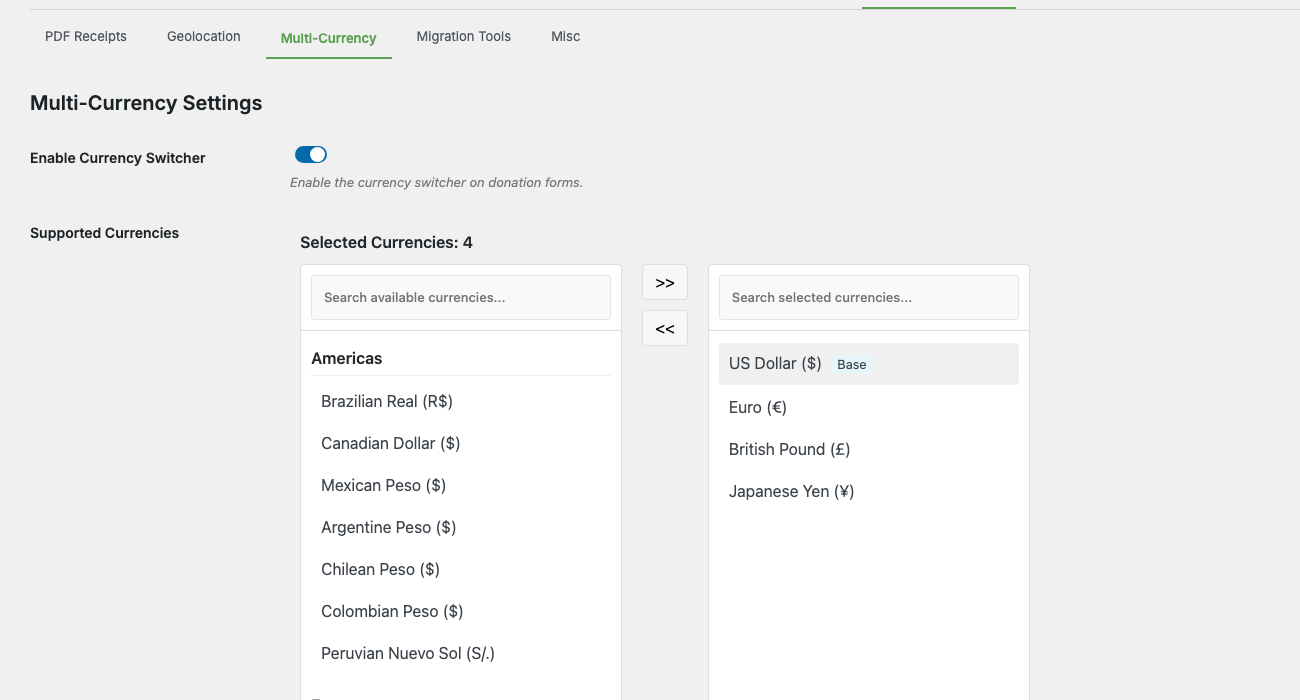
La pestaña Avanzado tiene su propia subnavegación (Recibos PDF, Geolocalización, Múltiples Divisas, Herramientas de Migración, Varios). Abre Múltiples Divisas y encontrarás todo en un solo panel:
- Activar Selector de Divisas — interruptor maestro para toda la función.
- Divisas Soportadas — selector de doble lista agrupado por región (América, Europa, Asia Pacífico, Otras) para elegir qué divisas están disponibles en los formularios de donación.
- Tipos de Cambio — la tabla de tipos de cambio por divisa con actualización automática, anulación manual, decimales y margen.
- Mensaje del Selector de Divisas — el texto que se muestra a los donantes cuando cambian de divisa.
- Etiqueta del Selector de Divisas — la etiqueta encima del selector en el formulario de donación.
- Mostrar Acrónimo de Divisa — muestra el código de 3 letras (p. ej.,
USD) junto al símbolo. - Activar Geolocalización — detecta automáticamente el país del visitante y preselecciona una divisa coincidente.
- Ajustes de Desactivación del Complemento — qué hacer con los datos de múltiples divisas si alguna vez desactivas el complemento (conservar, convertir a divisa base o eliminar).
Hay otros dos lugares que debes conocer:
- Listas de divisas por pasarela — en Charitable > Ajustes > Pasarelas de Pago > [Stripe / PayPal / Square / Offline], una sección “Múltiples Divisas” te permite limitar qué divisas de las soportadas aceptará esa pasarela específica.
- Los informes de desglose por divisa aparecen en Charitable > Informes > Avanzado una vez que tienes donaciones en más de una divisa.
El panorama general
Hay cuatro partes que trabajan juntas:
| Parte | ¿Dónde se encuentra? | Lo que hace |
|---|---|---|
| Divisas soportadas | Ajustes > Avanzado > Múltiples Divisas | La lista maestra de divisas que ofrece tu sitio. La divisa base siempre está incluida. |
| Tipos de cambio | Ajustes > Avanzado > Múltiples Divisas | Tipo de cambio por divisa frente a la divisa base. Actualizado diariamente por cron o fijado manualmente. |
| Filtros a nivel de pasarela | Configuración > Pasarelas de pago > [gateway] | Activación por pasarela de pago para las divisas que dicho procesador aceptará. |
| El selector de divisas | Formulario de donación en el frontend | El menú desplegable que los donantes utilizan para elegir una divisa. Se muestra automáticamente cuando hay más de una divisa habilitada. |
Un donante visita una campaña, ve su divisa preferida preseleccionada (o elige una del menú desplegable), introduce una cantidad, y el formulario la convierte y la envía a la pasarela de pago en esa divisa. Detrás de escena, Charitable almacena tanto la divisa de la donación como su equivalente en la divisa base para que los informes sigan siendo precisos.
Configuración paso a paso
La primera vez que lo configures:
- Confirma tu divisa base. Ve a Charitable > Configuración > General y comprueba Divisa en la parte superior. Esta es la divisa contra la que se calculan todos los tipos de cambio; elige aquella en la que se basan la mayoría de tus informes.
- Habilita el selector de divisas. Ve a Charitable > Configuración > Avanzado > Divisas Múltiples y activa Habilitar Selector de Divisas. Este es el interruptor principal del complemento.
- Elige tus divisas admitidas. En Divisas Admitidas, utiliza el selector de doble lista (América, Europa, Asia-Pacífico, Otras Regiones) para mover divisas del panel derecho al panel Divisas Seleccionadas de la izquierda. Tu divisa base siempre se incluye como "Base" y no se puede eliminar.
- Confirma la tabla de tipos de cambio. Desplázate hacia abajo hasta Tipos de Cambio. Cada divisa no base que hayas seleccionado ahora tiene una fila que muestra el tipo actual, el número decimal y el margen. Haz clic en Actualizar Tipos de Cambio para obtener las últimas tasas de la API.
- (Opcional) Establece un tipo o margen manual. Marca la columna Establecer Manualmente para una divisa para bloquear su tipo frente a la actualización automática. Introduce un valor en la columna Margen (por ejemplo,
2para un margen del 2% sobre el tipo en tiempo real) si deseas un pequeño margen para cubrir las comisiones de conversión de divisa. - (Opcional) Ajusta las etiquetas visibles para el donante. Establece Mensaje del Selector de Divisas (el mensaje que aparece cuando un donante cambia de divisa) y Etiqueta del Menú Desplegable de Divisas (la etiqueta encima del menú desplegable). Activa Mostrar Acrónimo de Divisa si deseas el código de 3 letras junto al símbolo en el formulario de donación.
- (Opcional) Activa la geolocalización. Activa Habilitar Geolocalización. Los nuevos visitantes tendrán su divisa preseleccionada según el país al que se resuelva su IP (utilizando la base de datos GeoLite2 de MaxMind incluida). El donante aún puede cambiarla a través del menú desplegable.
- Elige tu comportamiento de desactivación. En Ajustes de desactivación de plugins, selecciona qué sucederá con los datos de donaciones multidivisa si el complemento se desactiva alguna vez: Conservar datos (recomendado; mantiene todo intacto), Convertir a divisa base (reescribe las donaciones en divisa extranjera a sus equivalentes en divisa base) o Eliminar todos los datos de divisa (elimina los metadatos multidivisa, irreversible).
- Restringe por pasarela si es necesario. Ve a Caritativo > Ajustes > Pasarelas de pago y abre cada pasarela en uso. Desplázate hasta la sección Multidivisa; verás casillas de verificación para las divisas que habilitaste en el paso 3. Desmarca las que la pasarela no acepte (o no pueda aceptar). Las divisas que la pasarela no admite se ocultan automáticamente en el menú desplegable cuando se selecciona esa pasarela.
- Prueba el formulario de donación. Abre una página de donación de campaña en una ventana de incógnito. El selector de divisa debería aparecer encima del campo de importe. Cambia de divisa y confirma que los importes se reformatean con el símbolo y los decimales correctos.
Después de esto, las donaciones enviadas en divisas distintas de la base aparecerán en la lista de donaciones con la insignia de su divisa original, y los totales de los informes se mostrarán tanto en la divisa de la donación como en su equivalente en divisa base.
Referencia de ajustes
Interruptor maestro
| Configuración | Lo que hace |
|---|---|
| Habilitar selector de divisa | Interruptor maestro para todo el complemento. Desactivado significa: sin selector en los formularios de donación, sin actualizaciones de tipos de cambio, sin informes por divisa. |
Divisas admitidas
Un selector de doble lista agrupado por región. El panel derecho agrupa todas las divisas disponibles (más de 150 códigos de la lista ISO 4217) bajo Américas, Europa, Asia Pacífico y Otras regiones. El panel izquierdo contiene tus Divisas seleccionadas, con tu divisa base fijada en la parte superior como “Base” (no se puede eliminar). Usa los botones de flecha para mover divisas entre paneles, o el cuadro de búsqueda en la parte superior de cada panel para filtrar por código o nombre.
Tabla de tipos de cambio
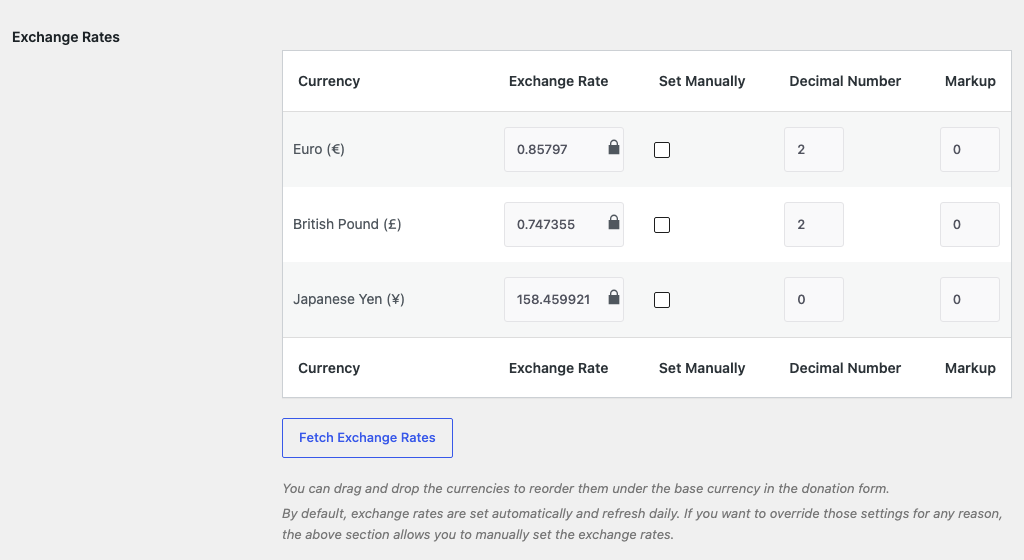
Una fila por cada divisa no base habilitada, con estas columnas:
| Columna | Lo que hace |
|---|---|
| Moneda | El código ISO y el nombre completo (p. ej., Euro (€)). |
| Tipo de cambio | Cuántas unidades de esta divisa equivalen a 1 unidad de la divisa base. Editable, pero bloqueado a menos que se marque Establecer manualmente. |
| Establecer manualmente | Bloquea la fila a tu valor introducido. La actualización automática omite las filas establecidas manualmente. |
| Número decimal | Cuántos decimales mostrar en los importes de las donaciones y los recibos. La mayoría de las divisas usan 2; JPY usa 0; algunos casos de uso compatibles con criptomonedas quieren 3 o 4. |
| Margen | Porcentaje añadido al tipo de cambio de la API. Útil para absorber las comisiones de conversión. Establécelo en 0 si no deseas margen. |
Encima de la tabla encontrarás un botón Obtener tipos de cambio que realiza una llamada a la API inmediata (se omiten las filas establecidas manualmente). Las filas se pueden arrastrar para reordenar cómo aparecen las divisas en el menú desplegable del formulario de donación.
Etiquetas para el donante
| Configuración | Lo que hace |
|---|---|
| Mensaje del selector de divisa | El mensaje que se muestra a los donantes cuando cambian de divisa. Admite los marcadores de posición {base_currency}, {new_currency_rate} y {new_currency} (por ejemplo, “El tipo de cambio actual es 1.00 {base_currency} equivale a {new_currency_rate} {new_currency}”). |
| Etiqueta del desplegable de divisa | La etiqueta encima del desplegable en el formulario de donación (por ejemplo, “Selecciona tu divisa”). |
| Mostrar acrónimo de divisa | Cuando está activado, el código de divisa de 3 letras se muestra junto al símbolo en los importes de las donaciones (por ejemplo, “100 $ USD” en lugar de “100 $”). |
Geolocalización
Un único interruptor: Activar geolocalización. Cuando está activado, la IP del donante se comprueba con la base de datos incluida MaxMind GeoLite2 Country para determinar su país, y el formulario preselecciona la divisa correspondiente si está en tu lista seleccionada. Si la divisa del país detectado no está seleccionada, el donante ve tu divisa base.
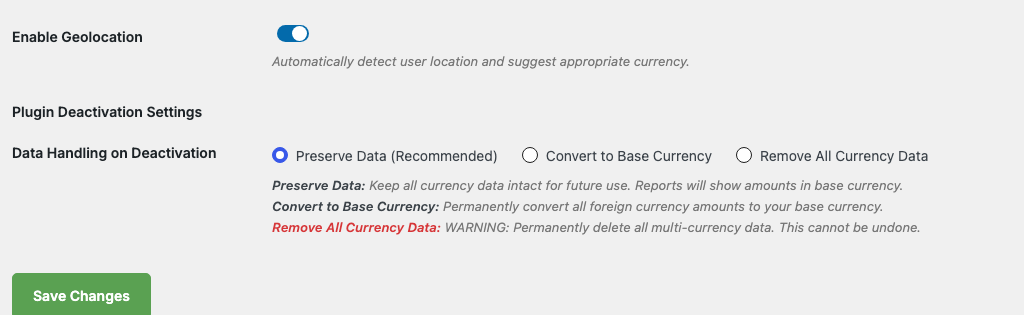
La geolocalización no anula una elección explícita del donante. Una vez que un donante cambia de divisa en el formulario, esa elección se mantiene para la sesión (configurable; consulta la Referencia del desarrollador más abajo).
Ajustes de desactivación del plugin
Elige cómo se gestionan los datos de varias divisas si el complemento se desactiva alguna vez:
| Opción | Lo que hace |
|---|---|
| Conservar datos (Recomendado) | Mantén intactos todos los datos de divisas. Los informes solo mostrarán importes en divisa base, pero los registros de donaciones conservan su divisa original para más tarde si vuelves a activarlo. |
| Convertir a divisa base | Reescribe permanentemente los importes de donaciones en divisa extranjera a sus equivalentes en divisa base en el momento de la desactivación. Irreversible. |
| Eliminar todos los datos de divisa | Elimina todos los campos de metadatos de varias divisas. Las donaciones permanecen pero pierden su información de divisa original. Irreversible. |
Esta configuración solo se ejecuta cuando se desactiva el complemento; cambiarla no tiene ningún efecto durante el funcionamiento normal.
Informe de desglose por divisa
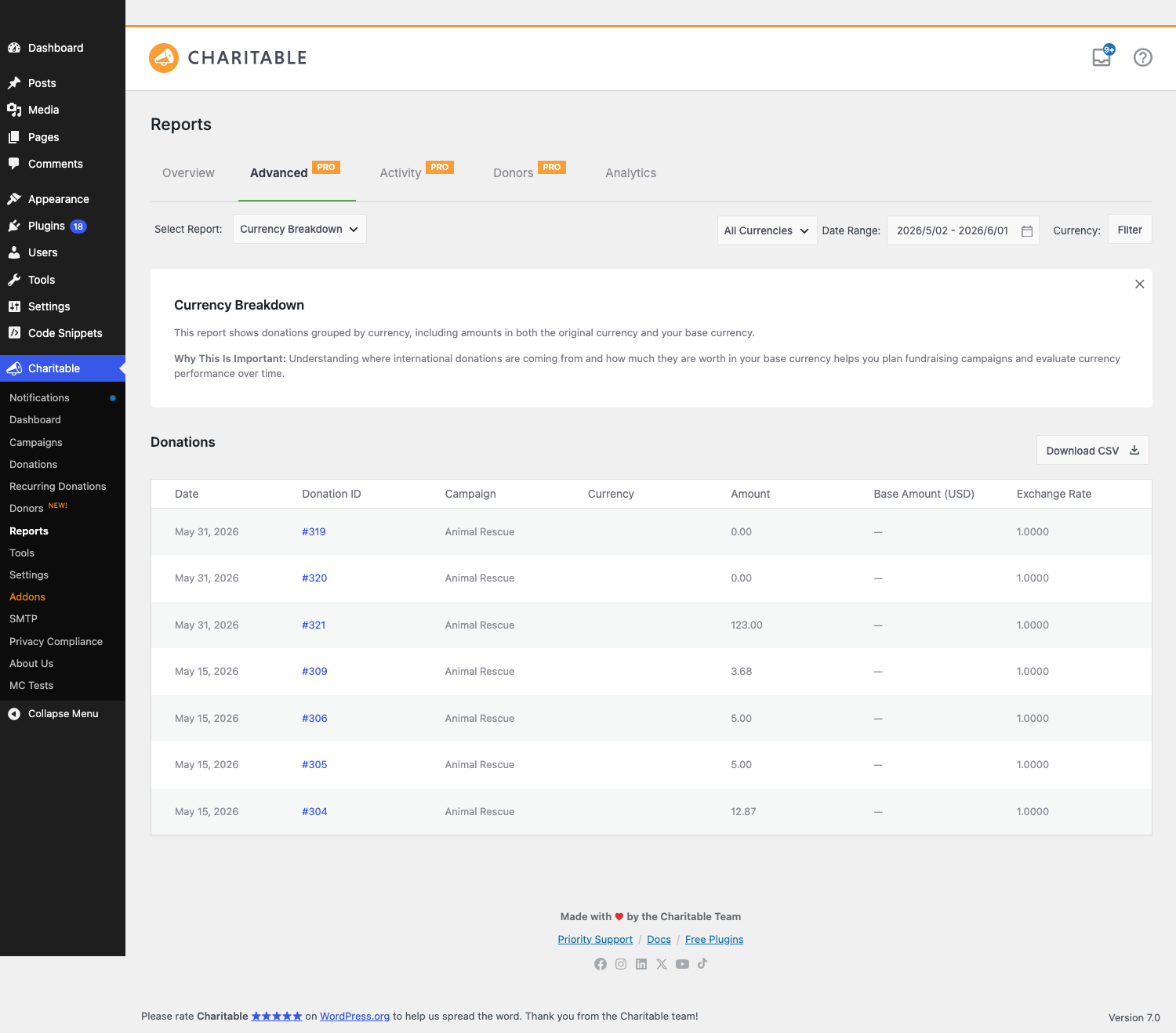
Una vez que tengas donaciones en varias divisas, Charitable > Informes > Avanzado tendrá un nuevo tipo de informe Desglose por divisa. Muestra totales por divisa para un rango de fechas, con descarga en CSV.
Selección de divisa en el formulario de donación
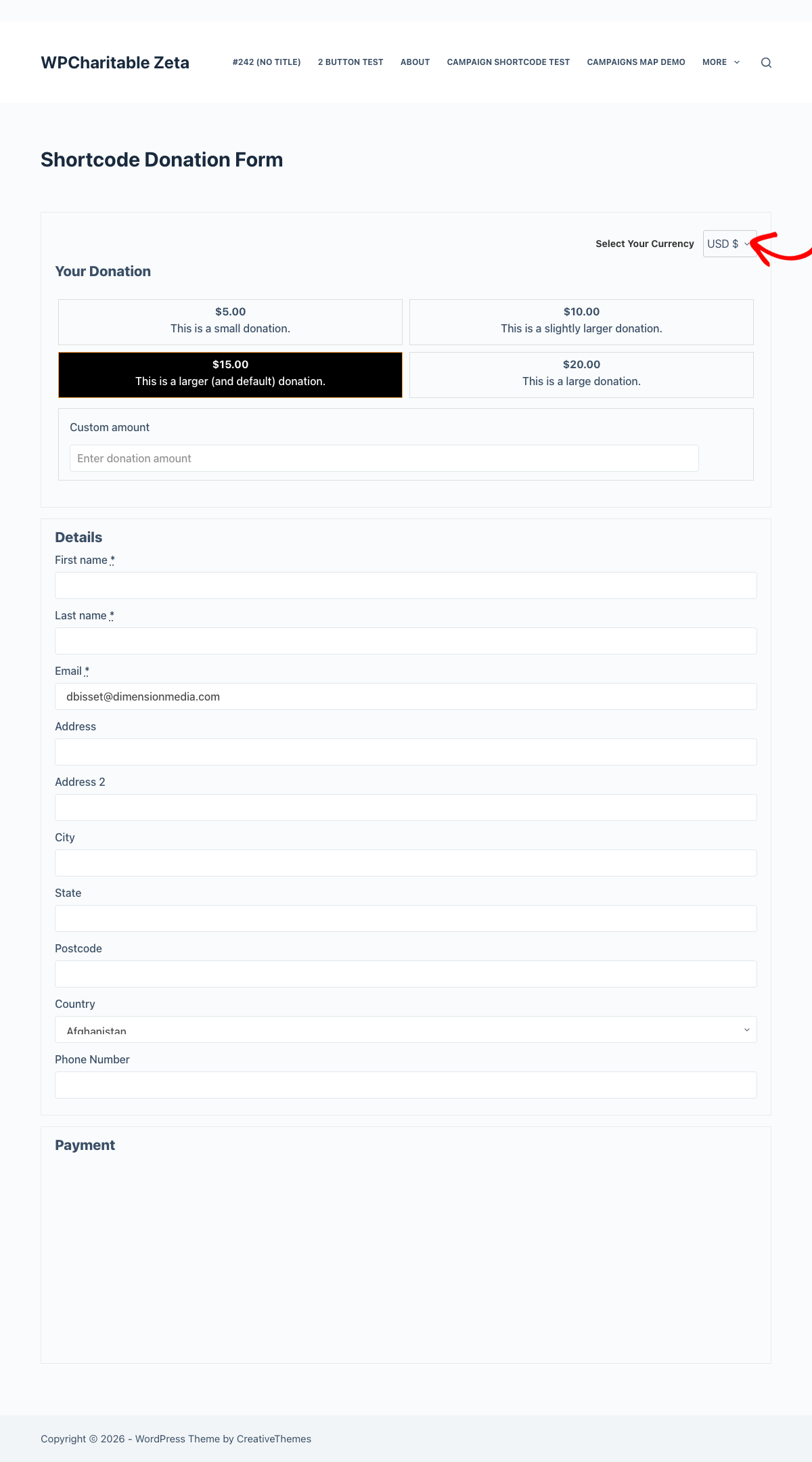
Cuando se habilita más de una divisa, cada formulario de donación de Charitable renderiza automáticamente un selector de divisa encima del campo de importe. El selector:
- Muestra el código y el símbolo de la divisa (por ejemplo,
EUR €). - Actualiza el importe de la donación mostrado y cualquier botón de importe sugerido cada vez que el donante lo cambie.
- Conserva la selección del donante durante el resto de su sesión (mediante cookie). Las nuevas donaciones desde el mismo navegador se establecerán por defecto en su última elección hasta que expire la cookie.
- Oculta las divisas que la pasarela activa no puede procesar. Si un donante cambia el método de pago y su divisa seleccionada no es compatible, el formulario recurrirá a la divisa base.
Los formularios de donación visuales de Charitable Pro renderizan el mismo selector dentro del diseño del formulario. No se necesita configuración adicional; el complemento detecta Pro y se integra automáticamente.
Restricciones de divisa por pasarela
Cada pasarela de pago en Charitable > Ajustes > Pasarelas de pago tiene su propia lista de verificación de Múltiples divisas cerca de la parte inferior de la página de ajustes de la pasarela:

Desmarca cualquier divisa que la pasarela no acepte (o no pueda aceptar). El formulario de donación oculta automáticamente cualquier divisa que la pasarela activa no admita; por lo tanto, si un donante cambia de Stripe a PayPal y la divisa seleccionada no está en la lista de PayPal, el formulario recurre a la divisa base.
Actualización de tipos de cambio
Las tarifas se actualizan automáticamente una vez al día a través de WP-Cron (charitable_multi_currency_daily_exchange_rate_update). En un sitio web en buen estado, no necesitas tocar esto. La fuente principal es una fuente de WPCharitable con un respaldo de ExchangeRate-API en api.exchangerate-api.com/v4/latest/ (utilizada automáticamente de nuevo si la fuente principal no es accesible).
Si ambos fallan (problema de red, ambos servicios caídos), las últimas tarifas válidas conocidas permanecen en su lugar en lugar de restablecerse a 1:1. La pestaña de Ajustes muestra la marca de tiempo de la última actualización exitosa para que puedas detectar una tabla de tarifas desactualizada.
Para forzar una actualización manual, utiliza el botón Actualizar tipos de cambio en la página de ajustes, o llama a la función auxiliar desde PHP:
charitable_multi_currency_refresh_exchange_rates();
Detalles de geolocalización
La geolocalización utiliza la base de datos GeoLite2 Country de MaxMind incluida. Se ejecuta localmente; no se realiza ninguna solicitud externa cuando un visitante carga un formulario de donación, y las direcciones IP no se almacenan permanentemente.
La correspondencia de país a divisa es subjetiva (por ejemplo, todos los países miembros de la UE se corresponden con EUR, incluso si existe una sub-divisa local, como el RON de Rumanía). Si la divisa del país detectado no está en tu lista admitida, se utiliza la divisa de respaldo.
La geolocalización no tiene efecto en visitantes de localhost o IP privadas (la base de datos no puede resolverlos), por lo que la divisa de respaldo es lo que verás en el desarrollo local.
Informes y lista de donaciones
Una vez activada la opción de múltiples divisas, dos cosas cambian en el administrador:
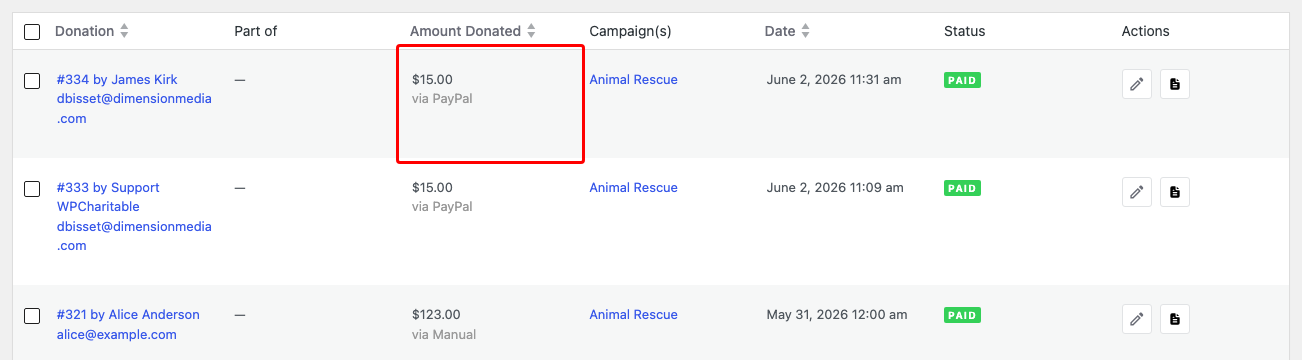
- La lista de donaciones muestra la divisa original junto al importe (por ejemplo,
100,00 € EUR). El equivalente en divisa base aparece como una información sobre herramientas al pasar el ratón por encima. - Los detalles de la donación incluyen una fila "Equivalente en divisa base" que muestra el valor de la donación en tu divisa base a la tarifa vigente en el momento de la donación. El valor en divisa base se fija en el momento de la donación; los cambios posteriores de tarifas no modifican retroactivamente los totales históricos.
El nuevo informe Desglose por divisa en Informes > Avanzado te permite filtrar por divisa, rango de fechas y pasarela. La descarga en CSV está disponible en la misma pantalla:
Consejos
- Establece un margen de tipo de cambio una vez que tengas donaciones reales. La conversión de divisas en producción conlleva pequeñas comisiones; un margen del 1-3% sobre el tipo de cambio en vivo las cubre sin dejar un diferencial visible para el donante.
- No desactives una divisa que tenga donaciones históricas. Los registros de donaciones todavía hacen referencia al código de divisa, por lo que eliminarla de las divisas admitidas solo detiene las nuevas donaciones en esa divisa; no rompe los informes de las antiguas.
- Las tarifas manuales son fijas. Si marcas Establecer manualmente para una divisa, la actualización automática la omitirá permanentemente hasta que desmarques esa casilla. Útil para divisas vinculadas (stablecoins vinculadas a USD, AED, etc.) donde la fluctuación diaria de la API es ruido.
- Prueba las combinaciones de pasarelas. Si aceptas tanto Stripe como PayPal, revisa las listas de divisas a nivel de pasarela. PayPal admite un conjunto de divisas diferente al de Stripe, y el formulario necesita saber cuáles ocultar cuando cada pasarela esté en uso.
- La geolocalización no es una huella digital. Es una preselección de un solo uso. Un donante en Toronto que prefiera donar en USD simplemente abre el menú desplegable y elige USD; su sesión se mantendrá en esa elección a partir de entonces.
Referencia del desarrollador
Filtros
Los filtros de mayor tráfico con más probabilidades de aparecer en trabajos de personalización:
| Filtro | Predeterminado | Propósito |
|---|---|---|
charitable_multi_currency_supported_currencies | (array) | La lista de divisas admitidas. Filtra para agregar códigos que el complemento no incluye, o elimina códigos que no deseas que se muestren. |
charitable_multi_currency_exchange_rates | (array) | Filtra los tipos de cambio antes de que se guarden. Envuelve la actualización automática en tu propia lógica o inyecta tipos de cambio personalizados. |
charitable_multi_currency_symbol | (cadena) | El símbolo de visualización de una divisa. Filtra para anular (por ejemplo, muestra US$ en lugar de $ para USD). |
charitable_multi_currency_format_amount | (cadena) | La cadena de importe completamente formateada. Anula para un formato numérico personalizado más allá de lo que proporcionan los decimales + símbolo. |
charitable_multi_currency_rate_providers | (array) | La lista de clases de proveedores de tipos de cambio. Agrega las tuyas para usar una API diferente. |
charitable_multi_currency_persist_donor_choice | verdadero | Si la selección de divisa del donante persiste durante la sesión a través de una cookie. Devuelve false para que la selección sea por carga de página. |
charitable_multi_currency_cache_disable_when_cookie_set | false | Indica a las cachés de página que no cacen una respuesta cuando se establezca la cookie multidivisa. Devuelve true si sirves formularios de donación desde una ruta con caché de página completa y necesitas que se vuelvan a renderizar por donante. |
charitable_multi_currency_form_supports | (booleano) | Si un formulario determinado debe mostrar el selector de divisas. Anula por formulario. |
charitable_multi_currency_forms_js_vars | (array) | El contenedor de variables JS que se pasa al script del formulario. Inyecta configuración adicional legible desde JS personalizado. |
charitable_donation_form_currency | (cadena) | La divisa predeterminada para un formulario de donación. Anula por formulario o por campaña. |
Acciones
| Acción | Cu uevo00e1ndo se ejecuta |
|---|---|
charitable_multi_currency_start | Después de que la clase principal del complemento termine de iniciarse (se pasa $plugin_instance). |
charitable_multi_currency_pro_init | Después de que la compatibilidad con Pro se cargue (cuando Charitable Pro está activo). |
charitable_multi_currency_rates_updated | Después de una actualización exitosa de los tipos de cambio (se pasan $rates, $base_currency). |
charitable_multi_currency_donation_saved | Después de que se guarda una donación en una moneda distinta de la base (se pasan $donation_id, $currency, $amount). |
charitable_multi_currency_daily_exchange_rate_update | El hook de WP-Cron que activa la actualización diaria de tipos de cambio. Engancha para añadir efectos secundarios (registro, notificaciones de Slack). |
charitable_multi_currency_activate | Activación del plugin. |
charitable_multi_currency_deactivate | Desactivación del plugin. |
Funciones auxiliares
| Función | Propósito |
|---|---|
charitable_multi_currency_get_available_currencies() | Devuelve la matriz completa de monedas que el complemento conoce (código => [nombre, símbolo]). |
charitable_multi_currency_get_supported_currencies() | Devuelve la matriz de códigos de moneda que el sitio tiene habilitados. |
charitable_multi_currency_convert_amount( $amount, $from, $to ) | Convierte una cantidad entre dos monedas utilizando los tipos de cambio actuales. |
charitable_multi_currency_get_exchange_rate( $currency ) | Devuelve el tipo de cambio actual de una moneda (frente a la moneda base). |
charitable_multi_currency_format_amount( $amount, $currency ) | Formatea una cantidad con el símbolo y los decimales correctos para la moneda dada. |
Programación de Cron
La actualización diaria se programa en la activación del plugin y se desprograma en la desactivación:
// Hook into the daily refresh:
add_action( 'charitable_multi_currency_daily_exchange_rate_update', function() {
    // Your code runs after the rates table is refreshed.
} );
Si el cron no se ejecuta (algunos hosts deshabilitan WP-Cron), puedes activarlo con WP-CLI:
wp cron event run charitable_multi_currency_daily_exchange_rate_update
Ejemplos de personalización
Añade una moneda personalizada que el complemento no incluye de serie:
add_filter( 'charitable_multi_currency_supported_currencies', function( $currencies ) {
    $currencies['XYZ'] = array(
        'name'   => 'Example Coin',
        'symbol' => 'X',
    );
    return $currencies;
} );
Haz que la selección de moneda del donante se olvide entre cargas de página:
add_filter( 'charitable_multi_currency_persist_donor_choice', '__return_false' );
Deshabilita el almacenamiento en caché de página completa cuando se establece la cookie multidivisa:
add_filter( 'charitable_multi_currency_cache_disable_when_cookie_set', '__return_true' );
Anula el tipo de cambio para una moneda específica (por ejemplo, fija el AED al USD a un tipo fijo):
add_filter( 'charitable_multi_currency_exchange_rates', function( $rates, $base_currency ) {
    if ( 'USD' === $base_currency ) {
        $rates['AED'] = array(
            'exchange_rate'  => 3.6725,
            'set_manually'   => 1,
            'number_decimal' => 2,
            'rate_markup'    => 0,
        );
    }
    return $rates;
}, 10, 2 );
Notificar a Slack sobre cada actualización de tasa diaria:
add_action( 'charitable_multi_currency_rates_updated', function( $rates, $base_currency ) {
    $count = count( $rates );
    wp_remote_post( SLACK_WEBHOOK_URL, array(
        'body' => json_encode( array(
            'text' => "Exchange rates refreshed: {$count} currencies vs {$base_currency}.",
        ) ),
    ) );
}, 10, 2 );
Forzar que una campaña se establezca por defecto en EUR independientemente de la geolocalización:
add_filter( 'charitable_donation_form_currency', function( $currency, $form ) {
    if ( $form && method_exists( $form, 'get_campaign_id' ) && $form->get_campaign_id() === 123 ) {
        return 'EUR';
    }
    return $currency;
}, 10, 2 );
Relacionado
- Centro de Documentación de Charitable – El índice principal de documentación.
- Charitable Pro – Los formularios de donación visuales funcionan perfectamente con el selector de divisas.


