
Charitable 1.6 ist ab heute verfügbar, mit wichtigen Änderungen bezüglich der Nutzersprivatsphäre & DSGVO unter anderem. Lesen Sie weiter, um zu erfahren, was es Neues gibt.
Änderungen bezüglich Privatsphäre & DSGVO
Der Hauptschwerpunkt dieser Version ist eine Reihe neuer Datenschutzfunktionen. Angetrieben wird dieser Fokus durch die bevorstehende Implementierung der DSGVO, der neuen Datenschutzbestimmungen Europas. Diese Bestimmungen gelten für jede Organisation oder jedes Unternehmen, das in Europa tätig ist oder Einzelpersonen in der Europäischen Union bedient, sodass sie globale Auswirkungen haben.
Wenn Ihr Unternehmen außerhalb der EU ansässig ist und Sie sich nicht sicher sind, ob die DSGVO für Sie gilt, lesen Sie dies, um mehr zu erfahren.
Aktualisierungen des Spendenformulars: Datenschutzrichtlinie, Nutzungsbedingungen und Zustimmung zur Spenderwerbung
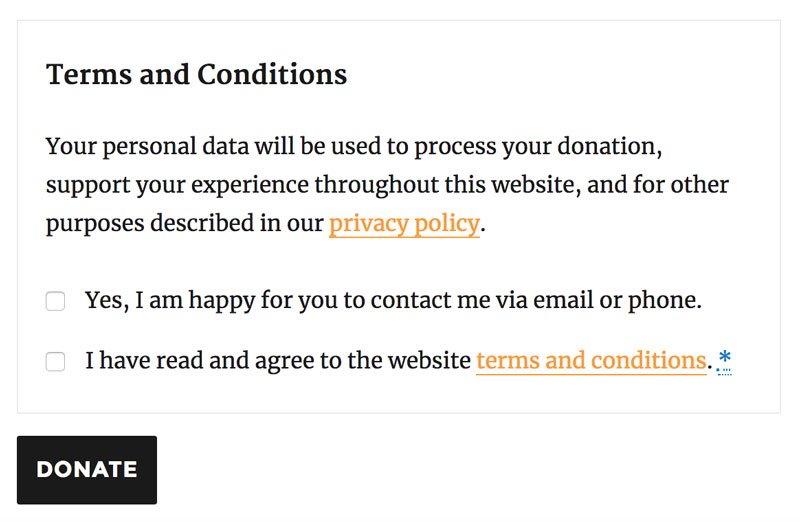
Das Spendenformular wurde aktualisiert, um einen neuen Abschnitt zu enthalten, der Ihre Nutzungsbedingungen, einen Hinweis zur Verwendung personenbezogener Daten auf Ihrer Website (einschließlich eines Links zu Ihrer Datenschutzrichtlinie) und ein Kontrollkästchen enthält, das es Spendern ermöglicht, der zukünftigen Kontaktaufnahme zuzustimmen.
Die Nutzungsbedingungen können so umgeschaltet werden, dass sie im Spendenformular angezeigt werden.
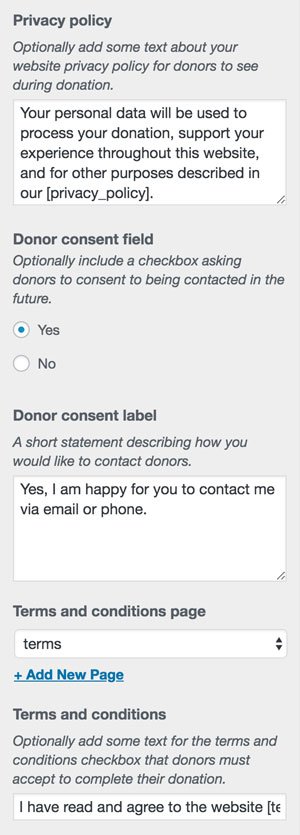
Alle diese Einstellungen, einschließlich des verwendeten Textes und der verknüpften Seiten für Nutzungsbedingungen und Datenschutzrichtlinie, werden über das Charitable-Panel im WordPress Customizer verwaltet. Sie sind standardmäßig alle deaktiviert.
Bonus-Tipp: Sie können jetzt direkt auf die Customizer-Einstellungen von Charitable zugreifen, indem Sie auf den Link Anpassen im Menü des Charitable-Dashboards klicken.
Integration mit den Datenschutz- & personenbezogenen Datentools von WordPress
WordPress 4.9.6 wurde Anfang dieses Monats veröffentlicht und enthielt einige wichtige Tools, die erforderlich sind, um WordPress-Websites bei der Einhaltung der DSGVO und der Achtung der Datenschutzrechte ihrer Nutzer zu unterstützen. Unser Team hat zur Veröffentlichung von WordPress 4.9.6 beigetragen und wir haben Charitable stetig darauf vorbereitet, diese Tools zu integrieren.
Das erste dieser Tools war ein Ersteller für Datenschutzseiten. Sie können diesen verwenden, um Ihre Datenschutzrichtlinie zu erstellen, einschließlich vorgeschlagener Texte, die von den Plugins hinzugefügt werden, die Sie auf Ihrer Website verwenden – einschließlich Charitable.
Wir empfehlen dringend, dieses Tool zur Erstellung der Datenschutzrichtlinie Ihrer Website zu verwenden. Wenn Sie bereits eine Datenschutzrichtlinie erstellt haben, können Sie in unserer Dokumentation mehr darüber lesen, wie Charitable Daten auf Ihrer Website verwendet: Charitable & Nutzersprivatsphäre.
Charitable hilft Ihnen auch bei der Beantwortung von Anfragen Ihrer Nutzer nach Zugriff auf die auf Ihrer Website gespeicherten personenbezogenen Daten, indem es alle von Charitable gesammelten Daten in das Export-Tool (verfügbar unter Tools > Persönliche Daten exportieren in WordPress 4.9.6) aufnimmt.
Wenn Nutzer die Löschung ihrer personenbezogenen Daten verlangen, können Sie auch die von Charitable gesammelten Daten löschen lassen. Da Ihr Land jedoch möglicherweise eine gesetzliche Verpflichtung hat, bestimmte Daten im Zusammenhang mit Spenden für eine bestimmte Zeit aufzubewahren, bietet Ihnen Charitable detaillierte Kontrollen darüber, wie lange Daten aufbewahrt werden und welche Daten früher gelöscht werden können. Diese Einstellungen finden Sie unter Charitable > Einstellungen > Datenschutz.
Standardmäßig werden alle personenbezogenen Daten, die für Spenden innerhalb der letzten zwei Jahre gespeichert wurden, aufbewahrt. Personenbezogene Daten werden nicht automatisch entfernt, wenn die Aufbewahrungsfrist abgelaufen ist; sie werden gelöscht, wenn ein Nutzer ausdrücklich die Löschung seiner Daten verlangt.
Weitere neue Funktionen
Spenden automatisch in PayPal zurückerstatten
Rückerstattungen machen keinen Spaß und hoffentlich müssen Sie sie nicht sehr oft vornehmen, aber mit dieser Version haben wir versucht, die Rückerstattung Ihrer Charitable-Spenden etwas weniger schmerzhaft zu gestalten.
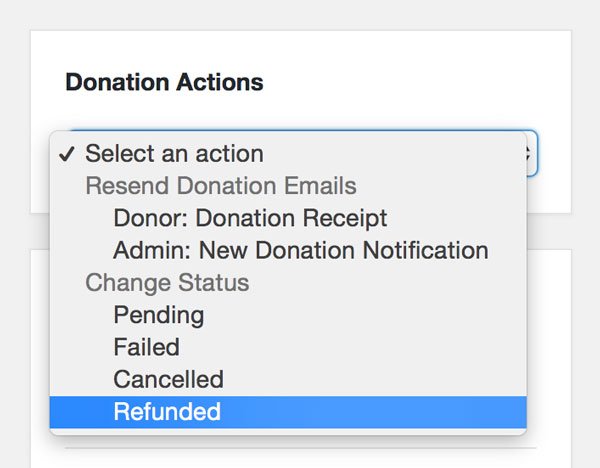
Sie können eine Spende jetzt über ihre Detailseite als zurückerstattet markieren und sie automatisch über PayPal zurückerstatten lassen. Wählen Sie einfach „Zurückerstattet“ im Spendenaktionen Meta-Box und wählen Sie, ob sie sofort in PayPal zurückerstattet werden soll; Charitable kümmert sich um den Rest.
Charitable-Statistiken überall anzeigen
Eine praktische kleine Funktion, die wir in Charitable 1.6 hinzugefügt haben, ist der [charitable_stat] Shortcode. Dieser Shortcode ermöglicht es Ihnen, Spendenbeträge, Fortschrittsbalken oder Spenden- und Spenderzahlen anzuzeigen. Um beispielsweise anzuzeigen, wie viel Geld Ihre Organisation gesammelt hat und wie viele Spender sie hat, könnten Sie Folgendes schreiben:
[charitable_stat display=donors]haben[charitable_stat display=total]gesammelt, um unsere Arbeit zu unterstützen.
Klicken Sie hier für die vollständige Anleitung zur Verwendung des Charitable Stat Shortcodes.
Kampagnen-Export
Charitable enthielt schon lange einen Spendenexport, aber uns fehlte ein ähnlicher Bericht für Kampagnen. Seit Charitable 1.6 ist dieses Problem gelöst.
Gehen Sie zu Charitable > Kampagnen und klicken Sie auf die Schaltfläche Exportieren, um eine CSV-Datei mit all Ihren Kampagnen herunterzuladen, optional gefiltert nach Datum und Status.
Updates für Entwickler
Diese Version fügt einige neue Funktionen und Verfeinerungen für Entwickler hinzu, die Spendenaktionen mit Charitable erstellen.
Neue Kampagnenfelder mit der Campaign Fields API registrieren
Charitable 1.5 führte die Donation Fields API ein. In dieser Version haben wir eine passende Campaign Fields API hinzugefügt. Dies ermöglicht es Ihnen, neue Einstellungen und Felder für Kampagnen einzuführen:
function ed_charitable_add_campaign_field() {
    // Define a new field.
    $field = new Charitable_Campaign_Field( 'focus_country', array(
        'label' => __( 'Focus Country', 'your-namespace' ),
        'admin_form' => array(
            'type' => 'select',
            'options' => array(
                'india' => __( 'India', 'your-namespace' ),
                'thailand' => __( 'Thailand', 'your-namespace' ),
                'cambodia' => __( 'Cambodia', 'your-namespace' ),
            ),
        ),
        'show_in_export' => true,
        'email_tag' => array(
        'description' => __( 'The focus country for the campaign' , 'your-namespace' ),
    ) ) );

    // Register the field.
    charitable()->campaign_fields()->register( $field );
}

add_action( 'init', 'ed_charitable_add_campaign_field' );
Der Wert des Feldes kann mit der Methode Charitable_Campaign::get() abgerufen werden:
$campaign = charitable_get_campaign( 123 );
$campaign->get( 'focus_country' );
Verwenden Sie Botschafter? Halten Sie Ausschau nach der nächsten Hauptversion, um die Unterstützung für die Campaign Fields API hinzuzufügen.
Spendenfelder einfach ändern
Das Hinzufügen von Feldern war mit der Donation Fields API bereits einfach genug. Das Ändern der Einstellungen des Spendenformulars für die Felder war etwas schwieriger als nötig. Sie können jetzt jedes vorhandene Spenden- oder Kampagnenfeld mit der Donation Fields API ändern. Um beispielsweise das Label des Feldes „State“ in „Province“ zu ändern, können Sie einfach Folgendes tun:
function ed_charitable_change_state_field_label() {
    // Get the field through the API.
    $field = charitable()->donation_fields()->get_field( 'state' );

    // Update the 'label' setting of the 'donation_form' argument.
    $field->set( 'donation_form', 'label', 'Province' );
}

add_action( 'init', 'ed_charitable_change_state_field_label' );
Jetzt upgraden
Wenn Sie dies noch nicht getan haben, aktualisieren Sie Charitable noch heute über Ihr Dashboard und teilen Sie uns Ihre Meinung mit.
Vielen Dank an alle in der Charitable-Community, die uns Feedback und Funktionswünsche gegeben haben, die zu den Änderungen in Charitable 1.6 geführt haben. Das Nutzerfeedback hat uns durchweg maßgeblich dabei geholfen zu entscheiden, worauf wir uns bei der Entwicklung von Charitable konzentrieren, und diese Version war keine Ausnahme.
Wir würden uns freuen, Ihre Meinung in den Kommentaren unten zu hören!





Hinterlassen Sie eine Antwort