

Es ist soweit. Nach Hunderten von Entwicklungsstunden starten wir an diesem Wochenende Ambassadors, Version 2. Machen Sie sich bereit, den besten Weg für Peer-to-Peer-Fundraising zu entdecken, Punkt.
Lesen Sie weiter für einen Blick hinter die Kulissen, wie sich diese Version im Laufe der Zeit entwickelt hat und was sie für Sie und Ihre gemeinnützige Organisation bedeutet.
Möchten Sie nur wissen, was es Neues gibt? Klicken Sie hier, um direkt zu den Versionshinweisen zu springen.
Zuerst ein kurzer Rückblick...
Ein Hauptgrund, warum wir uns entschieden haben, Charitable zu entwickeln, war, dass wir sahen, dass gemeinnützige Organisationen mit zwei weniger als idealen Optionen für ihre Online-Spenden feststeckten.
Einerseits konnten sie gehostete Fundraising-Plattformen nutzen, die in der Regel einen Anteil jeder Spende einbehalten, die die gemeinnützige Organisation erhält. Eine Transaktionsgebühr von 2 % klingt vielleicht nicht schlecht, aber wenn Ihre Kampagne durchstartet und Sie 100.000 US-Dollar sammeln, sind das 2.000 US-Dollar, die an die Plattform gehen. Und 2 % sind ein konservativer Wert – wir haben von gemeinnützigen Organisationen erfahren, dass sie bis zu 10 % ihrer Spenden an die von ihnen genutzten Plattformen verloren haben. Autsch.
In der WordPress-Welt gab es eine Handvoll WordPress-Spenden-Plugins, aber keines mit vollem Funktionsumfang für Features wie Peer-to-Peer-Fundraising. Außer Charitable ist das immer noch der Fall.
Von Anfang an war es unser Ziel, ein WordPress-Spenden-Plugin zu entwickeln, das gemeinnützigen Organisationen hilft, mehr Geld zu sammeln und gleichzeitig weniger auszugeben.
Die allererste Version von Charitable Ambassadors erschien im Oktober 2015 – nur wenige Monate nachdem wir Charitable selbst gestartet hatten. Aber schon bevor wir Charitable veröffentlichten, war Ambassadors in aktiver Entwicklung.
Ambassadors 1.0 bot gemeinnützigen Organisationen eine sofort einsatzbereite Möglichkeit, Peer-to-Peer-Fundraising-Kampagnen direkt auf ihrer Website zu starten. Hunderte von gemeinnützigen Organisationen haben es seitdem genutzt, um ihre Fundraising-Veranstaltungen zu unterstützen. Spendenläufe, Fun Runs, Marathons, Jump-a-thons, Polar Plunges – wir haben gesehen, wie gemeinnützige Organisationen Charitable genutzt haben, um Spenden für alle Arten von großartigen Veranstaltungen zu sammeln!
Was Ambassadors v1 fehlte
Natürlich gäbe es keine Ambassadors 2.0, wenn Ambassadors 1.0 nicht in irgendeiner Weise mangelhaft wäre, oder?
Ambassadors funktionierte gut, wenn Sie eine offene Fundraising-Kampagne durchführten. Leute konnten jederzeit Kampagnen für Ihre Organisation erstellen und so die Reichweite Ihrer gemeinnützigen Organisation organisch erweitern.
Aber sobald Sie zeitlich begrenzte Fundraising-Kampagnen durchführten, war Ambassadors etwas eingeschränkter. Wenn Sie eine Veranstaltung wie einen Spendenlauf durchführen, möchten Sie, dass Ihre Unterstützer eine Spendenaktion für diesen Spendenlauf erstellen können und dass alle von ihnen gesammelten Spenden automatisch in den Spendenstatistiken der Hauptkampagne für den Spendenlauf angezeigt werden.
Sie möchten auch in der Lage sein, diesen Prozess für alle Ihre Fundraising-Kampagnen zu wiederholen, wobei jede übergeordnete Kampagne von einem Netzwerk von Fundraisern unterstützt wird, die Geld für diese Kampagne sammeln.
Ein weiterer wichtiger Bereich, in dem es bei Ambassadors an Funktionen mangelte, war die Möglichkeit, Fundraising-Teams zu erstellen. Natürlich konnten die Leute eine einzelne Kampagne für ihr gesamtes Team erstellen, aber das bedeutet, dass Sie einige der Netzwerkvorteile des Team-Fundraisings verlieren. Was Sie stattdessen wollen, ist, dass jedes Teammitglied in der Lage ist, sein eigenes Fundraising zu starten, es in seinem Netzwerk zu teilen und Ihre Reichweite exponentiell zu vergrößern.
Im Laufe der Zeit entwickelten wir Workarounds, um grundlegenden Support für diese Funktionen zu bieten, aber Workarounds sind genau das – Workarounds. Sie werden niemals mit nativen Funktionen als eng integrierter Teil eines kohäsiven Produkts mithalten können.
Wie Ambassadors v2 diese Probleme (und mehr!) löst
Sie haben also die Vorgeschichte gelesen. Tauchen wir nun ein und entdecken Sie, wie Ambassadors 2.0 diese Probleme löst.
Bringen Sie Leute dazu, Spenden für Ihre Fundraising-Kampagnen zu sammeln
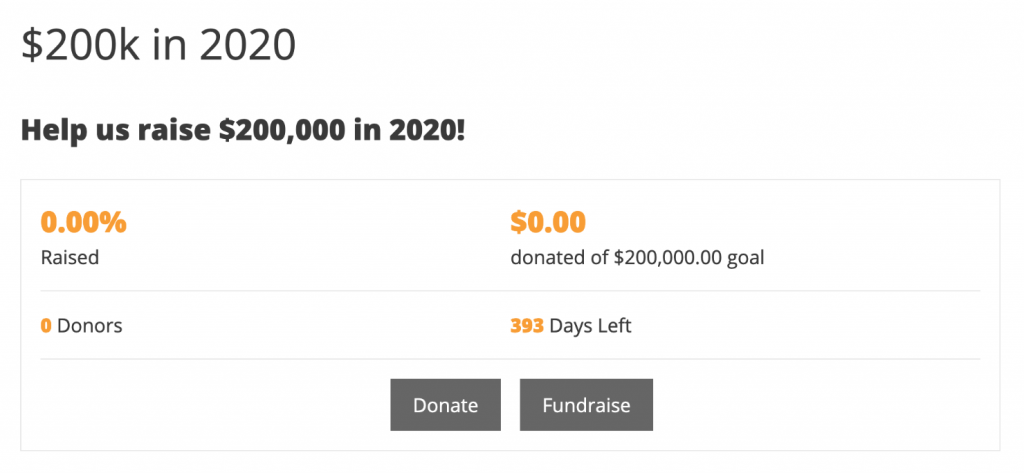
Mit Ambassadors 2.0 können Sie übergeordnete Kampagnen erstellen, für die Leute Spenden sammeln können.
Anstatt Ihre Kampagne nur durch eine Spende unterstützen zu können, können Ihre Unterstützer eine Spendenaktion für Ihre Kampagne erstellen.
Ihre Unterstützer erhalten ihre eigene Fundraising-Seite, die sie mit ihrem Netzwerk teilen können. Eine Spende an ihre Spendenaktion wird automatisch zu den Fundraising-Statistiken Ihrer Kampagne gezählt.
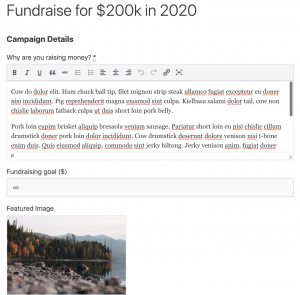
Als gemeinnützige Organisation können Sie festlegen, wie viel (oder wie wenig) der Fundraiser tun muss, um seine Fundraising-Seite einzurichten. Sie können ihnen Standardtext und ein hervorgehobenes Bild für ihre Fundraising-Seite zur Verfügung stellen und entscheiden, ob sie Dinge wie einen Titel oder ein Ziel festlegen können.
Das Endergebnis ist, dass Ihre Unterstützer einen viel schnelleren Weg zur Erstellung ihrer Spendenaktion haben.
Weniger Reibung bedeutet, dass Sie mehr Spendenaktionen, eine größere Reichweite und mehr Spenden erzielen. Win, win, win.
Erweitern Sie Ihr Netzwerk exponentiell mit Fundraising-Teams
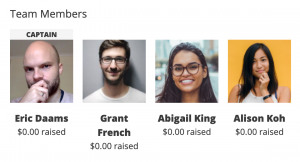
Was ist besser, als jemanden dazu zu bringen, eine neue Spendenaktion zu erstellen? Jemand, der eine für sich selbst und all seine Freunde erstellt!
Das ist die Kraft des Team-Fundraisings. Anstatt nur eine Spendenaktion für sich selbst einzurichten, kann Ihr Unterstützer jetzt sein eigenes Fundraising-Team gründen, und das ist nur ein winziger Aufwand mehr als die Erstellung einer Solo-Kampagne.
Ihr Unterstützer gibt seinem Team einen Namen und fügt dann so viele Teammitglieder hinzu, wie er möchte. Sobald er sein Team eingereicht hat, sendet Charitable jedem dieser Teammitglieder eine E-Mail mit der Bitte, zu bestätigen, dass er dem Team beitreten möchte.
Für die Teammitglieder sind es nur zwei Klicks und sie sind fertig – Charitable kümmert sich um den Rest.
Möchten Sie es ausprobieren? Versuchen Sie, eine Spendenaktion in unserer Demo einzurichten.
Nutzen Sie E-Mail-Marketing, um mit Ihren Unterstützern in Kontakt zu treten (und wieder in Kontakt zu treten)
Natürlich ist der Aufbau eines Unterstützernetzwerks fantastisch. Aber die Verbindung mit ihnen durch E-Mail-Marketing ist der Schlüssel, um sie langfristig für die Arbeit Ihrer Organisation zu begeistern.
Durch die Kombination von Ambassadors mit unserer Newsletter Connect-Erweiterung können Sie ganz einfach Kampagnenersteller zu Ihrer Mailingliste hinzufügen.
Um die Dinge organisiert zu halten, können Sie sie einer bestimmten Liste nur für Kampagnenersteller hinzufügen lassen. Dies gibt Ihnen nicht nur die Möglichkeit, Ihre E-Mails auf Ihre Bedürfnisse zuzuschneiden, sondern bedeutet auch, dass Sie sie mit einer E-Mail-Automatisierungskampagne starten können.
Sie können Ihren Kampagnenerstellern beispielsweise eine automatisierte E-Mail-Serie senden, die sie durch die Schritte zur Durchführung einer erfolgreichen Spendenaktion führt.
Weitere E-Mails für Ihre Kampagnenersteller
Neben der Eröffnung aller Möglichkeiten des E-Mail-Marketings für Ihre Kampagnenersteller haben wir auch eine Reihe von integrierten E-Mails hinzugefügt, die Sie verwenden können, um mit Kampagnenerstellern in Kontakt zu treten, nachdem sie ihre Kampagne hinzugefügt haben.
Sie können ihnen automatisch eine E-Mail senden, wenn sie ihre Kampagne zum ersten Mal einreichen, wenn ihre Kampagne genehmigt wird, wenn ihre Kampagne bald endet und nachdem sie beendet wurde, sowie E-Mails, wann immer jemand zu ihrer Kampagne spendet.
Wie bei allen in Charitable integrierten E-Mails können Sie den Text und die Betreffzeile jeder E-Mail steuern, und wir stellen eine Reihe von Variablen zur Verfügung, mit denen Sie Ihre E-Mails personalisieren und feinabstimmen können.
Passen Sie das Kampagnenformular an Ihre Bedürfnisse an
Einige Produkte bieten ihren Benutzern im Namen der Flexibilität millionenfach Optionen. Das kann leider zu einem verwirrenden Durcheinander führen.
Bei Charitable konzentrieren wir uns darauf, die Dinge für die Benutzer einfach zu halten. Manchmal stellen wir jedoch fest, dass die Bereitstellung von mehr Auswahlmöglichkeiten für den Website-Administrator den Benutzern eine bessere Erfahrung bietet.
Das Formular zur Kampagnenerstellung war ein wichtiger Bereich, in dem wir der Meinung waren, dass Benutzer von mehr Auswahlmöglichkeiten profitieren würden. Daher haben wir eine Reihe von Optionen zur Anpassung verschiedener Aspekte des Formulars hinzugefügt, mit denen Sie Dinge, die zuvor benutzerdefinierten Code erfordert hätten, einfach erledigen können.
Das bedeutet, dass Sie jetzt einfach steuern können, wie Kampagnenersteller die Kategorie/das Tag für ihre Kampagne auswählen, wie sie ein Enddatum festlegen und ob sie ihre eigenen vorgeschlagenen Spendenoptionen hinzufügen können.
Nur die Release Notes…
Auf einen Blick, hier ist alles Neue in Ambassadors 2.0.
- Spendenaktionen! Spendenaktionen sind eine spezielle Art von Kampagnen, die erstellt werden, um Geld für eine bestehende Kampagne zu sammeln. Diese Funktion ermöglicht es Ihnen, übergeordnete Kampagnen zu erstellen, für die Personen Spendenaktionen durchführen können. Sie können so viele übergeordnete Kampagnen erstellen, wie Sie möchten. Das Spendenaktionsformular ist eine vereinfachte Version des Front-End-Kampagnenformulars.
- Teams! Bei der Einrichtung einer neuen Spendenaktion können Ihre Kampagnenersteller Teams erstellen und anderen Teams beitreten.
- E-Mail-Marketing! Jetzt können Sie Kampagnenersteller automatisch zu Ihrer Mailingliste hinzufügen. Diese Funktion erfordert Newsletter Connect und verwendet die Funktion „Kontaktzustimmung“ in Charitable.
- Passen Sie das Kampagnenformular mit neuen Admin-Einstellungen an. Passen Sie einfach an, wie Kampagnenersteller Kategorien oder Tags für ihre Kampagnen auswählen, wie sie ein Enddatum festlegen und ob sie ihre eigenen vorgeschlagenen Spendenoptionen angeben können.
- Weitere E-Mails: Es stehen neue E-Mails zur Verfügung, die an Kampagnenersteller gesendet werden können, wenn ihre Kampagne genehmigt wurde, wenn sie beendet wurde oder wenn sie vor der Veröffentlichung eine Aktion erfordert (d. h. sie müssen sich anmelden, registrieren oder ihre E-Mail-Adresse verifizieren). Administratoren können auch eine E-Mail erhalten, wenn eine Kampagne noch eine Art von Aktion vom Kampagnenersteller erfordert.
- Ein seit langem bestehendes Problem behoben, das nicht angemeldete Benutzer daran hinderte, eine Kampagne zu erstellen. Sie können den Kampagnenerstellungsprozess jetzt so einrichten, dass Benutzer ein Konto erstellen müssen, bevor sie ihre Kampagne einreichen, oder danach. Wenn ein Kampagnenersteller eine Kampagne einreicht, ohne angemeldet zu sein, wird er aufgefordert, sich anzumelden, zu registrieren und/oder seine E-Mail-Adresse zu verifizieren, nachdem er seine Spendenkampagne eingereicht hat.
- Viele weitere Fehlerbehebungen!
- Niederländische Übersetzung hinzugefügt.
Bereit, Peer-to-Peer-Fundraising für Ihre Non-Profit-Organisation zu nutzen?
Mit Ambassadors 2.0 hilft Charitable Ihrer Non-Profit-Organisation, durch Peer-to-Peer-Fundraising mehr Geld zu sammeln. Und das tun wir ohne den hohen Preis, der normalerweise mit dieser Art von Funktion verbunden ist, sodass Ihre Non-Profit-Organisation mehr Geld sammeln und weniger ausgeben kann.
Bereit, einzutauchen?
Beginnen Sie noch heute mit dem Sammeln von Spenden mit WordPress
Schließen Sie sich über 10.000 gemeinnützigen Organisationen an, die mit Charitable online mehr Geld sammeln.





Hinterlassen Sie eine Antwort