
Prérequis :
- Charitable 1.8.16+
- Charitable Multi-Currency 1.0.0+
Le module Multi-Currency permet aux donateurs de donner dans leur propre devise sur n'importe quel formulaire de don Charitable. Choisissez les devises que vous prenez en charge, définissez comment les taux de change sont obtenus (actualisés automatiquement quotidiennement ou définis manuellement avec une majoration optionnelle), et utilisez éventuellement la géolocalisation pour présélectionner la devise d'un visiteur en fonction de son pays. Les rapports ventilent les totaux par devise, passerelle et période.
Quand l'utiliser
- Vous acceptez des dons de sympathisants en dehors de votre pays d'origine et souhaitez que les montants soient affichés dans des unités familières plutôt qu'une seule devise mondiale.
- Vous souhaitez des taux de change qui s'actualisent quotidiennement au lieu de modifier une feuille de calcul.
- Vous avez besoin de rapports par devise afin de pouvoir voir combien a réellement été reçu en EUR par rapport à USD par rapport à GBP, séparément des totaux en devise de base.
- Vous souhaitez que les visiteurs voient les montants des dons dans leur devise locale sans avoir à choisir d'abord dans une liste déroulante.
Où le trouver
Toute la configuration principale se trouve à un seul endroit :
Administration WordPress > Charitable > Réglages > Avancé > Multi-Currency
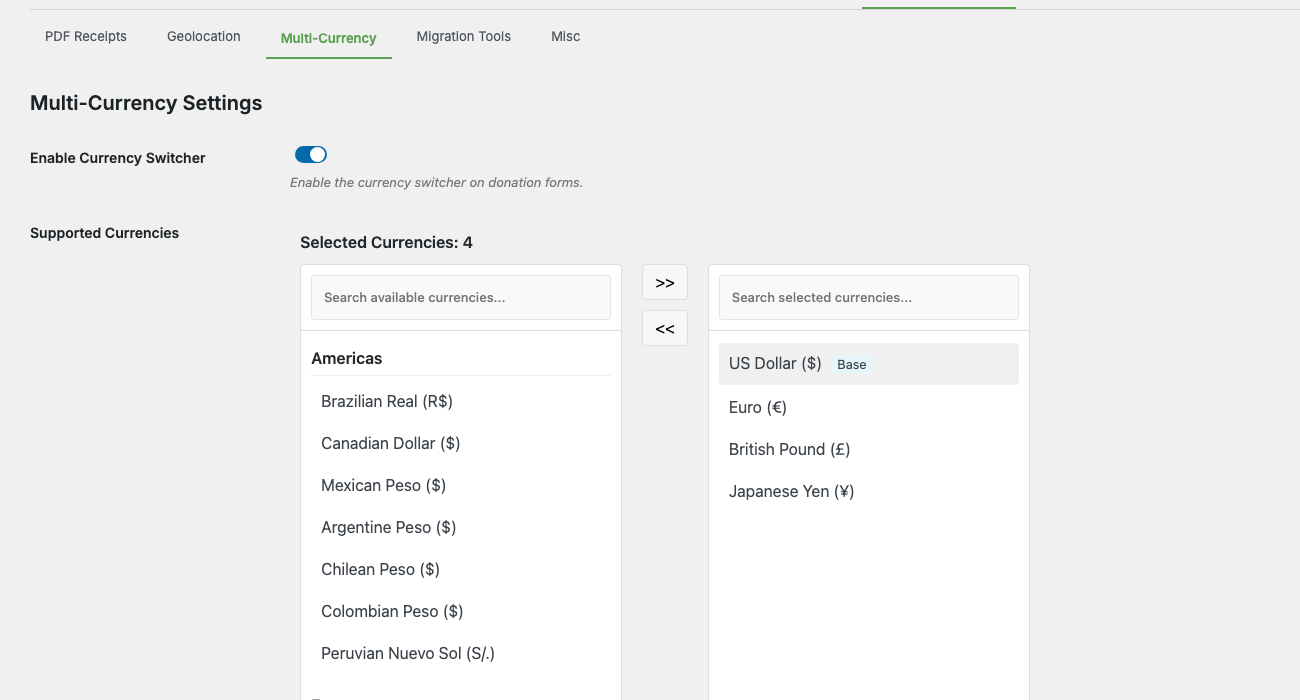
L'onglet Avancé possède sa propre sous-navigation (Reçus PDF, Géolocalisation, Multi-Currency, Outils de migration, Divers). Ouvrez Multi Currency et vous trouverez tout dans un seul panneau :
- Activer le sélecteur de devises — interrupteur principal pour l'ensemble de la fonctionnalité.
- Devises prises en charge — sélecteur à double liste regroupé par région (Amériques, Europe, Asie-Pacifique, Autres) pour choisir les devises disponibles sur les formulaires de don.
- Taux de change — tableau des taux par devise avec actualisation automatique, substitution manuelle, nombre de décimales et majoration.
- Message du sélecteur de devises — le texte affiché aux donateurs lorsqu'ils changent de devise.
- Libellé du menu déroulant de devises — le libellé au-dessus du menu déroulant sur le formulaire de don.
- Afficher l'acronyme de la devise — afficher le code à 3 lettres (par exemple,
USD) à côté du symbole. - Activer la géolocalisation — détecter automatiquement le pays du visiteur et présélectionner une devise correspondante.
- Paramètres de désactivation du plugin — que faire des données multi-devises si vous désactivez le module (conserver, convertir en devise de base ou supprimer).
Il y a deux autres endroits à connaître :
- Listes de devises par passerelle — sous Charitable > Réglages > Passerelles de paiement > [Stripe / PayPal / Square / Offline], une section « Multi-Currency » vous permet de spécifier quelles devises parmi celles prises en charge cette passerelle spécifique acceptera.
- Les rapports ventilés par devise apparaissent sous Charitable > Rapports > Avancé une fois que vous avez des dons dans plus d'une devise.
La vue d'ensemble
Quatre éléments travaillent ensemble :
| Partie | Où elle se trouve | Ce qu'il fait |
|---|---|---|
| Devises prises en charge | Réglages > Avancé > Multi-Currency | La liste principale des devises proposées par votre site. La devise de base est toujours incluse. |
| Taux de change | Réglages > Avancé > Multi-Currency | Taux par devise par rapport à la devise de base. Rafraîchi quotidiennement par cron ou défini manuellement. |
| Filtres au niveau de la passerelle | Paramètres > Passerelles de paiement > [passerelle] | Option par passerelle pour les devises que ce processeur acceptera. |
| Le sélecteur de devise | Formulaire de don frontend | Le menu déroulant que les donateurs utilisent pour choisir une devise. S'affiche automatiquement lorsque plus d'une devise est activée. |
Un donateur visite une campagne, voit sa devise préférée présélectionnée (ou en choisit une dans le menu déroulant), saisit un montant, et le formulaire convertit et soumet à la passerelle dans cette devise. En coulisses, Charitable stocke à la fois la devise du don et l'équivalent en devise de base afin que les rapports restent précis.
Configuration étape par étape
La première fois que vous configurez ceci :
- Confirmez votre devise de base. Allez dans Charitable > Paramètres > Général et vérifiez Devise en haut. C'est la devise par rapport à laquelle tous les taux de change sont calculés ; choisissez celle dans laquelle la plupart de vos rapports sont effectués.
- Activez le sélecteur de devise. Allez dans Charitable > Paramètres > Avancé > Multi-devises et basculez Activer le sélecteur de devise sur On. C'est l'interrupteur principal pour le module complémentaire.
- Choisissez vos devises prises en charge. Dans Devises prises en charge, utilisez le sélecteur à double liste (Amériques, Europe, Asie-Pacifique, Autres régions) pour déplacer les devises du panneau de droite vers le panneau Devises sélectionnées à gauche. Votre devise de base est toujours incluse en tant que « Base » et ne peut pas être supprimée.
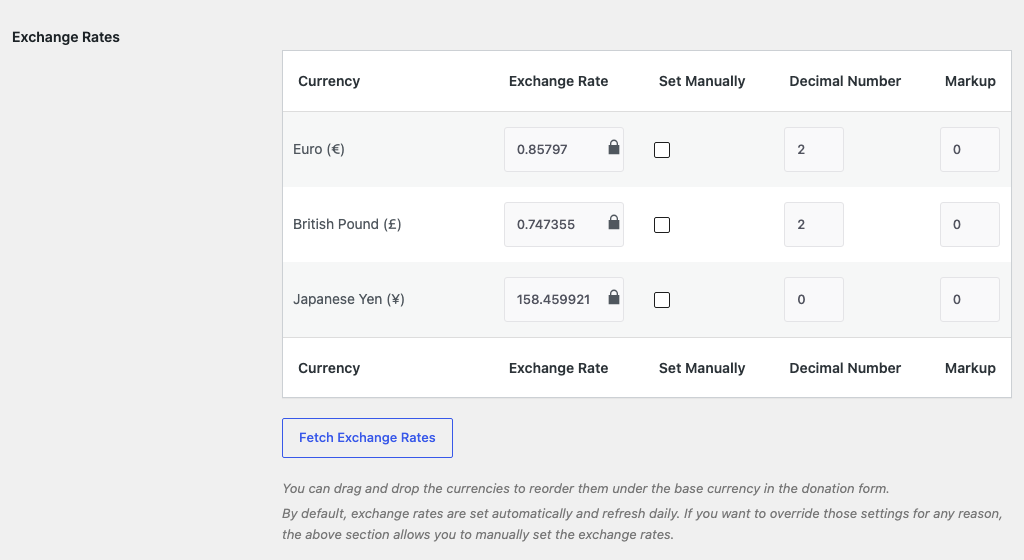
- Confirmez le tableau des taux de change. Faites défiler jusqu'à Taux de change. Chaque devise non de base que vous avez sélectionnée a maintenant une ligne indiquant le taux actuel, le nombre décimal et la majoration. Cliquez sur Actualiser les taux de change pour récupérer les derniers taux de l'API.
- (Facultatif) Définissez un taux ou une majoration manuelle. Cochez la colonne Définir manuellement pour une devise afin de verrouiller son taux par rapport à l'actualisation automatique. Entrez une valeur dans la colonne Majoration (par exemple,
2pour une majoration de 2 % en plus du taux en direct) si vous souhaitez une petite marge pour couvrir les frais de conversion de devises. - (Facultatif) Ajustez les étiquettes visibles par le donateur. Définissez Message du sélecteur de devise (le message qui apparaît lorsqu'un donateur change de devise) et Libellé du menu déroulant de devise (l'étiquette au-dessus du menu déroulant). Activez Afficher l'acronyme de la devise si vous souhaitez le code à 3 lettres à côté du symbole sur le formulaire de don.
- (Facultatif) Activez la géolocalisation. Basculez Activer la géolocalisation sur On. Les nouveaux visiteurs auront leur devise présélectionnée en fonction du pays auquel leur IP est résolue (en utilisant la base de données MaxMind GeoLite2 fournie). Le donateur peut toujours la modifier via le menu déroulant.
- Choisissez votre comportement de désactivation. Sous Paramètres de désactivation du plugin, choisissez ce qui doit arriver aux données de dons multi-devises si le module complémentaire est désactivé : Conserver les données (recommandé ; conserve tout intact), Convertir en devise de base (réécrit les dons en devises étrangères en équivalents de devise de base) ou Supprimer toutes les données de devise (supprime les métadonnées multi-devises, irréversible).
- Restreignez par passerelle si nécessaire. Allez dans Charitable > Paramètres > Passerelles de paiement et ouvrez chaque passerelle utilisée. Faites défiler jusqu'à la section Multi-devises — vous verrez des cases à cocher pour les devises que vous avez activées à l’étape 3. Décochez celles que la passerelle n’accepte pas (ou ne peut pas accepter). Les devises que la passerelle ne prend pas en charge sont automatiquement masquées dans la liste déroulante lorsque cette passerelle est sélectionnée.
- Testez le formulaire de don. Ouvrez une page de don de campagne dans une fenêtre incognito. Le sélecteur de devise doit apparaître au-dessus du champ du montant. Changez de devise et confirmez que les montants sont reformatés avec le bon symbole et le bon nombre de décimales.
Après cela, les dons soumis dans des devises autres que la devise de base apparaîtront dans la liste des dons avec leur badge de devise d’origine, et les totaux des rapports afficheront à la fois la devise du don et son équivalent en devise de base.
Référence des paramètres
Interrupteur principal
| Paramètre | Ce qu'il fait |
|---|---|
| Activer le sélecteur de devise | Interrupteur principal pour l’ensemble du module complémentaire. Désactivé signifie : pas de sélecteur sur les formulaires de don, pas de rafraîchissement des taux de change, pas de rapports par devise. |
Devises prises en charge
Un sélecteur double liste groupé par région. Le panneau de droite regroupe toutes les devises disponibles (plus de 150 codes de la liste ISO 4217) sous Amériques, Europe, Asie-Pacifique et Autres régions. Le panneau de gauche contient vos Devises sélectionnées, avec votre devise de base épinglée en haut comme « Base » (elle ne peut pas être supprimée). Utilisez les boutons fléchés pour déplacer les devises entre les panneaux, ou la boîte de recherche en haut de chaque panneau pour filtrer par code ou par nom.
Tableau des taux de change
Une ligne par devise activée autre que la devise de base, avec ces colonnes :
| Colonne | Ce qu'il fait |
|---|---|
| Devise | Le code ISO et le nom complet (par exemple, Euro (€)). |
| Taux de change | Combien d’unités de cette devise équivalent à 1 unité de la devise de base. Modifiable, mais verrouillé sauf si Définir manuellement est coché. |
| Définir manuellement | Verrouille la ligne à la valeur que vous avez saisie. Le rafraîchissement automatique ignore les lignes définies manuellement. |
| Nombre de décimales | Combien de décimales afficher dans les montants des dons et les reçus. La plupart des devises utilisent 2 ; le JPY utilise 0 ; certains cas d’utilisation favorables aux cryptomonnaies en veulent 3 ou 4. |
| Majoration | Pourcentage ajouté au taux de l’API. Utile pour absorber les frais de conversion. Définissez à 0 si vous ne souhaitez pas de majoration. |
Au-dessus du tableau, vous trouverez un bouton Récupérer les taux de change qui déclenche un appel API immédiat (les lignes définies manuellement sont ignorées). Les lignes peuvent être déplacées pour réorganiser l’ordre d’apparition des devises dans la liste déroulante du formulaire de don.
Étiquettes visibles par le donateur
| Paramètre | Ce qu'il fait |
|---|---|
| Message du sélecteur de devise | Le message affiché aux donateurs lorsqu'ils changent de devise. Prend en charge les espaces réservés {base_currency}, {new_currency_rate} et {new_currency} (par exemple, « Le taux de change actuel est de 1,00 {base_currency} équivaut à {new_currency_rate} {new_currency} »). |
| Libellé du menu déroulant de devise | Le libellé au-dessus du menu déroulant sur le formulaire de don (par exemple, « Sélectionnez votre devise »). |
| Afficher l'acronyme de la devise | Lorsque cette option est activée, le code de devise à 3 lettres est affiché à côté du symbole dans les montants des dons (par exemple, « 100 $ USD » au lieu de « 100 $ »). |
Géoréférencement
Un seul interrupteur : Activer la géolocalisation. Lorsqu'il est activé, l'adresse IP du donateur est vérifiée par rapport à la base de données groupée MaxMind GeoLite2 Country pour déterminer son pays, et le formulaire présélectionne la devise correspondante si elle figure dans votre liste sélectionnée. Si la devise du pays détecté n'est pas sélectionnée, le donateur voit votre devise de base.
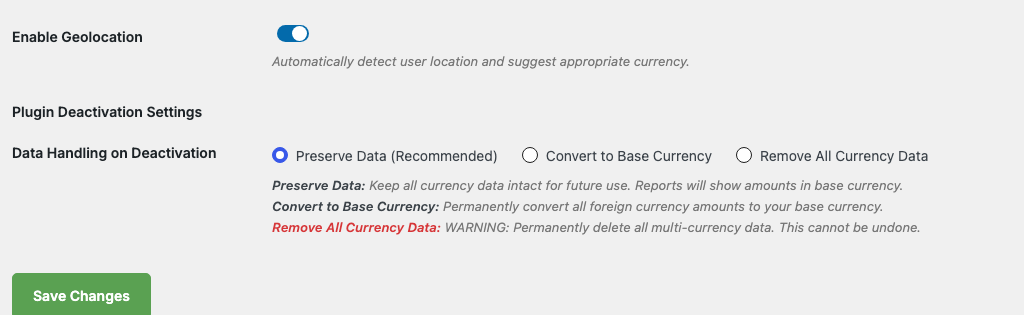
La géolocalisation ne remplace pas un choix explicite du donateur. Une fois qu'un donateur change de devise sur le formulaire, ce choix reste valable pour la session (filtrable ; voir la référence du développeur ci-dessous).
Paramètres de désactivation du plugin
Choisissez comment les données multi-devises sont gérées si le module complémentaire est désactivé :
| Option | Ce qu'il fait |
|---|---|
| Conserver les données (Recommandé) | Conservez toutes les données de devise intactes. Les rapports afficheront les montants dans la devise de base uniquement, mais les enregistrements de dons conserveront leur devise d'origine pour plus tard si vous réactivez. |
| Convertir en devise de base | Réécrivez définitivement les montants des dons en devises étrangères par leurs équivalents en devise de base au moment de la désactivation. Irréversible. |
| Supprimer toutes les données de devise | Supprimez tous les champs de métadonnées multi-devises. Les dons restent mais perdent leurs informations de devise d'origine. Irréversible. |
Ce paramètre ne s'exécute que lorsque le module complémentaire est désactivé ; son activation n'a aucun effet pendant le fonctionnement normal.
Rapport de répartition par devise
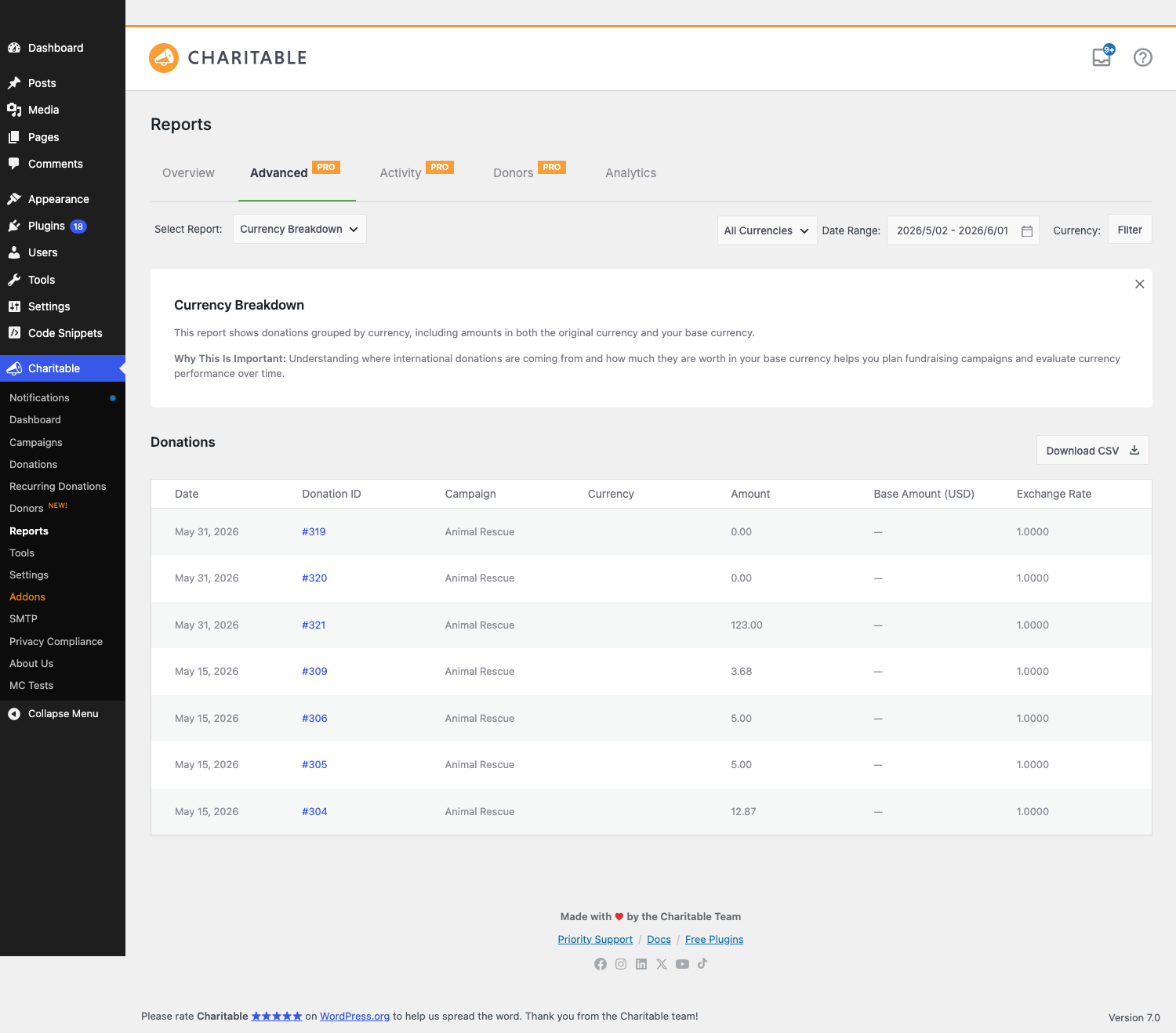
Une fois que vous avez des dons dans plusieurs devises, Charitable > Rapports > Avancé obtient un nouveau type de rapport Répartition par devise. Il affiche les totaux par devise pour une période donnée, avec téléchargement CSV.
Sélection de la devise sur le formulaire de don
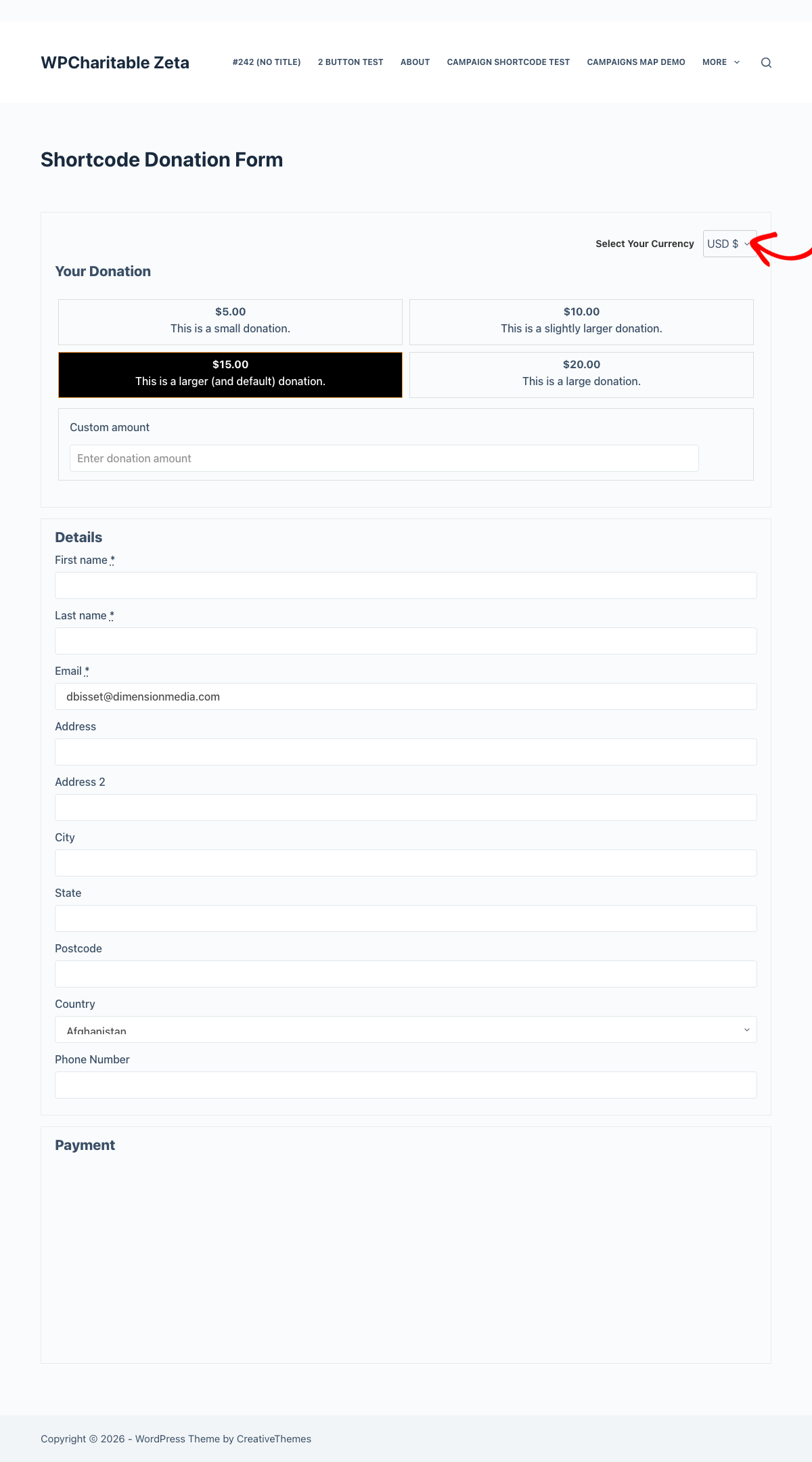
Lorsque plusieurs devises sont activées, chaque formulaire de don Charitable affiche automatiquement un sélecteur de devise au-dessus du champ du montant. Le sélecteur :
- Affiche le code et le symbole de la devise (par exemple,
EUR €). - Actualise le montant du don affiché et tous les boutons de montant suggéré chaque fois que le donateur le modifie.
- Conserve la sélection du donateur pour le reste de sa session (via cookie). Les nouveaux dons du même navigateur utilisent par défaut leur dernier choix jusqu'à l'expiration du cookie.
- Masque les devises que la passerelle active ne peut pas traiter. Si un donateur change de méthode de paiement et que sa devise sélectionnée n'est pas prise en charge, le formulaire revient à la devise de base.
Les formulaires de don visuels de Charitable Pro rendent le même sélecteur à l'intérieur de la mise en page du formulaire. Aucune configuration supplémentaire nécessaire ; le module complémentaire détecte Pro et s'intègre automatiquement.
Restrictions de devise par passerelle
Chaque passerelle de paiement dans Charitable > Paramètres > Passerelles de paiement possède sa propre liste de contrôle Multi-Devises près du bas de la page des paramètres de la passerelle :

Décochez toute devise que la passerelle n’accepte pas (ou ne peut pas accepter). Le formulaire de don masque automatiquement toute devise que la passerelle active ne prend pas en charge — ainsi, si un donateur passe de Stripe à PayPal et que la devise sélectionnée ne figure pas dans la liste de PayPal, le formulaire revient à la devise de base.
Actualisation des taux de change
Les taux sont automatiquement actualisés une fois par jour via WP-Cron (charitable_multi_currency_daily_exchange_rate_update). Sur un site sain, vous n’avez pas besoin de toucher à cela. La source principale est une source WPCharitable avec une solution de repli ExchangeRate-API à l’adresse api.exchangerate-api.com/v4/latest/ (utilisée automatiquement si la source principale est inaccessible).
Si les deux échouent (problème réseau, les deux services en panne), les derniers taux valides connus restent en place plutôt que de se réinitialiser à 1:1. L’onglet Paramètres affiche l’horodatage de la dernière actualisation réussie afin que vous puissiez repérer une table de taux obsolète.
Pour forcer une actualisation manuelle, utilisez le bouton Actualiser les taux de change sur la page des paramètres, ou appelez la fonction d’aide depuis PHP :
charitable_multi_currency_refresh_exchange_rates();
Détails de géolocalisation
La géolocalisation utilise la base de données GeoLite2 Country incluse. Elle s’exécute localement – aucune requête externe n’est effectuée lorsqu’un visiteur charge un formulaire de don, et les adresses IP ne sont pas stockées de manière permanente.
Le mappage pays-devise est subjectif (par exemple, tous les pays membres de l’UE sont mappés à l’EUR même s’il existe une sous-devise locale, comme le RON de la Roumanie). Si la devise du pays détecté ne figure pas dans votre liste prise en charge, la devise de repli est utilisée.
La géolocalisation n’a aucun effet sur les visiteurs en localhost ou en IP privée (la base de données ne peut pas les résoudre), donc la devise de repli est celle que vous verrez en développement local.
Rapports et liste des dons
Une fois le multi-devises activé, deux choses changent dans l’administration :
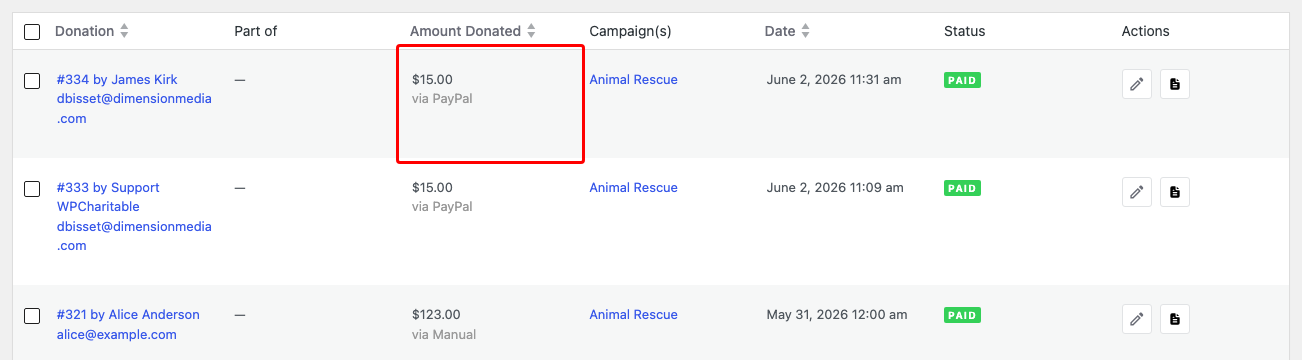
- La liste des dons affiche la devise d’origine à côté du montant (par exemple,
100,00 € EUR). L’équivalent en devise de base apparaît sous forme d’infobulle au survol. - Les détails du don incluent une ligne « Équivalent en devise de base » indiquant la valeur du don dans votre devise de base au taux en vigueur au moment du don. La valeur en devise de base est verrouillée au moment du don ; les changements de taux ultérieurs ne modifient pas rétroactivement les totaux historiques.
Le nouveau rapport Répartition par devise sous Rapports > Avancé vous permet de filtrer par devise, plage de dates et passerelle. Le téléchargement CSV est disponible depuis le même écran :
Conseils
- Définissez une majoration de taux une fois que vous avez de vrais dons. La conversion de devises en production entraîne de petits frais ; une majoration de 1 à 3 % sur le taux en direct les couvre sans laisser de marge visible pour le donateur.
- Ne désactivez pas une devise qui a des dons historiques. Les enregistrements de dons font toujours référence au code de devise, donc le supprimer des devises prises en charge empêche uniquement les nouveaux dons dans cette devise — cela ne casse pas le reporting sur les anciens.
- Les taux manuels sont figés. Si vous cochez Définir manuellement pour une devise, l'actualisation automatique l'ignorera définitivement jusqu'à ce que vous décochiez cette case. Utile pour les devises indexées (stablecoins indexés sur l'USD, AED, etc.) où la fluctuation quotidienne de l'API est du bruit.
- Testez les combinaisons de passerelles. Si vous acceptez à la fois Stripe et PayPal, vérifiez les listes de devises au niveau de la passerelle. PayPal prend en charge un ensemble de devises différent de celui de Stripe, et le formulaire doit savoir lesquelles masquer lorsque chaque passerelle est utilisée.
- La géolocalisation n'est pas une empreinte digitale. C'est une pré-sélection unique. Un donateur à Toronto qui préférerait donner en USD ouvre simplement le menu déroulant et choisit USD ; sa session s'en tient à ce choix à partir de ce moment-là.
Référence du développeur
Filtres
Les filtres les plus utilisés susceptibles d'apparaître dans les travaux de personnalisation :
| Filtre | Défaut | Objectif |
|---|---|---|
charitable_multi_currency_supported_currencies | (tableau) | La liste des devises prises en charge. Filtrez pour ajouter des codes que le module complémentaire n'inclut pas par défaut, ou supprimez des codes que vous ne souhaitez pas exposer. |
charitable_multi_currency_exchange_rates | (tableau) | Filtre les taux de change avant qu'ils ne soient enregistrés. Encapsulez l'actualisation automatique dans votre propre logique, ou injectez des taux personnalisés. |
charitable_multi_currency_symbol | (chaîne) | Le symbole d'affichage pour une devise. Filtrez pour remplacer (par exemple, afficher US$ au lieu de $ pour USD). |
charitable_multi_currency_format_amount | (chaîne) | La chaîne de montant entièrement formatée. Remplacez pour un formatage numérique personnalisé au-delà de ce que les décimales + le symbole fournissent. |
charitable_multi_currency_rate_providers | (tableau) | La liste des classes de fournisseurs de taux de change. Ajoutez les vôtres pour utiliser une API différente. |
charitable_multi_currency_persist_donor_choice | vrai | Si la sélection de devise du donateur persiste pour la session via un cookie. Retournez false pour que la sélection soit par chargement de page. |
charitable_multi_currency_cache_disable_when_cookie_set | faux | Indique aux caches de page de ne pas mettre en cache une réponse lorsque le cookie multi-devises est défini. Retournez true si vous servez les formulaires de don à partir d'un chemin mis en cache sur toute la page et que vous avez besoin qu'ils se réaffichent par donateur. |
charitable_multi_currency_form_supports | (booléen) | Si un formulaire donné doit afficher le sélecteur de devise. Remplacez par formulaire. |
charitable_multi_currency_forms_js_vars | (tableau) | Le sac de variables JS passé au script du formulaire. Injectez une configuration supplémentaire lisible à partir de JS personnalisé. |
charitable_donation_form_currency | (chaîne) | La devise par défaut pour un formulaire de don. Remplacez par formulaire ou par campagne. |
Actions
| Action | Quand cela s'exécute |
|---|---|
charitable_multi_currency_start | Après que la classe principale du module a fini de démarrer ($plugin_instance passé). |
charitable_multi_currency_pro_init | Après le chargement de la compatibilité Pro (lorsque Charitable Pro est actif). |
charitable_multi_currency_rates_updated | Après une actualisation réussie des taux de change ($rates, $base_currency passés). |
charitable_multi_currency_donation_saved | Après qu'un don dans une devise autre que la devise de base a été enregistré ($donation_id, $currency, $amount passés). |
charitable_multi_currency_daily_exchange_rate_update | Le hook WP-Cron qui déclenche l'actualisation quotidienne des taux. Accrochez-vous pour ajouter des effets secondaires (journalisation, notifications Slack). |
charitable_multi_currency_activate | Activation du plugin. |
charitable_multi_currency_deactivate | Désactivation du plugin. |
Fonctions d'aide
| Fonction | Objectif |
|---|---|
charitable_multi_currency_get_available_currencies() | Retourne le tableau complet des devises que le module connaît (code => [nom, symbole]). |
charitable_multi_currency_get_supported_currencies() | Retourne le tableau des codes de devises que le site a activés. |
charitable_multi_currency_convert_amount( $amount, $from, $to ) | Convertit un montant entre deux devises en utilisant les taux actuels. |
charitable_multi_currency_get_exchange_rate( $currency ) | Retourne le taux actuel d'une devise (par rapport à la devise de base). |
charitable_multi_currency_format_amount( $amount, $currency ) | Formate un montant avec le bon symbole et le bon nombre de décimales pour la devise donnée. |
Planification Cron
L'actualisation quotidienne est planifiée lors de l'activation du plugin et annulée lors de la désactivation :
// Hook into the daily refresh:
add_action( 'charitable_multi_currency_daily_exchange_rate_update', function() {
    // Your code runs after the rates table is refreshed.
} );
Si le cron ne se déclenche pas (certains hôtes désactivent WP-Cron), vous pouvez le déclencher avec WP-CLI :
wp cron event run charitable_multi_currency_daily_exchange_rate_update
Exemples de personnalisation
Ajouter une devise personnalisée que le module complémentaire n'inclut pas :
add_filter( 'charitable_multi_currency_supported_currencies', function( $currencies ) {
    $currencies['XYZ'] = array(
        'name'   => 'Example Coin',
        'symbol' => 'X',
    );
    return $currencies;
} );
Faire en sorte que la sélection de devise du donateur s'oublie entre les chargements de page :
add_filter( 'charitable_multi_currency_persist_donor_choice', '__return_false' );
Désactiver la mise en cache complète de la page lorsque le cookie multi-devises est défini :
add_filter( 'charitable_multi_currency_cache_disable_when_cookie_set', '__return_true' );
Remplacer le taux pour une devise spécifique (par exemple, fixer l'AED au USD à un taux fixe) :
add_filter( 'charitable_multi_currency_exchange_rates', function( $rates, $base_currency ) {
    if ( 'USD' === $base_currency ) {
        $rates['AED'] = array(
            'exchange_rate'  => 3.6725,
            'set_manually'   => 1,
            'number_decimal' => 2,
            'rate_markup'    => 0,
        );
    }
    return $rates;
}, 10, 2 );
Notifier Slack à chaque actualisation quotidienne des taux :
add_action( 'charitable_multi_currency_rates_updated', function( $rates, $base_currency ) {
    $count = count( $rates );
    wp_remote_post( SLACK_WEBHOOK_URL, array(
        'body' => json_encode( array(
            'text' => "Exchange rates refreshed: {$count} currencies vs {$base_currency}.",
        ) ),
    ) );
}, 10, 2 );
Forcer une campagne à utiliser l'EUR par défaut, quelle que soit la géolocalisation :
add_filter( 'charitable_donation_form_currency', function( $currency, $form ) {
    if ( $form && method_exists( $form, 'get_campaign_id' ) && $form->get_campaign_id() === 123 ) {
        return 'EUR';
    }
    return $currency;
}, 10, 2 );
Connexes
- Hub de documentation Charitable – L'index principal de la documentation.
- Charitable Pro – Les formulaires de don visuels fonctionnent de manière transparente avec le sélecteur de devises.


