
C'est fait. Après des centaines d'heures de développement, ce week-end nous lançons Ambassadors, version 2. Préparez-vous à découvrir la meilleure façon de faire de la collecte de fonds pair à pair, tout simplement.
Continuez votre lecture pour un aperçu des coulisses de l'évolution de cette version et de ce qu'elle signifie pour vous et votre association.
Vous voulez juste savoir ce qu'il y a de nouveau ? Cliquez ici pour passer directement aux notes de mise à jour.
Tout d'abord, un bref rappel...
L'une des principales raisons pour lesquelles nous avons décidé de créer Charitable était que nous avions constaté que les associations étaient coincées entre deux choix peu idéaux pour leurs dons en ligne.
D'une part, elles pouvaient utiliser des plateformes de collecte de fonds hébergées, qui prélèvent généralement une partie de chaque don reçu par l'association. Des frais de transaction de 2 % peuvent ne pas sembler trop importants, mais si votre campagne décolle et que vous collectez 100 000 $, cela fait 2 000 $ partis à la plateforme. Et 2 % est une estimation prudente — nous avons appris d'associations qu'elles perdaient jusqu'à 10 % de leurs dons au profit des plateformes qu'elles utilisaient. Aïe.
Dans le monde WordPress, il y avait une poignée de plugins de dons WordPress, mais aucun avec un support complet pour des fonctionnalités telles que la collecte de fonds pair à pair. En dehors de Charitable, c'est toujours le cas.
Dès le début, notre objectif a été de créer un plugin de dons WordPress qui aide les associations à collecter plus d'argent tout en dépensant moins.
La toute première version de Charitable Ambassadors remonte à octobre 2015 — quelques mois seulement après le lancement de Charitable lui-même. Mais même avant de lancer Charitable, Ambassadors était déjà en développement actif.
Ambassadors 1.0 a donné aux associations un moyen clé en main de commencer à organiser des campagnes de collecte de fonds pair à pair directement sur leur site Web. Des centaines d'associations l'ont utilisé depuis pour alimenter leurs événements de collecte de fonds. Marches, courses, marathons, jumpathons, bains polaires — nous avons vu des associations utiliser Charitable pour collecter des dons pour toutes sortes d'événements géniaux !
Ce qui manquait à Ambassadors v1
Bien sûr, il n'y aurait pas d'Ambassadors 2.0 si Ambassadors 1.0 n'avait pas eu quelques lacunes, n'est-ce pas ?
Ambassadors fonctionnait très bien si vous meniez une campagne de collecte de fonds ouverte. Les gens pouvaient créer une campagne pour votre organisation à tout moment, élargissant ainsi organiquement la portée de votre association.
Mais dès que vous commenciez à organiser des campagnes de collecte de fonds limitées dans le temps, Ambassadors était un peu plus limité. Lorsque vous organisez un événement comme une marche, vous voulez que vos supporters puissent créer une collecte de fonds pour cette marche, et vous voulez que tous les dons qu'ils collectent apparaissent automatiquement dans les statistiques de collecte de fonds de la campagne principale de la marche.
Vous voulez également pouvoir répéter ce processus pour toutes vos campagnes de collecte de fonds, chaque campagne de premier niveau étant soutenue par un réseau de collecteurs de fonds qui collectent de l'argent pour cette campagne.
Un autre domaine clé où Ambassadors pêchait était la capacité de créer des équipes de collecte de fonds. Bien sûr, les gens pouvaient créer une seule campagne pour toute leur équipe, mais cela signifie que vous perdez certains des avantages du réseau de la collecte de fonds en équipe. Ce que vous voulez à la place, c'est que chaque membre de l'équipe puisse créer sa propre collecte de fonds, la partager sur son réseau et multiplier ainsi votre portée de manière exponentielle.
Au fil du temps, nous avons développé des solutions de contournement pour aider à gérer le support de base de ces fonctionnalités, mais les solutions de contournement sont exactement cela — des solutions de contournement. Elles ne correspondront jamais à la fonctionnalité native, en tant que partie intégrante d'un produit cohérent.
Comment Ambassadors v2 résout ces problèmes (et plus encore !)
Vous avez donc lu l'historique. Plongeons maintenant et découvrons comment Ambassadors 2.0 résout ces problèmes.
Faites collecter des dons pour vos campagnes de collecte de fonds par vos contacts
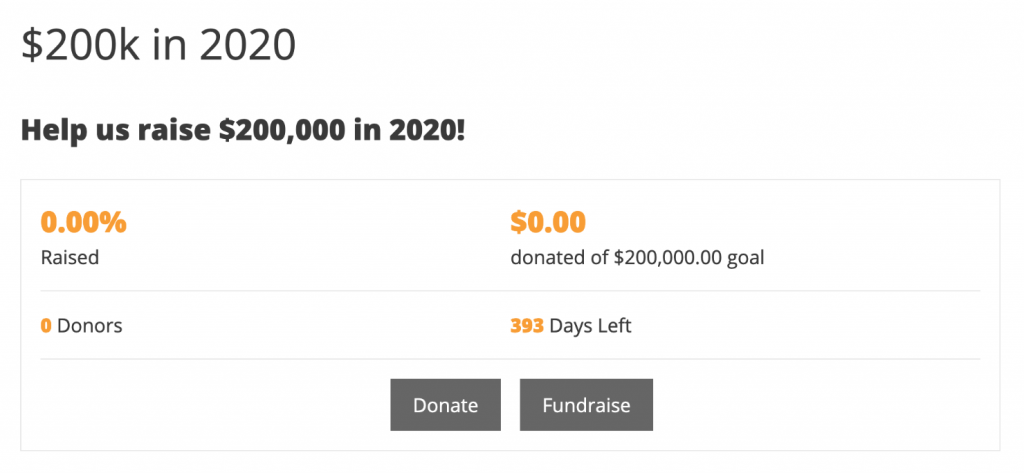
Avec Ambassadors 2.0, vous pouvez créer des campagnes de haut niveau pour lesquelles les gens peuvent collecter des fonds.
Au lieu de seulement pouvoir soutenir votre campagne en faisant un don, vos supporters peuvent créer une collecte de fonds pour votre campagne.
Vos supporters obtiennent leur propre page de collecte de fonds, qu'ils peuvent partager avec leur réseau. Un don à leur collecte de fonds sera automatiquement comptabilisé dans les statistiques de collecte de fonds de votre campagne.
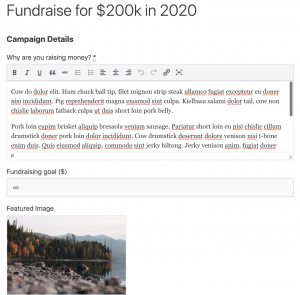
En tant qu'organisation à but non lucratif, vous pouvez ajuster la quantité (ou la quantité minimale) que le collecteur de fonds doit faire pour configurer sa page de collecte de fonds. Vous pouvez leur fournir un texte par défaut et une image mise en avant pour leur page de collecte de fonds, et décider s'ils peuvent définir des éléments tels qu'un titre ou un objectif.
Le résultat final est que vos supporters ont un parcours beaucoup plus rapide pour créer leur collecte de fonds.
Moins de friction signifie que vous finissez par avoir plus de collectes de fonds, une portée plus large et plus de dons. Gagnant, gagnant, gagnant.
Développez votre réseau de manière exponentielle avec des équipes de collecte de fonds
Quoi de mieux que de faire créer une nouvelle collecte de fonds par quelqu'un ? Quelqu'un qui en crée une pour lui-même et pour tous ses amis !
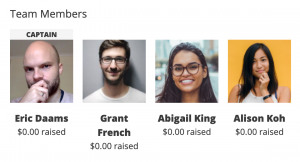
C'est la puissance de la collecte de fonds en équipe. Au lieu de créer une collecte de fonds juste pour eux-mêmes, votre supporter peut maintenant démarrer sa propre équipe de collecte de fonds, et cela demande un peu plus de travail que de créer une campagne individuelle.
Votre supporter donne un nom à son équipe, puis ajoute autant de membres que souhaité. Une fois qu'il soumet son équipe, Charitable envoie à chacun de ces membres un e-mail leur demandant de confirmer qu'ils souhaitent rejoindre l'équipe.
Pour les membres de l'équipe, il suffit de deux clics et c'est fait — Charitable s'occupe du reste.
Envie d'essayer ? Essayez de configurer une collecte de fonds sur notre démo.
Utilisez le marketing par e-mail pour vous connecter (et vous reconnecter) avec vos supporters
Bien sûr, développer un réseau de supporters est fantastique. Mais se connecter avec eux par marketing par e-mail est essentiel pour les maintenir investis dans le travail de votre organisation à long terme.
En combinant Ambassadors avec notre extension Newsletter Connect, vous pouvez facilement commencer à ajouter des créateurs de campagnes à votre liste de diffusion.
Pour garder les choses organisées, vous pouvez les ajouter à une liste spécifique réservée aux créateurs de campagnes. En plus de vous donner la possibilité de personnaliser vos e-mails pour eux, cela signifie également que vous pouvez les intégrer dans une campagne d'automatisation d'e-mails.
Par exemple, vous pouvez envoyer à vos créateurs de campagnes une série d'e-mails automatisés les guidant dans les étapes pour mener une collecte de fonds réussie.
Plus d'e-mails pour vos créateurs de campagnes
En plus d'ouvrir toutes les possibilités du marketing par e-mail à vos créateurs de campagnes, nous avons également ajouté une série d'e-mails intégrés que vous pouvez utiliser pour communiquer avec les créateurs de campagnes après qu'ils aient ajouté leur campagne.
Vous pouvez leur envoyer un e-mail automatiquement lorsqu'ils soumettent leur campagne pour la première fois, lorsque leur campagne est approuvée, lorsqu'elle est sur le point de se terminer et après qu'elle soit terminée, ainsi que des e-mails chaque fois que quelqu'un fait un don à leur campagne.
Comme pour tous les e-mails intégrés à Charitable, vous pouvez contrôler le texte et l'objet de chaque e-mail, et nous fournissons une série de variables que vous pouvez utiliser pour personnaliser et affiner vos e-mails.
Personnalisez le formulaire de campagne selon vos besoins
Certains produits proposent une multitude d'options à leurs utilisateurs, au nom de la flexibilité. Malheureusement, cela peut créer un désordre déroutant.
Avec Charitable, nous nous concentrons sur la simplicité pour les utilisateurs. Mais parfois, nous découvrons que donner un peu plus de choix à l'administrateur du site aide à offrir une meilleure expérience aux utilisateurs.
Le formulaire de création de campagne était un domaine clé où nous pensions que les utilisateurs bénéficieraient de plus de choix, nous avons donc ajouté un ensemble d'options pour personnaliser différents aspects du formulaire, vous permettant d'accomplir facilement des choses qui auraient auparavant nécessité du code personnalisé.
Cela signifie que vous pouvez désormais contrôler facilement comment les créateurs de campagnes choisissent la catégorie/l'étiquette de leur campagne, comment ils définissent une date de fin, et s'ils peuvent ajouter leurs propres options de don suggérées.
Juste les notes de publication…
En un coup d'œil, voici tout ce qui est nouveau dans Ambassadors 2.0.
- Collectes de fonds ! Les collectes de fonds sont un type spécial de campagne créé pour collecter des fonds pour une campagne existante. Cette fonctionnalité vous permet de créer des campagnes parentales pour lesquelles les gens peuvent collecter des fonds. Vous pouvez créer autant de campagnes parentales que vous le souhaitez. Le formulaire de collecte de fonds est une version simplifiée du formulaire de campagne front-end.
- Équipes ! Lors de la configuration d'une nouvelle collecte de fonds, vos créateurs de campagnes peuvent créer des équipes et rejoindre d'autres équipes.
- Marketing par e-mail ! Vous pouvez désormais ajouter automatiquement les créateurs de campagnes à votre liste de diffusion. Cette fonctionnalité nécessite Newsletter Connect et utilise la fonctionnalité « consentement de contact » dans Charitable.
- Ajustez le formulaire de campagne avec de nouveaux paramètres d'administration. Ajustez facilement la façon dont les créateurs de campagnes sélectionnent les catégories ou les étiquettes pour leurs campagnes, comment ils définissent une date de fin, et s'ils peuvent fournir leurs propres options de don suggérées.
- Plus d'e-mails : De nouveaux e-mails sont disponibles pour être envoyés aux créateurs de campagnes lorsque leur campagne est approuvée, lorsqu'elle est terminée ou lorsqu'elle nécessite une action avant d'être publiée (c'est-à-dire qu'ils doivent se connecter, s'inscrire ou vérifier leur adresse e-mail). L'administrateur peut également recevoir un e-mail lorsqu'une campagne nécessite encore une action de la part de son créateur.
- Résolu un problème de longue date empêchant les utilisateurs non connectés de créer une campagne. Vous pouvez désormais configurer le processus de création de campagne pour exiger que les utilisateurs créent un compte avant de soumettre leur campagne, ou après. Lorsqu'un créateur de campagne soumet une campagne sans être connecté, il sera invité à se connecter, à s'inscrire et/ou à vérifier son adresse e-mail après avoir soumis sa campagne de collecte de fonds.
- Beaucoup plus de corrections de bugs !
- Traduction néerlandaise ajoutée.
Prêt à utiliser la collecte de fonds pair à pair pour votre organisation à but non lucratif ?
Avec Ambassadeurs 2.0, Charitable aidera votre organisation à but non lucratif à collecter plus d'argent grâce à la collecte de fonds pair à pair. Et nous le faisons sans le prix exorbitant qui accompagne normalement ce type de fonctionnalité, afin que votre organisation à but non lucratif puisse collecter plus d'argent tout en dépensant moins.
Prêt à plonger ?
Commencez à collecter des dons avec WordPress dès aujourd'hui
Rejoignez plus de 10 000 organisations à but non lucratif qui collectent plus d'argent en ligne avec Charitable.





Laisser un commentaire