
Do you want to embed a donation form in a page?
When you create a donation campaign, Charitable makes it easy to add a simple donation form for that campaign anywhere on your site. This lets you show a simple donation form instead of a full-fledged fundraiser campaign.
Step 1: Create a Fundraiser Campaign
Head over to your WordPress dashboard, and go to Charitable » Add New. Here, you can choose a template and customize your campaign using the drag and drop builder.
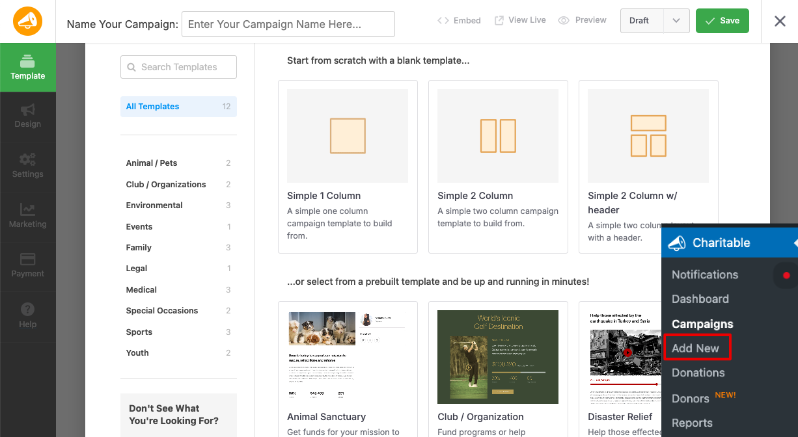
Make sure you publish and save your campaign.
If you need more detailed instructions, follow our guide on how to create your first campaign »
Step 2: Get Your Campaign ID
When you create a campaign, Charitable will assign a campaign ID to it. We’ve made this ID easily accessible in Charitable in 2 places.
1. Embed Wizard
Inside the campaign builder, make sure you Publish and Save your campaign in the top menu. Then there’s an Embed button which you can use to open the Embed Wizard.
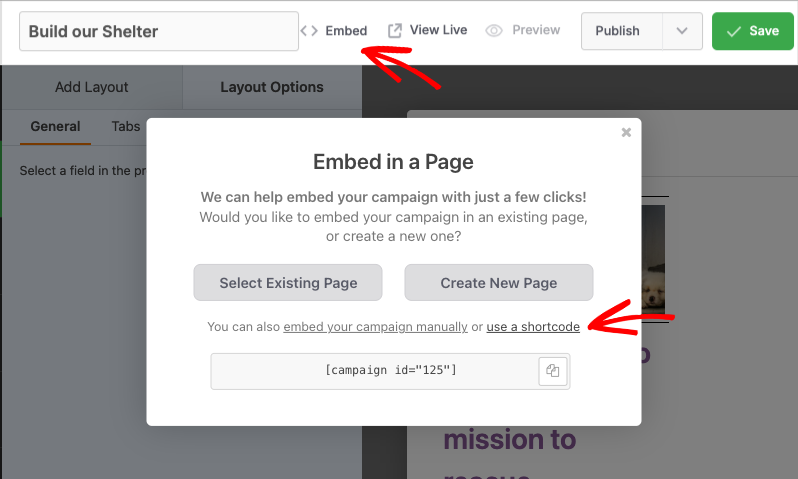
Click on the ‘Use a shortcode” link and the campaign ID will appear.
2. Campaigns Tab
You can also find the campaign ID by going to Charitable » Campaigns. You will see the ID listed below the campaign name.
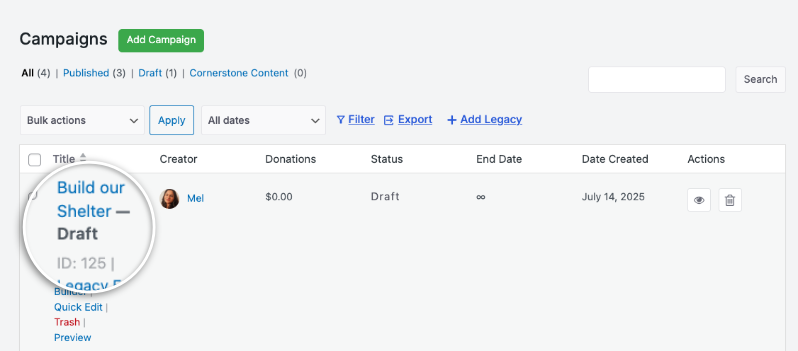
Now that you have your campaign ID, all that’s left to do is add it where you want it to appear.
Step 3: Add the Shortcode to the Post or Page
Edit the page or post in your WordPress site where you want to place the donation form.
Now you can add your donation form using this shortcode:
[charitable_donation_form campaign_id=123]
Replace ‘123’ with the ID of your campaign.
That’s it. You now have a simple donation form that you can share with your donors.
Not yet created your donation form? Watch how to create a donation form in Charitable here:
Want to change the donation form template on your site? Follow this guide: How to Switch Donation Form Templates »
Fundraising Tips and Advice
Compartimos regularmente guías prácticas, estrategias probadas y consejos de expertos para ayudarte a recaudar más fondos y construir relaciones más sólidas con los donantes. Únete a miles de organizaciones sin fines de lucro que reciben nuestro mejor contenido directamente:
- Únase a nuestro boletín – Reciba consejos semanales y guías exclusivas en su bandeja de entrada
- Suscríbase a nuestro canal de YouTube – Vea tutoriales paso a paso e historias de éxito
- Síganos en LinkedIn – Conéctese con nuestra comunidad y obtenga información diaria sobre organizaciones sin fines de lucro
- Síganos en TikTok – Vídeos informativos y divertidos para ayudarle a hacer crecer su causa
- Síguenos en Instagram – Reels divertidos y consejos para organizaciones sin ánimo de lucro
FAQs for Charitable Donation Form Templates
What are the available donation form templates in Charitable?
In Charitable, you can choose between two premade donation form templates: the Standard template and the Minimal view template. To switch templates, navigate to the WordPress dashboard and go to Charitable » Settings. Under the General tab, open the Donation Form page, and use the Form Template dropdown menu to select your desired template.
ilde{1}Puedo personalizar la apariencia de mis formularios de donaci ilde{³}n?
Yes. You can customize colors, form templates (standard or minimal), and field display options. You can also use custom CSS and code snippets.
Hice cambios en la configuraci ilde{³}n pero no se reflejan. ilde{1}Qu ilde{n} debo hacer?
Haz siempre clic en "Guardar Cambios" despu ilde{n}s de realizar cualquier modificaci ilde{³}n. Si los cambios a ilde{1}n no aparecen, intenta borrar la cach ilde{n} de tu sitio web si est ilde{1}s usando un plugin de cach ilde{n}.
¿Cuál es la diferencia entre mostrar los formularios de donación "en la misma página" y "en una página separada"?
- Misma página: El formulario de donación aparece directamente en tu página de campaña
- Página separada: Los donantes son redirigidos a una página de donación dedicada
- Modal: El formulario aparece en una ventana emergente
Elige según tu preferencia de experiencia de usuario y diseño de página.
Soy completamente nuevo en Charitable. ¿Por dónde debo empezar?
Follow this Getting Started guide here and start with the Setup Wizard that appears when you first install Charitable. It takes about 5 minutes and will guide you through the essential configuration steps including payment setup and creating your first campaign. If you missed the wizard, you can access all these settings manually through Charitable » Settings.
¿Dónde puedo obtener ayuda si tengo problemas?
- Usuarios gratuitos: Utiliza los foros de soporte de WordPress.org
- Usuarios Pro: Ponte en contacto directamente con el soporte para recibir asistencia prioritaria
- Documentación: Consulta la completa biblioteca de documentación
- Comunidad: Únete al boletín y sigue los canales sociales para obtener consejos y actualizaciones
¿Hay tutoriales en vídeo disponibles?
¡Sí! Suscríbete al canal de YouTube de Charitable para obtener tutoriales paso a paso e historias de éxito.
We hope these FAQs help!
Need support? Have a question? If you are a lite/free user of Charitable, you can reach out to our team on the WordPress.org support forums and our team will respond in a timely fashion. If you have an active license, feel free to reach out us directly for priority support.
You may also want to learn How to Use the Donor Management System »


