
Si vous menez de nombreuses campagnes, vous pourriez avoir besoin d'ajouter du texte spécifique à une campagne à vos e-mails de reçu de don. Charitable ne prend pas en charge cela nativement, mais grâce à la flexibilité du code sous-jacent, il est possible de l'activer.
La solution
Pour résoudre ce problème, nous allons ajouter un nouveau champ à l'éditeur de campagne dans le tableau de bord WordPress. Ce champ vous permettra d'ajouter du contenu.
De plus, nous ajouterons une nouvelle balise d'e-mail qui pourra être ajoutée à n'importe quel e-mail de don, y compris le reçu de don.
Mieux encore, nous pouvons réaliser tout cela avec seulement deux fonctions PHP ! Voyons comment.
Étape 1 : Ajouter notre fonction
Tout d'abord, nous allons ajouter une fonction PHP qui sera exécutée lorsque le hook init sera appelé dans WordPress. init est un hook qui se produit tôt pendant le chargement de WordPress, avant que la page ne commence à s'afficher.
add_action( 'init', function() {
    // Our code will go in here.
} );
Notez que dans cet exemple, nous créons ce que l'on appelle une fonction anonyme ; essentiellement, il s'agit d'une fonction sans nom. C'est acceptable tant que vous utilisez une version de PHP supérieure à 5.2.
Vous ne savez pas comment ajouter du code à votre site ? Voici notre résumé de trois méthodes différentes pour ajouter du code personnalisé à votre site.
Étape 2 : Ajouter le champ à l'éditeur de campagne
Depuis la version 1.6, Charitable inclut une API appelée Campaign Fields API qui offre un moyen simple d'ajouter de nouveaux champs à l'éditeur de campagne. Ceci fait suite à la Donation Fields API que nous avons ajoutée dans la version 1.5.
Notre prochaine étape consiste à utiliser la Campaign Fields API pour ajouter notre champ personnalisé à l'éditeur de campagne :
add_action( 'init', function() {

    /**
     * Create a new field as an instance of `Charitable_Campaign_Field`.
     *
     * See all available arguments at:
     *
     * @https://github.com/Charitable/Charitable/blob/ef9a468fbdd6fa83307abe6ac0c38896f625cf45/includes/fields/class-charitable-campaign-field.php
    */
    $campaign_field = new Charitable_Campaign_Field( 'campaign_email_content', array(
       'label' => 'Donation Email Content',
       'data_type' => 'meta',
       'admin_form' => array(
          'type' => 'textarea',
          'required' => false,
       ),
   ) );

    /**
     * Now, we register our new field.
     */
    charitable()->campaign_fields()->register_field( $campaign_field );

} );
Dans ce code, nous créons d'abord un nouveau champ en créant un objet Charitable_Campaign_Field. Nous passons deux paramètres lors de la création de cet objet :
– Une clé – campaign_email_content
– Un tableau d'arguments
Nous n'utilisons qu'un sous-ensemble de tous les arguments possibles lors de l'enregistrement d'un champ de campagne. Pour voir les autres arguments disponibles, lisez la documentation exhaustive en ligne sur Github.
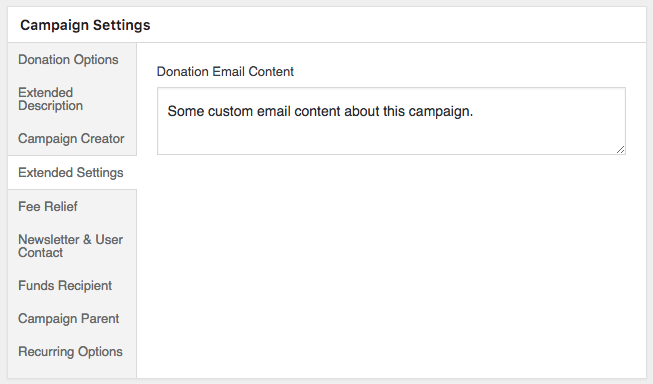
Si nous allons ajouter une nouvelle campagne ou en modifier une existante, nous verrons maintenant un panneau « Paramètres étendus », et à l'intérieur se trouve un champ « Contenu de l'e-mail de don ».
Étape 3 : Ajouter une balise d'e-mail de don
Maintenant que notre champ de campagne est en place, l'étape suivante consiste à créer une nouvelle balise d'e-mail pour les dons. Il y a plusieurs façons de le faire. Une option consiste à utiliser la Donation Fields API pour enregistrer un nouveau champ de don et ajouter automatiquement une balise d'e-mail pour celui-ci. Ce serait approprié si nous voulons utiliser le champ dans plusieurs endroits, comme l'exportation des dons ou dans les métadonnées du don.
Dans notre cas, nous voulons juste une balise d'e-mail, nous allons donc enregistrer uniquement cela. La première étape consiste à créer une nouvelle fonction qui sera appelée sur le hook de filtre charitable_email_donation_fields :
/**
 * We create a new function that will be called on the `charitable_email_donation_fields` filter.
 *
 * This function accepts two parameters:
 *
 * @param array $fields All registered donation email fields.
 * @param Charitable_Donation|null $donation When an email is being sent, this will be an instance of `Charitable_Donation`. Otherwise it's null.
 */
add_filter( 'charitable_email_donation_fields', function( $fields, $donation ) {
    Add our field here.
}, 10, 2 );
Comme pour notre fonction ci-dessus, il s'agit d'une fonction anonyme. Mais celle-ci accepte quelques paramètres. Puisque nous voulons utiliser deux paramètres, nous devons le spécifier dans la dernière ligne de code, où nous passons une priorité de 10 et le nombre de paramètres, 2.
Ensuite, nous allons créer une variable dans notre fonction appelée $field qui définira le champ.
/**
 * Define our field as an array.
 */
$field = array(
    'description' => 'Campaign-specific content',
    'preview' => 'This is some campaign-specific content.',
);
Jusqu'à présent, cela définit uniquement une description et une valeur de prévisualisation uniquement pour le champ. La valeur de prévisualisation est ce que vous voyez à la place du shortcode d'e-mail lorsque vous cliquez sur le bouton « Prévisualiser l'e-mail » dans l'e-mail.
Notre prochaine étape consiste à obtenir la valeur à afficher lorsqu'un e-mail est envoyé :
/**
 * When this filter is called with a Donation object, we need to set
 * the `value` of the field to the campaign content. The rest of the
 * time, we don't need a `value` parameter.
 */
if ( ! is_null( $donation ) ) {
    /**
     * Get the campaign that received the donation.
     */
    $campaign_id = current( $donation->get_campaign_donations() )->campaign_id;
    $campaign = charitable_get_campaign( $campaign_id );

    /**
     * Set the `value` of our field to the campaign's email content.
     */
    $field['value'] = $campaign->get( 'campaign_email_content' );
}
Dans ce code, nous vérifions d'abord si le paramètre $donation est null. Nous devons vérifier cela car ce filtre (charitable_email_donation_fields) n'est pas seulement appelé lorsqu'un e-mail de don est envoyé ; il est également appelé à d'autres moments. Par exemple, lorsque vous affichez la page des paramètres d'e-mail pour l'e-mail de reçu de don, ce filtre est appelé pour obtenir une liste complète des champs d'e-mail de don.
Lorsque nous savons que $donation n'est pas null, nous pouvons obtenir l'ID de la campagne en utilisant la méthode $donation->get_campaign_donations(), qui nous donne un ensemble de lignes contenant toutes les donations de campagne associées à une donation particulière. Sauf si vous créez des dons par programmation ou si vous utilisez notre intégration Easy Digital Downloads Connect, il n'y aura qu'une seule ligne. Nous obtenons donc la première ligne en utilisant current(), puis nous en obtenons la propriété campaign_id.
$campaign_id = current( $donation->get_campaign_donations() )->campaign_id;
Avec $campaign_id en main, nous pouvons appeler charitable_get_campaign( $campaign_id ) pour obtenir l'objet Charitable_Campaign.
$campaign = charitable_get_campaign( $campaign_id );
À son tour, nous définissons la propriété value de notre champ sur la valeur du champ campaign_email_content de la campagne — celui que nous avons enregistré à l'étape 2 ci-dessus.
$field['value'] = $campaign->get( 'campaign_email_content' );
Enfin, nous ajoutons notre champ au tableau $fields et retournons $fields, avec notre champ personnalisé inclus.
$fields['campaign_content'] = $field;

return $fields;
Étape 4 : Ajouter le shortcode au contenu de l'e-mail
Si vous avez suivi jusqu'ici, vous devriez maintenant avoir tout le code suivant :
/**
 * We are creating a function which will be called on the `init` hook.
 */
add_action( 'init', function() {

	/**
	 * Create a new field as an instance of `Charitable_Campaign_Field`.
	 *
	 * See all available arguments at:
	 *
	 * @https://github.com/Charitable/Charitable/blob/ef9a468fbdd6fa83307abe6ac0c38896f625cf45/includes/fields/class-charitable-campaign-field.php
	 */
	$campaign_field = new Charitable_Campaign_Field( 'campaign_email_content', array(
		'label'      => 'Donation Email Content',
		'data_type'  => 'meta',
		'admin_form' => array(
			'type'     => 'textarea',
			'required' => false,
		),
	) );

	/**
	 * Now, we register our new field.
	 */
	charitable()->campaign_fields()->register_field( $campaign_field );

} );

/**
 * We create a new function that will be called on the `charitable_email_donation_fields` filter.
 *
 * This function accepts two parameters and must return an array.
 *
 * @param array                    $fields   All registered donation email fields.
 * @param Charitable_Donation|null $donation When an email is being sent, this will be an instance of `Charitable_Donation`. Otherwise it's null.
 */
add_filter( 'charitable_email_donation_fields', function( $fields, $donation ) {
	/**
	 * Define our field as an array.
	 */
	$field = array(
		'description' => 'Campaign-specific content',
		'preview'     => 'This is some campaign-specific content.',
	);

	/**
	 * When this filter is called with a Donation object, we need to set
	 * the `value` of the field to the campaign content. The rest of the
	 * time, we don't need a `value` parameter.
	 */
	if ( ! is_null( $donation ) ) {
		/**
		 * Get the campaign that received the donation.
		 */
		$campaign_id = current( $donation->get_campaign_donations() )->campaign_id;
		$campaign    = charitable_get_campaign( $campaign_id );

		/**
		 * Set the `value` of our field to the campaign's email content.
		 */
		$field['value'] = $campaign->get( 'campaign_email_content' );
	}

	/**
	 * Finally, we add our new field to the `$fields` array.
	 *
	 * The key used here (`campaign_content`) will become the email tag
	 * key, so the email tag would be shown like this:
	 *
	 * [charitable_email show=campaign_content]
	 */
	$fields['campaign_content'] = $field;

	return $fields;

}, 10, 2 );
Il n'y a que deux fonctions incluses ici, mais ensemble, elles font tout ce dont nous avons besoin.
La dernière étape consiste à ajouter le shortcode de l'e-mail au corps de l'e-mail, ce qui peut être fait dans la zone des paramètres d'e-mail :
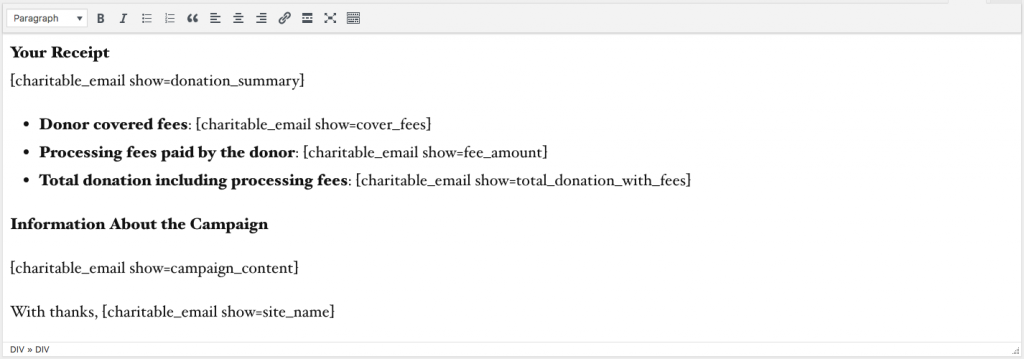
Une fois que vous avez fait cela, testez tout en modifiant l'une de vos campagnes, en définissant un contenu de campagne, puis en ajoutant un don de test à la campagne. L'e-mail devrait contenir votre contenu personnalisé spécifique à la campagne.
Astuce bonus : Ajouter une balise d'e-mail Easy Digital Downloads
Si vous utilisez notre extension Easy Digital Downloads Connect et que vous souhaitez afficher votre contenu spécifique à la campagne dans les e-mails d'achat d'EDD, vous pouvez copier le code de ce gist :
Voir le gist original sur GitHub →
Vous avez apprécié ?
Je prévois d'écrire d'autres tutoriels comme celui-ci pour illustrer différentes façons de personnaliser et d'affiner Charitable pour répondre à vos besoins. Ce tutoriel en particulier a été écrit en réponse à la demande d'un utilisateur, donc si vous avez une idée de sujet que vous aimeriez que je couvre à l'avenir, envoyez-nous un e-mail via notre page de support ou laissez un commentaire ci-dessous.






Laisser un commentaire