
Establecer una cantidad mínima de donación en Charitable te ayuda a asegurarte de que cada donación sea lo suficientemente grande como para apoyar tus objetivos de recaudación de fondos.
De esta manera, evitas pagos muy pequeños que podrían costar demasiado en comisiones de procesamiento y mantienes tu campaña funcionando sin problemas. Esto también ayuda a evitar confusiones durante el proceso de pago y mantiene tu recaudación de fondos fluida al detener pagos que son demasiado pequeños para procesar de manera rentable.
Tabla de Contenidos
Establecer una cantidad mínima de donación
Establecer una cantidad mínima de donación es fácil con Charitable. Con solo unos pocos clics, puedes crear tu campaña, ir a la configuración de donaciones y establecer la cantidad mínima que los donantes deben dar. Esta sencilla función ayuda a garantizar que cada donación apoye tus objetivos, manteniendo tu proceso de recaudación de fondos fluido y eficiente.
Si aún no has configurado Charitable, sigue esta guía: Empezar con Charitable »
Paso 1: Crear una campaña
Para establecer una cantidad mínima de donación en Charitable, primero crea una campaña yendo a Charitable » Añadir nueva y elige una plantilla. Esto abre el constructor de campañas para que puedas personalizarla.
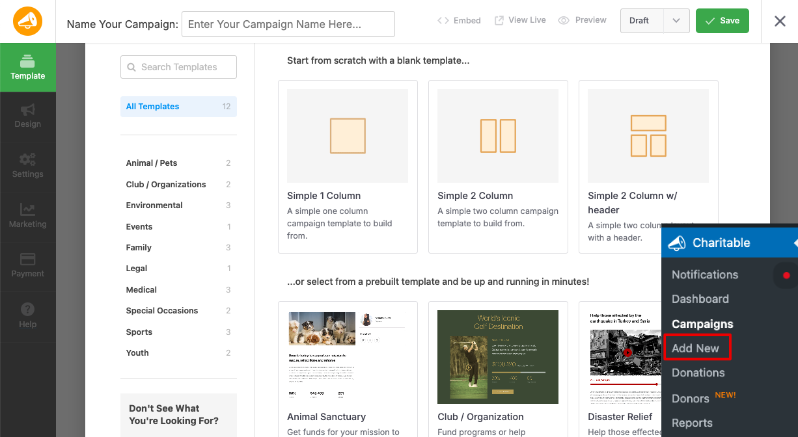
¿No estás seguro de cómo crear una campaña? Consulta nuestra guía: Cómo crear tu primera campaña »
Paso 2: Establecer opciones de donación
A continuación, ve a la pestaña Configuración en el menú de la izquierda y abre Opciones de donación.

Aquí, puedes establecer cantidades de donación sugeridas, como 5 €, 10 € o 25 €, lo que facilita que los donantes elijan una cantidad.
Justo debajo de esto, encontrarás la opción para establecer una cantidad mínima de donación: escribe tu mínimo preferido, como 5 € o 100 €, según lo que tenga sentido para tu recaudación de fondos.
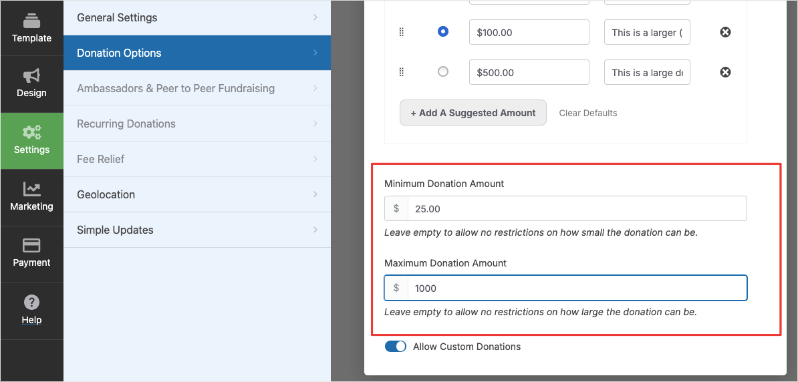
También puedes habilitar cantidades de donación personalizadas para que los donantes puedan escribir sus propios números por encima de tu mínimo.
Paso 3: Publicar tu campaña
Finalmente, guarda y publica tu campaña. Ahora, cuando un donante intente hacer una donación por una cantidad menor, verá un cuadro de alerta como este:
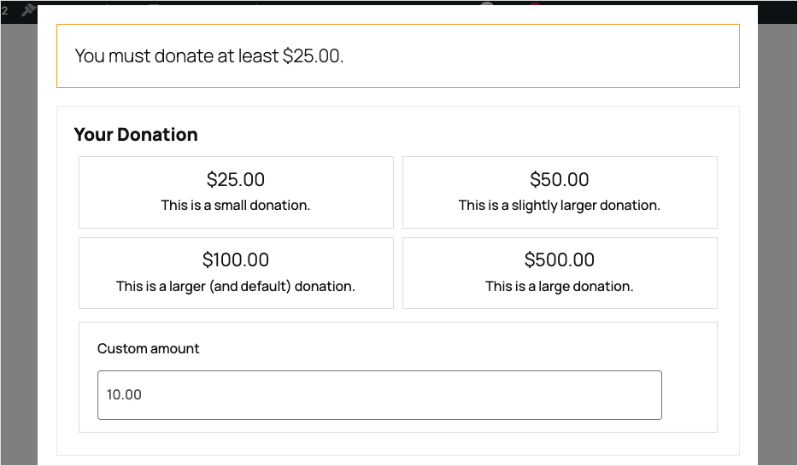
Esto proporciona a los donantes un mensaje claro en el formulario de tu campaña, haciéndoles saber la cantidad mínima que pueden dar.
Establecer la cantidad mínima de donación con shortcodes
Por defecto, Charitable aceptará cualquier donación superior a 0 €.
Puedes personalizar la cantidad mínima de donación con un poco de código, usando el filtro charitable_minimum_donation_amount :
add_filter( 'charitable_minimum_donation_amount', function() {
    return 2;
} );
El código anterior establece una cantidad mínima de donación de 2 €; se aceptará cualquier donación de 2 € o más.
Permitir donaciones de 0 €
Como se mencionó anteriormente, Charitable, por defecto, permitirá cualquier donación superior a 0 €.
Si deseas permitir también donaciones de 0 €, puedes usar el filtro charitable_permit_0_donation:
add_filter( 'charitable_permit_0_donation', '__return_true' );
Permitir donaciones de 0 € con el filtro charitable_permit_0_donation es útil para organizaciones que desean que los simpatizantes muestren interés, prometan apoyo o se unan a una campaña sin dar dinero de inmediato.
A veces, las campañas sin ánimo de lucro se centran en recopilar firmas, inscripciones de voluntarios u otras acciones que no son estrictamente de dinero, por lo que esta opción facilita que las personas participen con una donación “simbólica”.
También puede ayudar a rastrear la participación o permitir a los donantes probar el proceso de donación sin ningún compromiso financiero antes de hacer una contribución real.
¿Interesado en potenciar tu recaudación de fondos con funciones diseñadas para ayudarte a crecer? Actualiza a Charitable Pro para obtener herramientas como donaciones recurrentes, gestión avanzada de donantes, campañas de persona a persona e informes detallados para desbloquear todo el potencial de tu organización sin ánimo de lucro.


