
Si ejecutas muchas campañas, es posible que necesites añadir texto específico de la campaña a tus correos electrónicos de recibo de donación. Charitable no lo soporta de forma nativa, pero gracias a la flexibilidad del código subyacente, es posible habilitarlo.
La Solución
Para resolver este problema, vamos a añadir un nuevo campo al editor de Campaña en el panel de administración de WordPress. Este campo te permitirá añadir contenido.
Además, añadiremos una nueva etiqueta de correo electrónico que se puede incluir en cualquier correo de donación, incluido el Recibo de Donación.
Lo mejor de todo es que podemos lograr todo esto con solo dos funciones PHP. Veamos cómo.
Paso 1: Añadir nuestra función
En primer lugar, vamos a añadir una función PHP que se ejecutará cuando se llame al hook init dentro de WordPress. init es un hook que ocurre al principio mientras WordPress se está cargando, antes de que la página haya comenzado a renderizarse.
add_action( 'init', function() {
    // Our code will go in here.
} );
Ten en cuenta que en este ejemplo estamos creando lo que se conoce como una función anónima; esencialmente, es una función sin nombre. Esto está bien siempre que estés en una versión de PHP superior a la 5.2.
¿No estás seguro de cómo añadir código a tu sitio? Aquí tienes nuestro resumen de tres formas diferentes en las que puedes añadir código personalizado a tu sitio.
Paso 2: Añadir el campo al editor de Campaña
Desde la versión 1.6, Charitable ha incluido una API llamada Campaign Fields API que proporciona una forma fácil de añadir nuevos campos al editor de Campaña. Esto siguió a la Donation Fields API que añadimos en la versión 1.5.
Nuestro siguiente paso es usar la Campaign Fields API para añadir nuestro campo personalizado al editor de Campaña:
add_action( 'init', function() {

    /**
     * Create a new field as an instance of `Charitable_Campaign_Field`.
     *
     * See all available arguments at:
     *
     * @https://github.com/Charitable/Charitable/blob/ef9a468fbdd6fa83307abe6ac0c38896f625cf45/includes/fields/class-charitable-campaign-field.php
    */
    $campaign_field = new Charitable_Campaign_Field( 'campaign_email_content', array(
       'label' => 'Donation Email Content',
       'data_type' => 'meta',
       'admin_form' => array(
          'type' => 'textarea',
          'required' => false,
       ),
   ) );

    /**
     * Now, we register our new field.
     */
    charitable()->campaign_fields()->register_field( $campaign_field );

} );
En este código, primero creamos un nuevo campo creando un objeto Charitable_Campaign_Field. Pasamos dos parámetros al crear este objeto:
– Una clave – campaign_email_content
– Un array de argumentos
Solo estamos utilizando un subconjunto de todos los argumentos posibles al registrar un campo de campaña. Para ver otros argumentos disponibles, lee la documentación exhaustiva en línea en Github.
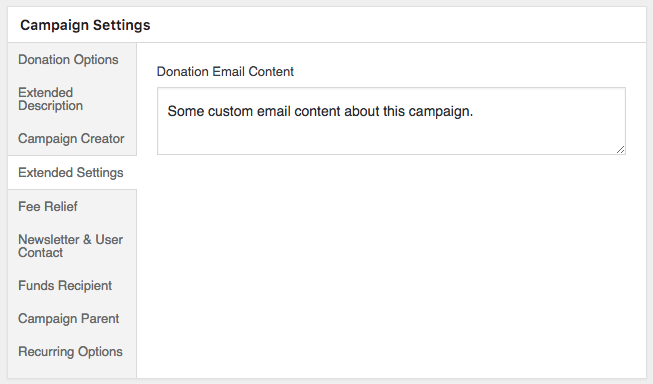
Si vamos a añadir una nueva campaña o editar una existente, ahora veremos un panel de "Configuración Ampliada" y, dentro de él, un campo de "Contenido del Correo de Donación".
Paso 3: Añadir una etiqueta de correo de donación
Ahora que tenemos nuestro campo de campaña en su lugar, el siguiente paso es crear una nueva etiqueta de correo para las donaciones. Hay varias formas de hacerlo. Una opción es usar la Donation Fields API para registrar un nuevo campo de donación y añadir automáticamente una etiqueta de correo para él. Esto sería apropiado si queremos usar el campo en varios lugares, como la exportación de donaciones o dentro de los metadatos de la donación.
En nuestro caso, solo queremos una etiqueta de correo, así que registraremos solo eso. El primer paso es crear una nueva función que se llamará en el hook de filtro charitable_email_donation_fields:
/**
 * We create a new function that will be called on the `charitable_email_donation_fields` filter.
 *
 * This function accepts two parameters:
 *
 * @param array $fields All registered donation email fields.
 * @param Charitable_Donation|null $donation When an email is being sent, this will be an instance of `Charitable_Donation`. Otherwise it's null.
 */
add_filter( 'charitable_email_donation_fields', function( $fields, $donation ) {
    Add our field here.
}, 10, 2 );
Al igual que con nuestra función anterior, esta es una función anónima. Pero esta acepta un par de parámetros. Dado que queremos usar dos parámetros, debemos especificarlo en la última línea de código, donde pasamos una prioridad de 10 y el número de parámetros, 2.
A continuación, crearemos una variable en nuestra función llamada $field que definirá el campo.
/**
 * Define our field as an array.
 */
$field = array(
    'description' => 'Campaign-specific content',
    'preview' => 'This is some campaign-specific content.',
);
Hasta ahora, esto solo establece una descripción y un valor de solo vista previa para el campo. El valor de vista previa es lo que ves en lugar del código corto del correo electrónico cuando haces clic en el botón "Vista previa del correo electrónico" en el correo electrónico.
Nuestro siguiente paso es obtener el valor a mostrar cuando se envía un correo electrónico:
/**
 * When this filter is called with a Donation object, we need to set
 * the `value` of the field to the campaign content. The rest of the
 * time, we don't need a `value` parameter.
 */
if ( ! is_null( $donation ) ) {
    /**
     * Get the campaign that received the donation.
     */
    $campaign_id = current( $donation->get_campaign_donations() )->campaign_id;
    $campaign = charitable_get_campaign( $campaign_id );

    /**
     * Set the `value` of our field to the campaign's email content.
     */
    $field['value'] = $campaign->get( 'campaign_email_content' );
}
En este código, primero verificamos si el parámetro $donation es null. Tenemos que verificar esto porque este filtro (charitable_email_donation_fields) no solo se llama cuando se envía un correo electrónico de donación; también se llama en otros momentos. Por ejemplo, cuando ve la página de configuración de correo electrónico para el correo electrónico de recibo de donación, este filtro se llama para obtener una lista completa de los campos de correo electrónico de donación.
Cuando sabemos que $donation no es null, podemos obtener el ID de la campaña usando el método $donation->get_campaign_donations(), que nos da un conjunto de filas que tienen todas las donaciones de campaña asociadas con una donación en particular. A menos que esté creando donaciones mediante programación o utilizando nuestra integración Easy Digital Downloads Connect, solo habrá una fila, por lo que obtenemos la primera fila usando current() y luego obtenemos la propiedad campaign_id de ella.
$campaign_id = current( $donation->get_campaign_donations() )->campaign_id;
Con $campaign_id en mano, podemos llamar a charitable_get_campaign( $campaign_id ) para obtener el objeto Charitable_Campaign.
$campaign = charitable_get_campaign( $campaign_id );
A su vez, establecemos la propiedad value de nuestro campo al valor del campo campaign_email_content de la campaña, el que registramos en el Paso 2 anterior.
$field['value'] = $campaign->get( 'campaign_email_content' );
Finalmente, agregamos nuestro campo al array $fields y devolvemos $fields, con nuestro campo personalizado incluido.
$fields['campaign_content'] = $field;

return $fields;
Paso 4: Agregar el código corto al contenido del correo electrónico
Si has estado siguiendo, ahora deberías tener todo el siguiente código:
/**
 * We are creating a function which will be called on the `init` hook.
 */
add_action( 'init', function() {

	/**
	 * Create a new field as an instance of `Charitable_Campaign_Field`.
	 *
	 * See all available arguments at:
	 *
	 * @https://github.com/Charitable/Charitable/blob/ef9a468fbdd6fa83307abe6ac0c38896f625cf45/includes/fields/class-charitable-campaign-field.php
	 */
	$campaign_field = new Charitable_Campaign_Field( 'campaign_email_content', array(
		'label'      => 'Donation Email Content',
		'data_type'  => 'meta',
		'admin_form' => array(
			'type'     => 'textarea',
			'required' => false,
		),
	) );

	/**
	 * Now, we register our new field.
	 */
	charitable()->campaign_fields()->register_field( $campaign_field );

} );

/**
 * We create a new function that will be called on the `charitable_email_donation_fields` filter.
 *
 * This function accepts two parameters and must return an array.
 *
 * @param array                    $fields   All registered donation email fields.
 * @param Charitable_Donation|null $donation When an email is being sent, this will be an instance of `Charitable_Donation`. Otherwise it's null.
 */
add_filter( 'charitable_email_donation_fields', function( $fields, $donation ) {
	/**
	 * Define our field as an array.
	 */
	$field = array(
		'description' => 'Campaign-specific content',
		'preview'     => 'This is some campaign-specific content.',
	);

	/**
	 * When this filter is called with a Donation object, we need to set
	 * the `value` of the field to the campaign content. The rest of the
	 * time, we don't need a `value` parameter.
	 */
	if ( ! is_null( $donation ) ) {
		/**
		 * Get the campaign that received the donation.
		 */
		$campaign_id = current( $donation->get_campaign_donations() )->campaign_id;
		$campaign    = charitable_get_campaign( $campaign_id );

		/**
		 * Set the `value` of our field to the campaign's email content.
		 */
		$field['value'] = $campaign->get( 'campaign_email_content' );
	}

	/**
	 * Finally, we add our new field to the `$fields` array.
	 *
	 * The key used here (`campaign_content`) will become the email tag
	 * key, so the email tag would be shown like this:
	 *
	 * [charitable_email show=campaign_content]
	 */
	$fields['campaign_content'] = $field;

	return $fields;

}, 10, 2 );
Solo hay dos funciones incluidas aquí, pero juntas hacen todo lo que necesitamos que hagan.
El paso final es agregar el código corto del correo electrónico al cuerpo del correo electrónico, lo que se puede hacer en el área de Configuración de correo electrónico:
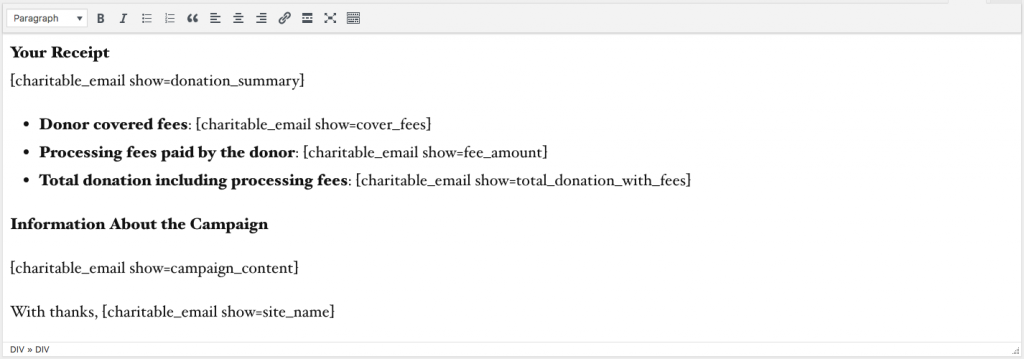
Una vez que hayas hecho esto, prueba todo editando una de tus campañas, estableciendo contenido de campaña y finalmente agregando una donación de prueba a la campaña. El correo electrónico debería contener tu contenido personalizado específico de la campaña.
Consejo extra: Agregar etiqueta de correo electrónico de Easy Digital Downloads
Si estás utilizando nuestra extensión Easy Digital Downloads Connect y deseas mostrar tu contenido específico de la campaña en los correos electrónicos de compra de EDD, puedes incluir el código de este gist:
Ver el gist original en GitHub →
¿Disfrutaste de esto?
Planeo escribir más tutoriales como este para ilustrar diferentes formas en las que puedes personalizar y ajustar Charitable para que se adapte a tus necesidades. Este tutorial en particular se escribió en respuesta a la solicitud de un usuario, así que si tienes una idea para un tema que te encantaría que cubriera en el futuro, envíanos un correo electrónico a través de nuestra página de Soporte o deja un comentario a continuación.






Deja una respuesta