
Do you want to embed a donation form in a page?
When you create a donation campaign, Charitable makes it easy to add a simple donation form for that campaign anywhere on your site. This lets you show a simple donation form instead of a full-fledged fundraiser campaign.
Step 1: Create a Fundraiser Campaign
Head over to your WordPress dashboard, and go to Charitable » Add New. Here, you can choose a template and customize your campaign using the drag and drop builder.
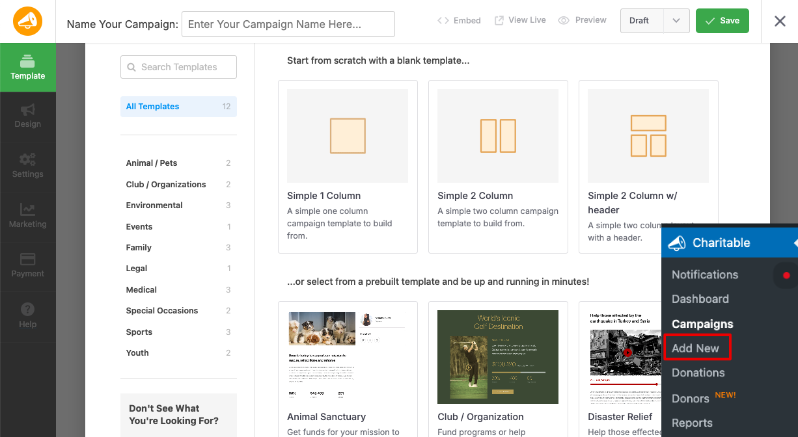
Make sure you publish and save your campaign.
If you need more detailed instructions, follow our guide on how to create your first campaign »
Step 2: Get Your Campaign ID
When you create a campaign, Charitable will assign a campaign ID to it. We’ve made this ID easily accessible in Charitable in 2 places.
1. Embed Wizard
Inside the campaign builder, make sure you Publish and Save your campaign in the top menu. Then there’s an Embed button which you can use to open the Embed Wizard.
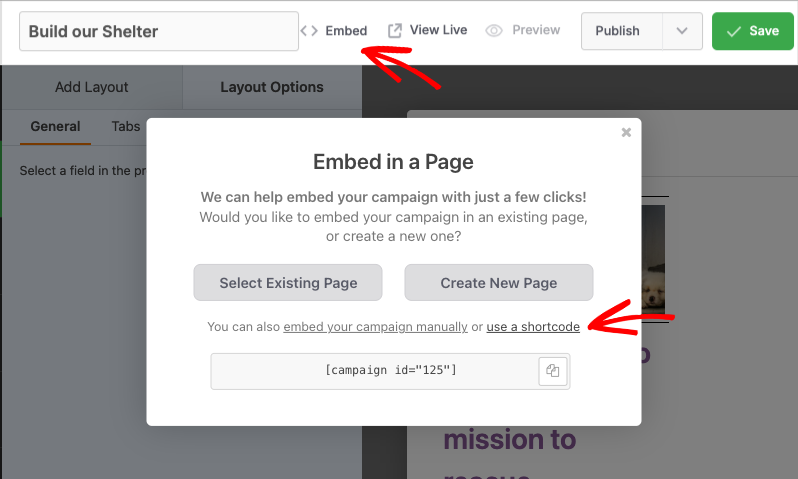
Click on the ‘Use a shortcode” link and the campaign ID will appear.
2. Campaigns Tab
You can also find the campaign ID by going to Charitable » Campaigns. You will see the ID listed below the campaign name.
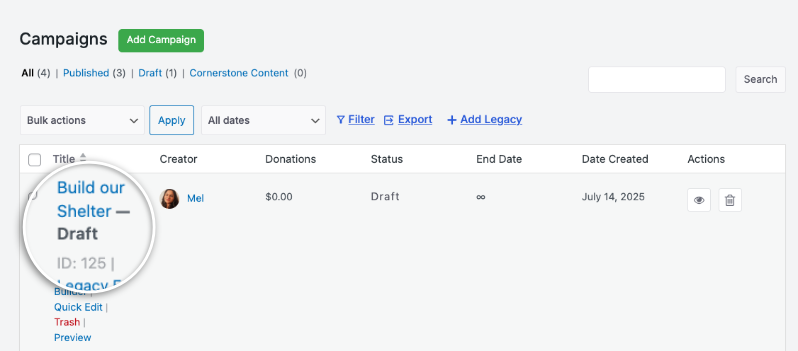
Now that you have your campaign ID, all that’s left to do is add it where you want it to appear.
Step 3: Add the Shortcode to the Post or Page
Edit the page or post in your WordPress site where you want to place the donation form.
Now you can add your donation form using this shortcode:
[charitable_donation_form campaign_id=123]
Replace ‘123’ with the ID of your campaign.
That’s it. You now have a simple donation form that you can share with your donors.
Not yet created your donation form? Watch how to create a donation form in Charitable here:
Want to change the donation form template on your site? Follow this guide: How to Switch Donation Form Templates »
Fundraising Tips and Advice
हम नियमित रूप से व्यावहारिक गाइड, सिद्ध रणनीतियाँ और अंदरूनी युक्तियाँ साझा करते हैं ताकि आप अधिक धन जुटा सकें और मजबूत डोनर संबंध बना सकें। हजारों गैर-लाभकारी संस्थाओं से जुड़ें जिन्हें हमारी सर्वोत्तम सामग्री सीधे उन तक पहुँचाई जाती है:
- हमारे न्यूज़लेटर में शामिल हों – अपने इनबॉक्स में साप्ताहिक युक्तियाँ और विशेष गाइड प्राप्त करें
- हमारे यूट्यूब चैनल को सब्सक्राइब करें – चरण-दर-चरण ट्यूटोरियल और सफलता की कहानियाँ देखें
- लिंक्डइन पर हमें फॉलो करें – हमारे समुदाय से जुड़ें और दैनिक गैर-लाभकारी अंतर्दृष्टि प्राप्त करें
- टिकटॉक पर हमें फॉलो करें – अपने कारण को बढ़ाने में मदद करने के लिए जानकारीपूर्ण और मजेदार वीडियो
- Follow us on Instagram – Fun reels and non-profit tips
FAQs for Charitable Donation Form Templates
What are the available donation form templates in Charitable?
In Charitable, you can choose between two premade donation form templates: the Standard template and the Minimal view template. To switch templates, navigate to the WordPress dashboard and go to Charitable » Settings. Under the General tab, open the Donation Form page, and use the Form Template dropdown menu to select your desired template.
Can I customize the appearance of my donation forms?
Yes. You can customize colors, form templates (standard or minimal), and field display options. You can also use custom CSS and code snippets.
I made changes to settings but they’re not showing up. What should I do?
Always click “Save Changes” after making any modifications. If changes still don’t appear, try clearing your website cache if you’re using a caching plugin.
What’s the difference between displaying donation forms “on the same page” vs “on a separate page”?
- Same page: The donation form appears directly on your campaign page
- Separate page: Donors are redirected to a dedicated donation page
- Modal: The form appears in a popup overlay
Choose based on your preference for user experience and page design.
मैं चैरिटेबल के लिए बिल्कुल नया हूँ। मुझे कहाँ से शुरू करना चाहिए?
Follow this Getting Started guide here and start with the Setup Wizard that appears when you first install Charitable. It takes about 5 minutes and will guide you through the essential configuration steps including payment setup and creating your first campaign. If you missed the wizard, you can access all these settings manually through Charitable » Settings.
यदि मुझे समस्याएँ आती हैं तो मैं सहायता कहाँ से प्राप्त कर सकता हूँ?
- मुफ़्त उपयोगकर्ता: वर्डप्रेस.org सहायता फ़ोरम का उपयोग करें
- प्रो उपयोगकर्ता: प्राथमिकता सहायता के लिए सीधे सहायता से संपर्क करें
- दस्तावेज़ीकरण: व्यापक दस्तावेज़ीकरण पुस्तकालय देखें
- समुदाय: न्यूज़लेटर की सदस्यता लें और युक्तियों और अपडेट के लिए सोशल चैनलों को फॉलो करें
क्या वीडियो ट्यूटोरियल उपलब्ध हैं?
हाँ! Charitable YouTube चैनल की सदस्यता लें स्टेप-बाय-स्टेप ट्यूटोरियल और सफलता की कहानियों के लिए।
We hope these FAQs help!
Need support? Have a question? If you are a lite/free user of Charitable, you can reach out to our team on the WordPress.org support forums and our team will respond in a timely fashion. If you have an active license, feel free to reach out us directly for priority support.
You may also want to learn How to Use the Donor Management System »


