
Getting your payment gateways set up is one of the most important steps in launching your fundraising campaign with Charitable.
In this guide, we’ll walk you through the steps to enable, connect, and configure your payment gateways in Charitable, so you’re ready to start accepting donations right away.
Payment Gateways in Charitable
Charitable supports a wide range of popular gateways so you can offer donors the options they trust and prefer.
Charitable provides four payment gateways out of the box:
In addition, you can purchase gateway extensions for the following payment gateways:
If you’d like a video walkthrough, watch our tutorial below that covers step-by-step details from setting up a campaign to accepting payments.
Below, we’ll show you how to enable and disable gateways as well as set up specific gateways for your site.
How to Enable Payment Gateways
You can enable or disable your payment gateway with just a click. Go to Charitable » Settings and open the Payment Gateways tab.
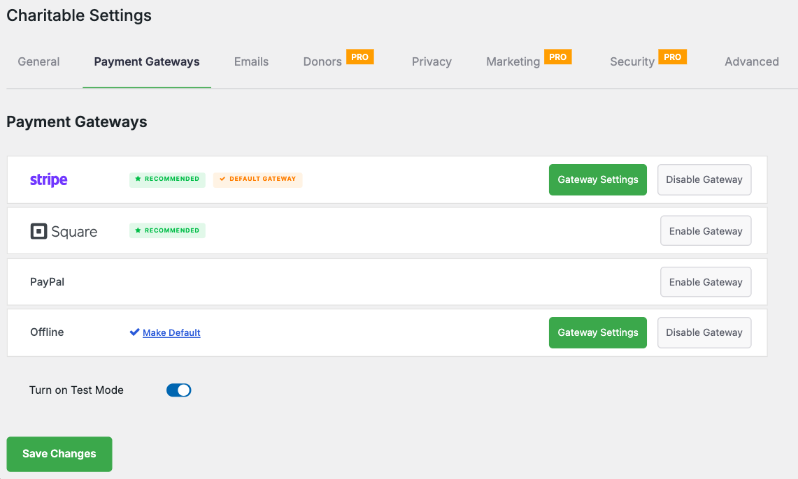
To enable a gateway, click on the Enable Gateway button in its block.
Once a gateway is activated, this button is replaced by a Disable Gateway button that can be clicked to turn off the payment gateway.
Configuring gateway settings
When you enable a gateway, a green Gateway Settings button will appear for that gateway. Click on this button to enter the settings for that specific gateway.
On the next page, you may either need to sign into your payment gateway account or add API keys to get connected.
Access gateway-specific documentation for details about setting up your chosen gateway(s). Choose your gateway from the list below:
- पेपैल
- स्क्वायर
- स्ट्राइप
- ऑथराइज़.नेट
- गोकार्डलेस
- ब्रेन्ट्री
- विंडकेव
- पेफास्ट
- पेयू मनी
- पेरेक्स
- पेस्टैक
- मोली
Using Offline Donations
With Charitable, you can easily accept and manage offline donations, like checks, cash, or bank transfers, right alongside your online gifts.
अपनी भुगतान गेटवे सेटिंग्स में ऑफ़लाइन दान सक्षम करें।
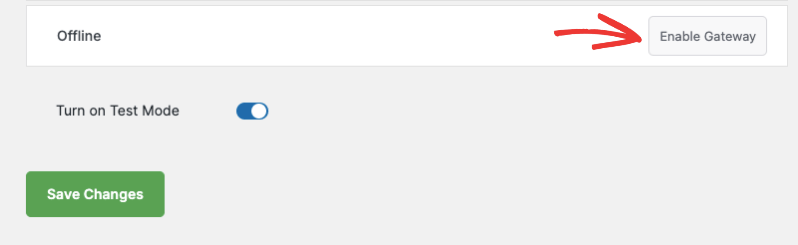
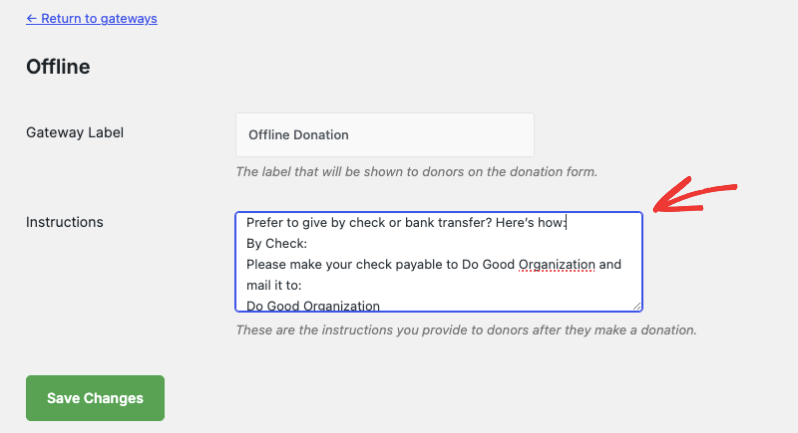
अगले पेज पर जाने के लिए गेटवे सेटिंग्स बटन का उपयोग करें, जहां आप स्पष्ट रूप से समझा सकते हैं कि दानदाता सीधे दान फॉर्म पर चेक या बैंक हस्तांतरण द्वारा कैसे दे सकते हैं।
आप कस्टम निर्देश जोड़ सकते हैं (जैसे, किसे चेक का भुगतान करना है, उन्हें कहां भेजना है, या वायर ट्रांसफर के लिए बैंक विवरण)।
एक बार जब आपको ऑफ़लाइन दान प्राप्त हो जाता है, तो उसे अपने चैरिटेबल डैशबोर्ड में मैन्युअल रूप से जोड़ें ताकि वह आपके लक्ष्यों की ओर गिना जाए और आपकी रिपोर्ट में शामिल हो।
जब आप ऑफ़लाइन दान रिकॉर्ड करते हैं, तो चैरिटेबल एक व्यक्तिगत ईमेल रसीद भेज सकता है (ऑनलाइन दान की तरह), जिससे हर समर्थक को सराहना महसूस होती है।
All your donations—online and offline—will appear in your reports, so you always have a complete view of your fundraising progress.
यहां जानें कि ऑफ़लाइन दान कैसे सेट अप करें »
Using Easy Digital Downloads gateways
With our EDD Connect extension, all donations are made through the EDD checkout. You can manage your payment gateways through the EDD Settings; Charitable’s gateways will not be used.
Find out more: EDD Connect Documentation
अधिक जानकारी प्राप्त करें
आपके लिए कुछ अधिक लोकप्रिय "कैसे करें" गाइड और सहायता लेख यहाँ दिए गए हैं:
- वर्डप्रेस डैशबोर्ड में दान बनाएं और संपादित करें
- डोनर मैनेजमेंट सिस्टम का उपयोग कैसे करें
- गूगल एनालिटिक्स से कनेक्ट करें
- दान ईमेल न भेजने की समस्याएँ
- डैशबोर्ड से दान ईमेल पुनः भेजें
- विजेट और शॉर्टकोड
अधिक धन उगाहने की युक्तियाँ और गैर-लाभकारी सलाह चाहते हैं?
हम नियमित रूप से व्यावहारिक गाइड, सिद्ध रणनीतियाँ और अंदरूनी युक्तियाँ साझा करते हैं ताकि आप अधिक धन जुटा सकें और मजबूत डोनर संबंध बना सकें। हजारों गैर-लाभकारी संस्थाओं से जुड़ें जिन्हें हमारी सर्वोत्तम सामग्री सीधे उन तक पहुँचाई जाती है:
- Join our newsletter – Get weekly tips and exclusive guides in your inbox
- Subscribe to our YouTube channel – Watch step-by-step tutorials and success stories
- Follow us on LinkedIn – Connect with our community and get daily nonprofit insights
- टिकटॉक पर हमें फॉलो करें – अपने कारण को बढ़ाने में मदद करने के लिए जानकारीपूर्ण और मजेदार वीडियो
- Follow us on Instagram – Fun reels and non-profit tips
कोई बकवास नहीं, बस उन लोगों से कार्रवाई योग्य सलाह जो उन चुनौतियों को समझते हैं जिनका आप हर दिन सामना करते हैं।
FAQs on Payment Gateways in Charitable
चैरिटेबल किन भुगतान गेटवे का समर्थन करता है?
Charitable includes Stripe, Square, PayPal, and Offline Donations by default. For additional options, we offer premium extensions for Authorize.Net, Braintree, Mollie, GoCardless, Windcave, Payfast, Payrexx, Paystack, and PayUMoney to match your donors’ preferred payment methods.
चैरिटेबल लाइट और प्रो के बीच क्या अंतर है?
Charitable offers a Lite version, which is free to use. You’ll only incur a 3% fee on your transactions from our end. We also offer a Charitable Pro plugin that comes with advanced features such as recurring donations, donor management, donor portal, and much more. With Pro, there are no Charitable fees on transactions. See the difference between Charitable Lite vs Pro »
मैं चैरिटेबल प्रो में कैसे अपग्रेड करूं?
Follow our guide here: How to Upgrade to Charitable Pro.
मैं भुगतान गेटवे को कैसे सक्षम या अक्षम करूं?
चैरिटेबल » सेटिंग्स » भुगतान गेटवे टैब पर नेविगेट करें। भुगतान विधि को सक्रिय करने के लिए “गेटवे सक्षम करें” पर क्लिक करें या इसे बंद करने के लिए “गेटवे अक्षम करें” पर क्लिक करें। हम दानकर्ताओं को अधिक भुगतान विकल्प देने और कार्ट परित्याग को कम करने के लिए कई गेटवे सक्षम करने की सलाह देते हैं।
मेरे भुगतान गेटवे सेटिंग्स को कॉन्फ़िगर करने में क्या शामिल है?
गेटवे सक्षम करने के बाद, अपना खाता कनेक्ट करने के लिए हरे “गेटवे सेटिंग्स” बटन पर क्लिक करें। आपको आम तौर पर अपने भुगतान प्रदाता के साथ प्रमाणित करने या एपीआई कुंजी दर्ज करने की आवश्यकता होगी। यह सुनिश्चित करने के लिए कि सब कुछ सुचारू रूप से काम करता है, अपना अभियान शुरू करने से पहले एक छोटे दान के साथ अपने सेटअप का परीक्षण करें।
चैरिटेबल के साथ ऑफ़लाइन दान कैसे काम करते हैं?
ऑफ़लाइन दान सक्षम करें चेक, नकद, या बैंक हस्तांतरण स्वीकार करने के लिए। भुगतान विधियों, मेलिंग पतों और बैंक विवरणों की व्याख्या करने वाले अपने दान फ़ॉर्म पर स्पष्ट निर्देश जोड़ें। जब आप ऑफ़लाइन उपहार प्राप्त करते हैं, तो सटीक धन उगाहने वाले योगों को बनाए रखने और उचित रसीदें भेजने के लिए उन्हें अपने डैशबोर्ड में मैन्युअल रूप से रिकॉर्ड करें।
क्या मेरी धन उगाहने वाली रिपोर्टों में ऑनलाइन और ऑफ़लाइन दोनों दान शामिल होंगे?
Yes, all donations—regardless of payment method—appear in your reports and count toward campaign goals. This gives you a complete picture of your fundraising progress and helps with donor stewardship and tax reporting.
क्या होगा यदि मैं पहले से ही भुगतान के लिए ईज़ी डिजिटल डाउनलोड का उपयोग कर रहा हूँ?
Our EDD Connect extension integrates seamlessly with your existing EDD setup. All donations process through EDD’s checkout system using your current payment gateways, while Charitable handles the fundraising campaign management and donor tracking.
Where can I get help setting up specific payment gateways?
In this guide, we’ve provided detailed setup guides for each supported gateway, including screenshots and troubleshooting tips. These step-by-step tutorials cover common issues like API key configuration, webhook setup, and testing procedures to get you accepting donations quickly.
What should I do if donors are having trouble completing their donations?
First, test your donation process yourself to identify any issues. Common problems include outdated API keys, incorrect webhook URLs, or gateway-specific settings. Check our troubleshooting guides for your specific payment gateway, and consider enabling multiple payment options to give donors alternatives.
क्या वीडियो ट्यूटोरियल उपलब्ध हैं?
हाँ! Charitable YouTube चैनल की सदस्यता लें स्टेप-बाय-स्टेप ट्यूटोरियल और सफलता की कहानियों के लिए।
और प्रश्न हैं? यदि आप चैरिटेबल के Lite/free उपयोगकर्ता हैं, तो आप WordPress.org सहायता फ़ोरम पर हमारी टीम से संपर्क कर सकते हैं। यदि आपके पास सक्रिय लाइसेंस है, तो प्राथमिकता सहायता के लिए हमसे सीधे संपर्क करने में संकोच न करें।


