AUTOMATION CONNECT

Connect and integrate with 3000+ apps

Send donation, donor, and campaign events to any platform… with a visual editor, conditional delivery, and asynchronous webhook performance built in.


Now Recently Updated (2.0 Release!)
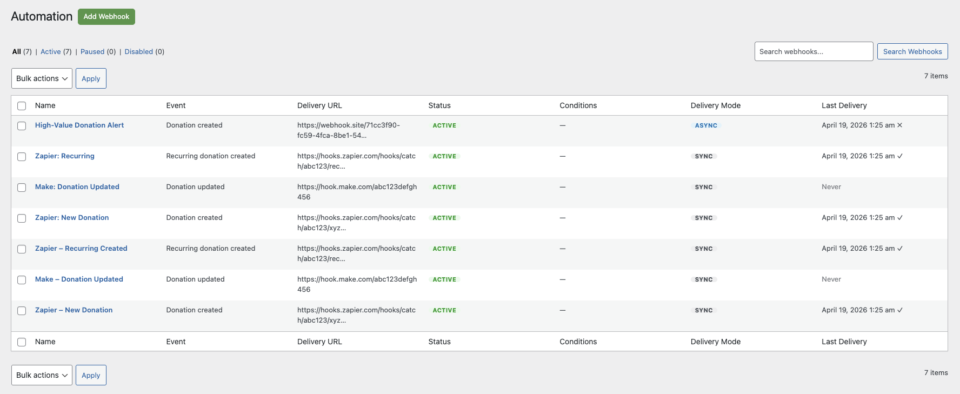
Connect Charitable to Zapier, Make.com, n8n, HubSpot, Slack, Mailchimp, your own custom endpoint, or any other platform that accepts HTTP webhooks. The 2.0 release is a complete rebuild around a new webhook engine, a tabbed React-based editor, and a delivery model that won’t slow down your donation page.

A visual webhook editor

A redesigned editor with four tabs – BasicConditionsPayload, and Test – replaces the old single-form workflow. Set your delivery URL, choose an event, attach rules, customize what gets sent, and fire a test request, all without leaving the page.

One-click templates for 7 platforms
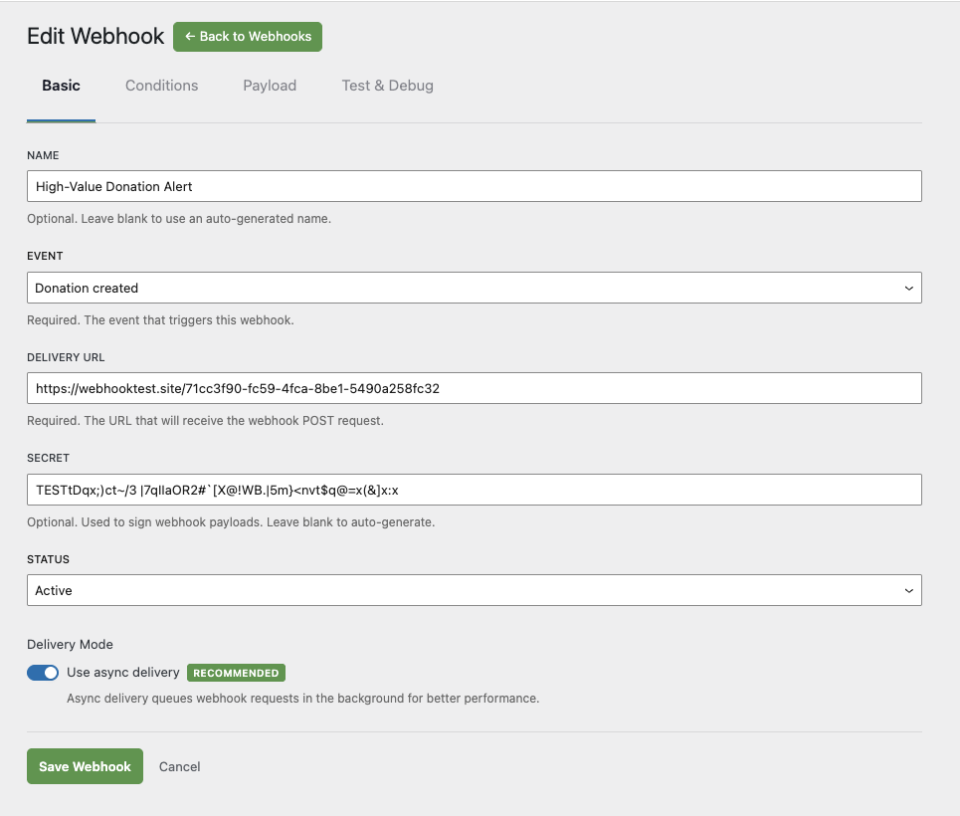
Start from a pre-configured template instead of a blank slate. Each template fills in the right defaults – event, delivery shape, helpful instructions – for the platform you’re connecting to.

  • Zapier (Webhooks by Zapier – Catch Hook trigger)
  • Make.com (Custom Webhook module)
  • n8n (Webhook node)
  • Pabbly Connect (Webhook trigger)
  • HubSpot (workflow webhook action)
  • Mailchimp (newsletter opt-in pre-filtered)
  • Slack (Incoming Webhook for channel notifications)

Or pick Start from scratch and configure everything yourself.

Conditional delivery
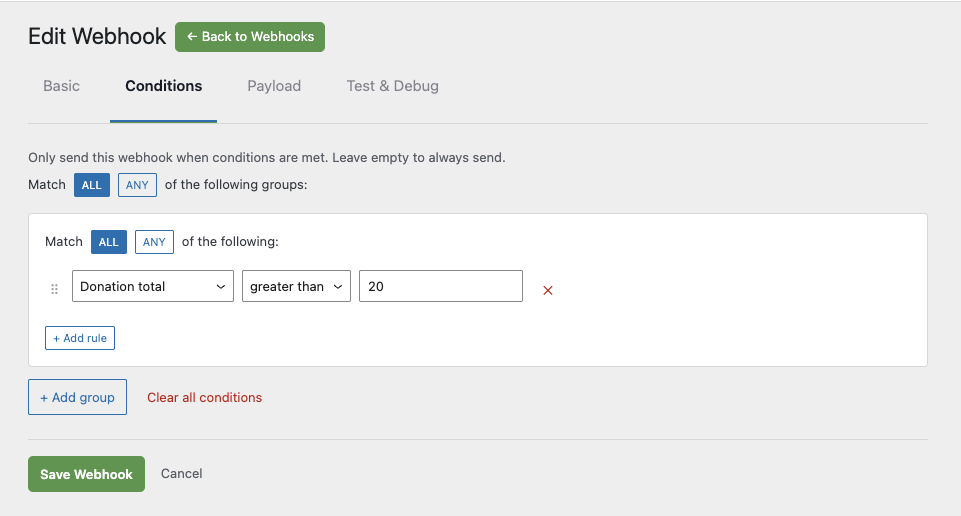
Fire webhooks only when the event matches your rules. The new condition builder supports nested AND/OR groups across donation, recurring donation, and campaign fields, including:

  • Donation total (><=)
  • Campaign or campaign category
  • Payment gateway
  • दान की स्थिति
  • Donor country
  • Newsletter opt-in
  • गुमनाम दान
  • Test mode
  • Recurring period
  • Campaign creator

Combine rules to build conditions like “big donations from US donors who opted in to the newsletter” without writing a line of code.

Asynchronous delivery

New subscriptions deliver asynchronously by default, using Action Scheduler to dispatch webhooks in the background. Donation pages no longer wait for third-party platforms to respond before completing – the donor sees their thank-you page immediately, and the webhook fires moments later.

Existing 1.x subscriptions keep running in synchronous mode. Switch any one of them to async whenever you’re ready, one subscription at a time.


Customize what gets sent

The new Payload tab lets you choose exactly which fields are included in each webhook request, and in what order. Drop the fields your integration doesn’t need, keep your payloads small, and reorder them to match what your receiving platform expects.

Charitable’s other extensions (Ambassadors, Recurring Donations, Fee Relief, Anonymous Donations, Gift Aid, Newsletter Connect) automatically contribute their own fields, and developers can register custom payload fields.


See exactly what’s happening

Every subscription has its own delivery log showing recent send attempts, HTTP response codes, and success/failure status. When something goes wrong, you can see why – no need to dig through server logs.

The Test tab in the editor sends a sample request to your delivery URL on demand, so you can verify the integration before any real donation triggers it.


Works with your existing extensions

Automation Connect 2.0 plugs into the rest of the Charitable ecosystem the same way it always has. Plugins like AmbassadorsRecurring DonationsFee ReliefAnonymous DonationsGift Aid, and Newsletter Connect add their own fields to outgoing webhooks automatically, with no extra configuration required.


Get started in four steps

  1. Click Add Webhook and pick a template – Zapier, Make.com, n8n, Pabbly Connect, HubSpot, Mailchimp, Slack, or “Start from scratch.”
  2. Paste your platform’s webhook URL into the Delivery URL field on the Basic tab.
  3. (Optional) On the Conditions tab, add rules so the webhook fires only when an event matches.
  4. (Optional) On the Payload tab, choose which fields to include. Click Send Test on the Test tab to verify it works, then save and activate.

That’s it. Your webhook is live.


Frequently asked questions

Do I need a paid Zapier plan to use this?

No. Zapier’s “Catch Hook” trigger is part of the free tier. The same is true for Make.com, n8n, and Pabbly Connect – their free plans include webhook triggers.

Can I retry a failed webhook?

Yes. Open the subscription, view its delivery log, and resend. You can also use the Test tab to fire a fresh request whenever you want.

What happens if my host can’t run async deliveries reliably?

Set the subscription’s delivery mode to Sync in the editor. The webhook will fire immediately on the request that triggered it, the same way 1.x worked.

Will my existing 1.x webhooks still work after upgrading?

Yes. Existing subscriptions are migrated automatically and keep running in legacy synchronous mode. Switch any of them to async whenever you’re ready – one subscription at a time, no all-or-nothing migration.

What Charitable plan do I need?

Charitable Pro plan or higher. Licenses get a 30-day grace period after expiry before delivery stops, so you have time to renew.

Does this work with platforms not in the template list?

Yes. Pick Start from scratch and paste any HTTPS endpoint. Anything that accepts an HTTP POST with a JSON body will work – that includes most modern automation platforms, CRMs, and custom internal services.


Connect Charitable to anything

Whether you’re piping new donations into a CRM, pinging Slack when a peer-to-peer fundraiser hits goal, syncing newsletter opt-ins into Mailchimp, or building a custom internal pipeline, Automation Connect 2.0 gets the data where it needs to go – quickly, reliably, and on your terms.

Get started with Automation Connect

You’ll find everything you need to get started with Automation Connect in our detailed setup guide.

It covers everything you need to know to start creating automated workflows powered by Charitable and your automation platform.


अक्सर पूछे जाने वाले प्रश्न

हमारे अक्सर पूछे जाने वाले प्रश्नों की सूची नीचे देखें। यदि आपका प्रश्न यहाँ सूचीबद्ध नहीं है, तो कृपया हमसे संपर्क करें।

चैरिटेबल में नया क्या है

नवीनतम अपडेट देखें
🔔 हमारे नवीनतम अपडेट प्राप्त करने के लिए सदस्यता लें
📧 ईमेल के लिए सदस्यता लें

ईमेल सदस्यता

हमारे न्यूज़लेटर में शामिल हों

हम आपको स्पैम नहीं भेजेंगे। हम केवल तभी ईमेल भेजते हैं जब हमें लगता है कि यह वास्तव में आपकी मदद करेगा। आप किसी भी समय सदस्यता समाप्त कर सकते हैं!

गिवडब्ल्यूपी माइग्रेशन नया

GiveWP के लिए व्हाइट ग्लोव माइग्रेशन सेवा

अपने फ़ंडरेज़िंग प्लेटफ़ॉर्म को GiveWP से Charitable पर स्विच करने के बारे में सोच रहे हैं, लेकिन अपना डेटा खोने का जोखिम नहीं उठाना चाहते या स्वयं एक जटिल तकनीकी सेटअप को संभालना नहीं चाहते? Charitable की व्हाइट ग्लोव माइग्रेशन सेवा में शामिल हैं:

👥 निर्दोष डोनर मैपिंग: शून्य डेटा हानि के साथ अपने पूरे समर्थक डेटाबेस को सुरक्षित रूप से स्थानांतरित करें।

📊 पूर्ण वित्तीय इतिहास: निरंतर, सटीक रिपोर्टिंग के लिए हर ऐतिहासिक लेनदेन को सावधानीपूर्वक संरक्षित करें।

🔄 निर्बाध आवर्ती दान: अपने आने वाले राजस्व को बाधित किए बिना या अपने दाताओं को अपनी जानकारी अपडेट करने की आवश्यकता के बिना सक्रिय स्थायी सब्सक्रिप्शन को सुरक्षित रूप से स्थानांतरित करें।

💳 शून्य गेटवे व्यवधान: स्ट्राइप, पेपाल, या किसी अन्य GiveWP-संगत प्रोसेसर का उपयोग करना जारी रखें जिसे आप पहले से ही पसंद करते हैं।

🚀 विशेषज्ञ तकनीकी सेटअप: जब हमारी टीम आपके फ़ॉर्म को इंस्टॉल और कॉन्फ़िगर करने का भारी काम संभालती है तो आराम करें—साथ ही, योग्य उपयोगकर्ताओं को Charitable Pro का पूरा साल पूरी तरह से मुफ़्त मिलता है।

अधिक जानने के लिए इस पृष्ठ पर जाएँ

चेकआउट


कार्ट में जोड़ा गया


ऑटोमेशन सुधार

📢 नई सुविधा अलर्ट: ऑटोमेशन कनेक्ट 2.0 यहाँ है! 🚀

अपने फ़ंडरेज़िंग डेटा को Mailchimp, Slack, या Google Sheets जैसे टूल से जोड़ने के बारे में सोच रहे हैं, लेकिन डेवलपर को काम पर नहीं रखना चाहते या कस्टम कोड नहीं लिखना चाहते? Charitable के नए ऑटोमेशन ऐडऑन में है:

⚡ 17 इवेंट ट्रिगर: डोनर के पहले उपहार, नवीनीकरण भुगतान, या अभियान मील के पत्थर तक पहुंचने के लिए तुरंत वेबहुक फायर करें।

🎯 स्मार्ट कंडीशनल लॉजिक: केवल तभी डेटा भेजने के लिए 11 फ़ील्ड में शक्तिशाली AND/OR लॉजिक का उपयोग करें जब यह आपकी सटीक शर्तों को पूरा करता हो, जैसे न्यूज़लेटर ऑप्ट-इन।

📊 कस्टम पेलोड नियंत्रण: डोनर, दान और अभियान मेटाडेटा में 80+ क्लीन डेटा फ़ील्ड में से चुनें ताकि आपके ऐप्स को वही मिले जिसकी उन्हें आवश्यकता है।

🚀 प्री-बिल्ट प्लेटफ़ॉर्म टेम्प्लेट: Zapier, Make.com, n8n, HubSpot, और Slack के लिए तैयार टेम्प्लेट के साथ स्क्रैच से सेटअप छोड़ें।

🛡️ विश्वसनीय डेवलपर टूल: हस्ताक्षरित HMAC-SHA256 पेलोड, पूर्ण वर्डप्रेस फ़िल्टर और स्वचालित पुनः प्रयास लॉग के साथ अपने वर्कफ़्लो को पावर दें।

चेकआउट


कार्ट में जोड़ा गया


ऑटोमेशन सुधार

🔌 चैरिटेबल ज़ैपियर से जुड़ता है: 7,000+ ऐप्स से कनेक्ट करें और अपने धन उगाहने को स्वचालित करें

दान डेटा को मैन्युअल रूप से अकाउंटिंग शीट में कॉपी करने या नए दाता साइनअप को ट्रैक करने से थक गए हैं? अपने प्रशासनिक कार्यों को ऑटोपायलट पर रखें। चैरिटेबल अब आधिकारिक तौर पर ज़ैपियर पर है, जो आपको अपने धन उगाहने को सीधे अपने पसंदीदा टूल के बाकी हिस्सों में प्लग करने का एक शक्तिशाली, नो-कोड तरीका प्रदान करता है।

हर दान, दाता साइनअप, और अभियान मील का पत्थर अब निर्बाध रूप से एक स्वचालित वर्कफ़्लो को ट्रिगर कर सकता है।

नई क्या है:

♾️ 7,000+ ऐप्स से कनेक्ट करें: अपने चैरिटेबल अभियानों को Google Sheets, QuickBooks, Slack, Mailchimp, HubSpot, Notion, Airtable, और हजारों अन्य जैसे रोजमर्रा के सॉफ़्टवेयर के साथ ब्रिज करें।

⚡ 12 शक्तिशाली ट्रिगर: संपूर्ण दान जीवनचक्र को कवर करने वाले स्मार्ट ऑटोमेशन ट्रिगर का उपयोग करके गहन वर्कफ़्लो बनाएं—जिसमें नया दान, नया दाता, सदस्यता रद्द, और अभियान लक्ष्य तक पहुंचना शामिल है।

📋 पूर्व-निर्मित एक्शन टेम्प्लेट: हमारे पूर्व-निर्मित टेम्प्लेट संयोजनों के साथ तीन मिनट या उससे कम समय में शुरुआत करें, जैसे कि Google शीट में सीधे नए दान लॉग करना या Gmail के माध्यम से कस्टम दाता स्वागत ईमेल भेजना।

🚫 किसी कोड की आवश्यकता नहीं: किसी जटिल वेबहुक या कस्टम PHP स्क्रिप्ट की आवश्यकता नहीं है। बस अपना ट्रिगर चुनें, अपना ऐप चुनें, अपने फ़ील्ड मैप करें, और ज़ैपियर को भारी काम करने दें।

एडमिन समय के घंटों को बचाने के लिए तैयार हैं? आज ही ऑटोमेशन कनेक्ट एडऑन के साथ चैरिटेबल प्रो प्राप्त करें और अपना पहला ज़ैप लॉन्च करें!

चेकआउट


कार्ट में जोड़ा गया


सुधार भुगतान

🚀 पेपैल कॉमर्स का परिचय: एक कनेक्शन, दान करने के छह तरीके

दानकर्ता जब किसी कारण का समर्थन करते हैं तो आधुनिक, लचीले भुगतान विकल्पों की उम्मीद करते हैं। यदि वे आपके दान फ़ॉर्म पर अपनी पसंदीदा विधि नहीं देखते हैं, तो वे अक्सर बिना कुछ कहे चले जाते हैं। पेपैल कॉमर्स के साथ, हम आपके अभियानों में एक पूरी तरह से आधुनिक चेकआउट अनुभव ला रहे हैं।

एक एकल एकीकरण का आनंद लें जो आपके फ़ॉर्म को अपग्रेड करता है, दान को निर्बाध बनाता है, और आपको हर एक दान को कैप्चर करने में मदद करता है।

नई क्या है:

🔌 एक-क्लिक कनेक्शन: गंदे एपीआई कुंजी और डेवलपर दस्तावेज़ों को छोड़ें। बस "पेपैल से कनेक्ट करें" पर क्लिक करें, अपने व्यवसाय खाते में साइन इन करें, और आपका आधुनिक फ़ॉर्म पांच मिनट से भी कम समय में लाइव हो जाएगा।

💳 देने के छह तरीके: अपने समर्थकों को पेपैल बैलेंस, वेन्मो (यूएस), पे लेटर फाइनेंसिंग, प्रमुख क्रेडिट/डेबिट कार्ड, एप्पल पे (सफारी), और गूगल पे (क्रोम) सभी एक ही फ़ॉर्म से तुरंत एक्सेस दें।

🔄 लचीला आवर्ती दान: मासिक दान का पूरी तरह से समर्थन करता है। पेपैल सब्सक्रिप्शन एपीआई (पेपैल के अंत में स्वचालित रूप से संभाला जाता है) या वॉल्ट + क्रॉन (सीधे आपकी साइट पर सुरक्षित रूप से संभाला जाता है) के बीच चयन करें।

💬 अनुकूल त्रुटि रिकवरी: कोई और भ्रमित करने वाले ब्राउज़र अलर्ट नहीं। यदि कोई भुगतान अस्वीकृत हो जाता है, तो दानकर्ताओं को सादे-भाषा, इनलाइन संदेश दिखाई देते हैं जो उन्हें समस्या को ठीक करने और अपना उपहार पूरा करने के तरीके के बारे में मार्गदर्शन करते हैं।

पेपैल के लिए तैयार हैं, आधुनिक? चैरिटेबल प्रो 1.8.15+ (या चैरिटेबल लाइट 1.8.11+) में अपडेट करें और आज ही अपना खाता कनेक्ट करें!

चेकआउट


कार्ट में जोड़ा गया


अभियान नया

⏳ अभियान काउंटडाउन: तात्कालिकता को बढ़ाएं और दान बढ़ाएं

तात्कालिकता धन उगाहने वाले सबसे शक्तिशाली उपकरणों में से एक है! अभियान काउंटडाउन से मिलें—एक लाइव, वास्तविक समय टाइमर जो टालमटोल को तत्काल उदारता में बदलने के लिए बनाया गया है।

अभियान_काउंटडाउन_एनीमेशन

नई क्या है:

⏱️ लाइव, रियल-टाइम तात्कालिकता: लाइव-अपडेटिंग विज़ुअल काउंटडाउन के साथ अपने अभियान की समय सीमा तक दिनों, घंटों, मिनटों और सेकंडों को खूबसूरती से ट्रैक करें।

🎨 आपके लुक के अनुरूप: बॉक्स्ड बॉर्डर्ड टाइल्स या एक साफ, सिंगल-लाइन इनलाइन डिस्प्ले के बीच चुनें। फ़ॉन्ट और डीप कलर कंट्रोल्स के साथ तुरंत अपने थीम से मिलान करें।

🛠️ कहीं भी रखें: कैंपेन बिल्डर फ़ील्ड, एक समर्पित गुटेनबर्ग ब्लॉक, या एक साधारण शॉर्टकोड का उपयोग करके कहीं भी काउंटडाउन ड्रॉप करें।

🚨 स्मार्ट समाप्ति क्रियाएं: अंतिम स्थिति पर पूर्ण नियंत्रण—टाइमर को स्वचालित रूप से एक कस्टम संदेश से बदलने, इसे शून्य पर फ्रीज करने और बहुत कुछ करने के लिए चुनें।

चेकआउट


कार्ट में जोड़ा गया