
आवश्यकताएँ:
- Charitable Pro 1.8.15+
- Charitable Campaign Updates 1.0.8+
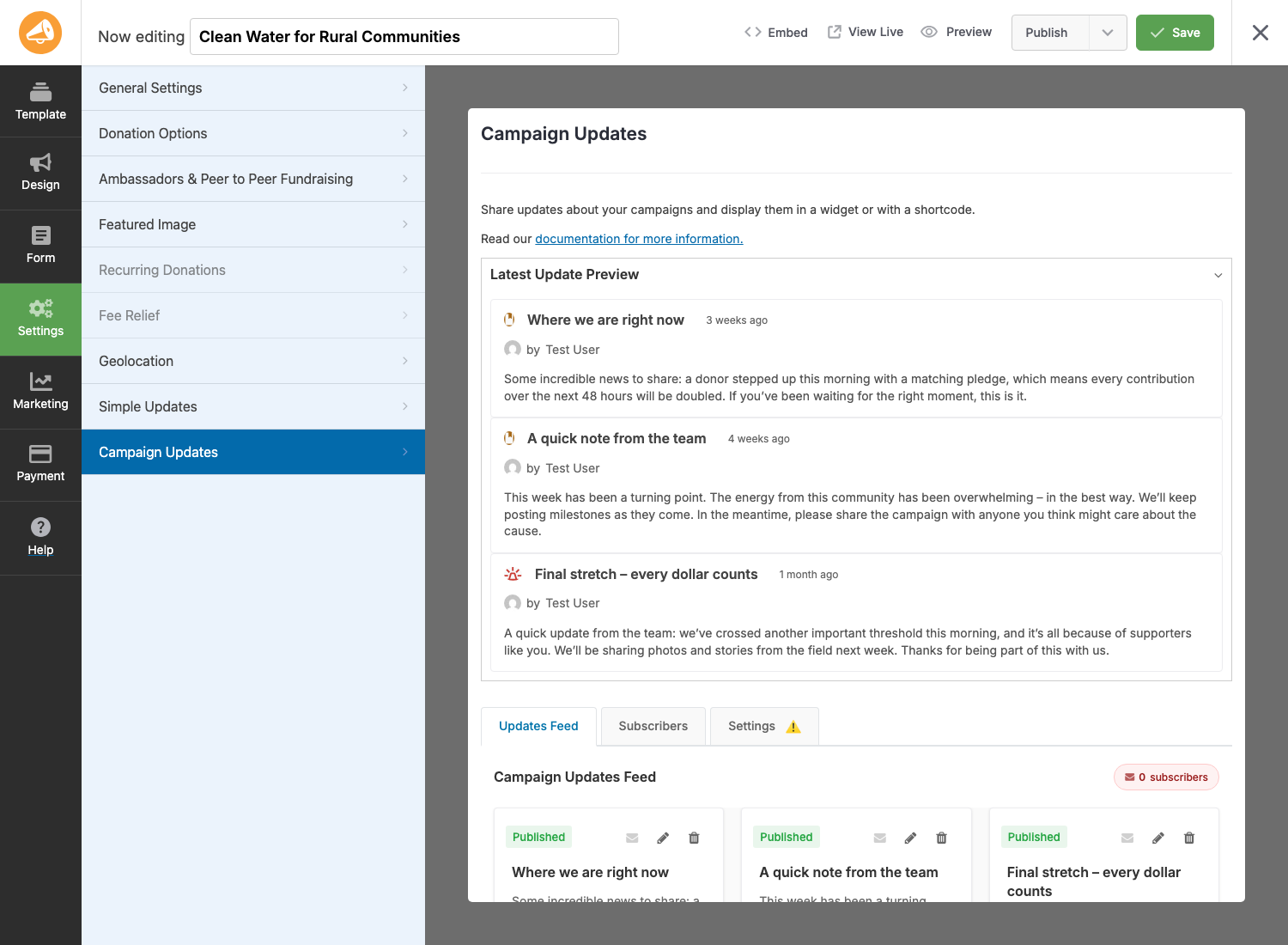
Campaign Updates lets you publish progress posts for any campaign, display them on the campaign page (or any page), and email the donors who opted in. Three update types (general, milestone, urgent), one “featured” pin per campaign, and a per-campaign unsubscribe link in every email so list hygiene takes care of itself.
When you’d use it
- You want donors to see the campaign keep moving after they give, not just at end-of-campaign thank-yous.
- You’re running a multi-week or multi-month campaign and need a way to surface milestones and urgent asks (matching gift expiring, emergency stretch goal).
- You want one signed-up audience per campaign instead of one site-wide list that includes everyone.
Finding it
The whole feature lives inside the Campaign Builder. Open any campaign and look in the left sidebar:
WordPress Admin > Campaigns > [your campaign] > Campaign Builder > Campaign Updates
The panel has three sub-tabs at the bottom:
- Updates Feed — the default. Latest update preview plus the full feed of update cards (add, edit, delete, send).
- Subscribers — donors who opted in to receive email updates for this campaign, plus the email-send history.
- Settings — the per-campaign on/off, content limit, and email behavior.
The big picture
There are three moving parts working together:
| Part | Where it lives | What it does |
|---|---|---|
| The updates feed | Campaign Builder > Campaign Updates > Updates Feed | The list of updates for one campaign. Add, edit, delete, send. |
| The donor opt-in | Donation form, when contact consent is enabled | A “I want to receive updates” checkbox next to the consent checkbox at donation time. |
| The display | Campaign page (via Campaign Builder field or Gutenberg block) | The public-facing list that donors and visitors see on the campaign page. |
A campaign needs all three turned on to deliver the full experience: you publish an update, the donors who opted in get an email, and visitors who land on the campaign page see the update displayed there.
Step-by-step setup
The first time you set this up for a campaign:
- Turn it on for the campaign. Open Campaign Builder > Campaign Updates > Settings. Flip Enable Campaign Updates to On. This is the master switch for everything else on this campaign.
- Verify the opt-in path exists. Go to Charitable > Settings > Privacy and confirm Contact consent is on. The Campaign Updates opt-in checkbox piggybacks on this; without it, the checkbox can’t render on the donation form. (The Settings tab will warn you if any of these prerequisites are missing.)
- Add the Campaign Updates field to the campaign layout. Open Campaign Builder > Design > Add Fields and drop Campaign Updates wherever you want updates to show on the campaign page. For Gutenberg-based campaigns or non-campaign pages, use the Campaign Updates block instead.
- Confirm the email is enabled. Go to Charitable > Settings > Emails and make sure Campaign Update is enabled. The Settings tab will also flag this if it’s missing.
- Post your first update. Back in Campaign Builder > Campaign Updates > Updates Feed, click Add First Update. See Creating updates for the full modal walkthrough.
After step 5, your donation form will show the opt-in checkbox, your campaign page will show the update, and (depending on your sending mode) the email may go out automatically or wait for you to send it.
Settings tab
Every campaign has its own settings under Campaign Builder > Campaign Updates > Settings:
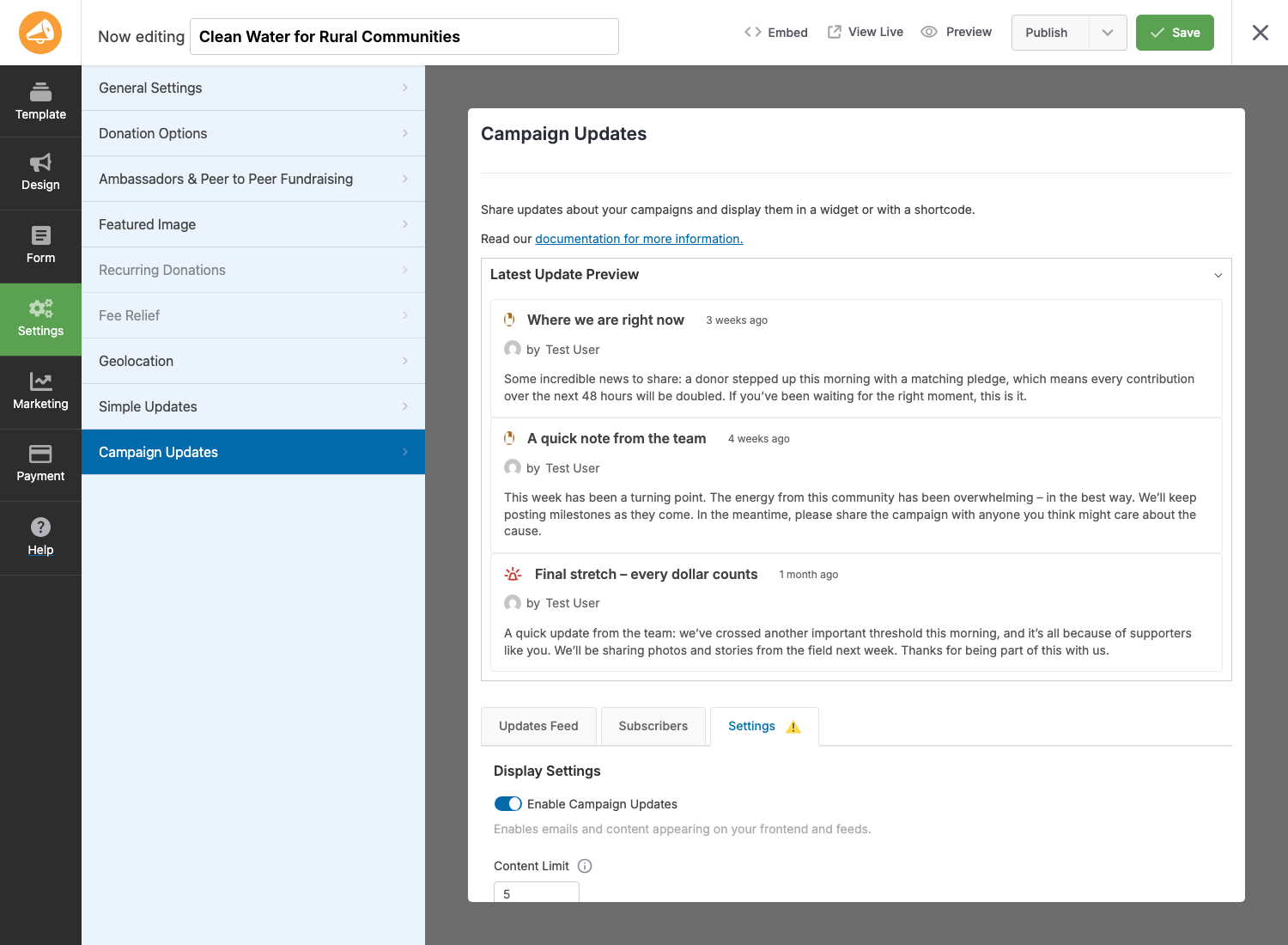
Display Settings
| सेटिंग | What it does |
|---|---|
| Enable Campaign Updates | Master switch for this campaign. Off means: no opt-in checkbox, no email sends, no updates rendered on the front end. |
| Content Limit | Maximum number of updates the field/block should display by default. Each instance of the Campaign Updates field can override this. Set to 0 for no limit. |
Email Notifications
| सेटिंग | What it does |
|---|---|
| Enable Update Emails | Allows update emails to be sent for this campaign. Also requires the Campaign Update email to be enabled in Charitable’s global email settings. |
| Automatic Email Sending | Three modes – Manual only (you click “send” per update), Auto for featured updates (publishing a featured update auto-sends), Auto for all updates (every published update auto-sends). |
| Email Content Length | Number of characters of the update body to include in the email. 0 means full content. Useful for keeping emails skimmable. |
The Settings tab shows yellow warning banners if it detects any of:
- The Campaign Update email is disabled in Charitable email settings.
- Contact consent is off in Privacy settings.
- The campaign form has no privacy/consent field (so new donors can’t opt in).
Fix what the warnings flag before you start posting updates, or new donors won’t be able to subscribe.
टिप्स
- One featured update at a time. Marking a second update as featured automatically unfeatures the previous one. Use it for “this is the one thing you need to know right now.”
- Drafts don’t email. Saving as draft is safe – drafts are invisible to donors and never trigger sends, even in auto-send modes. Use drafts to compose updates before they go live.
- Test before sending. The send modal has a “Send Test Email” link that sends to the currently-logged-in user. Always send yourself a test before hitting the real list.
- Donor opt-out is per-campaign. A donor unsubscribing from your gala campaign doesn’t unsubscribe them from your animal-rescue campaign. The unsubscribe link is campaign-scoped.
- Re-subscribe is automatic on new donations. If a donor unsubscribes then later makes a fresh donation to the same campaign with the opt-in checked, they’re back on the list. No manual cleanup needed.
Developer reference
फ़िल्टर
These are the high-traffic filters most likely to come up in customization work. See Hooks and Filters for the complete inventory.
| फ़िल्टर | डिफ़ॉल्ट | उद्देश्य |
|---|---|---|
charitable_campaign_updates_default_checked |
false |
Whether the donation-form opt-in checkbox is pre-checked. |
charitable_campaign_updates_consent_label |
"I want to receive updates about this campaign's progress." |
The opt-in checkbox label. |
charitable_campaign_updates_require_contact_consent |
सत्य |
Whether the opt-in checkbox is disabled until contact consent is checked. |
charitable_campaign_update_types |
(array) | The list of update types – general, milestone, urgent – and their labels, icons, and colors. |
charitable_campaign_updates_content_limit |
(int) | Per-campaign default content limit. |
charitable_can_user_manage_campaign_updates |
सत्य |
Whether the current user can add/edit/delete updates for a campaign. |
कार्रवाई
| कार्रवाई | When it runs |
|---|---|
charitable_campaign_update_meta_saved |
After an update’s post meta is saved from the admin (post_id, post). |
charitable_campaign_updates_builder_loaded |
When the Campaign Builder’s Campaign Updates panel finishes loading. |
charitable_campaign_updates_activated |
On plugin activation. |
charitable_campaign_updates_installed |
After plugin install (version string passed). |
Helper functions and post type
| Symbol | उद्देश्य |
|---|---|
charitable_get_campaign_update_types() |
Returns the array of registered update types. Apply the charitable_campaign_update_types filter to add/modify types. |
Post type: campaign_update |
Each update is a campaign_update post with _campaign_id, _update_type, _featured, and (for urgent) _urgency_level meta. |
Capability gate
Edit access defaults to anyone who can edit the campaign. Override the charitable_can_user_manage_campaign_updates filter to restrict (for example, to only the campaign author):
add_filter( 'charitable_can_user_manage_campaign_updates', function( $can, $campaign_id ) {
    if ( ! $can ) {
        return $can;
    }
    $campaign = get_post( $campaign_id );
    return $campaign && (int) $campaign->post_author === get_current_user_id();
}, 10, 2 );
Customization examples
Pre-check the opt-in checkbox for first-time donors:
add_filter( 'charitable_campaign_updates_default_checked', '__return_true' );
Change the consent label to something campaign-specific:
add_filter( 'charitable_campaign_updates_consent_label', function( $label ) {
    return 'Email me updates about this campaign. We send roughly one per month.';
} );
Add a fourth update type (“inspiration”) for sharing donor stories:
add_filter( 'charitable_campaign_update_types', function( $types ) {
    $types['inspiration'] = array(
        'label'       => __( 'Inspiration', 'your-textdomain' ),
        'description' => __( 'Stories and quotes from donors and beneficiaries.', 'your-textdomain' ),
        'icon'        => 'fa-heart',
        'color'       => '#9333ea',
    );
    return $types;
} );
Override the default per-campaign content limit globally to 10:
add_filter( 'charitable_campaign_updates_content_limit', function( $limit, $campaign_id ) {
    return 10;
}, 10, 2 );
संबंधित
- Creating updates – The add/edit modal, update types, featured pin, draft vs publish.
- Email notifications – Donor opt-in, manual and automatic sending, unsubscribe and re-subscribe.
- Campaign Builder field – The drag-in field for displaying updates inside the Campaign Builder layout.
- Campaign Updates block – The Gutenberg block, shortcode, and PHP function for displaying updates anywhere on the site.
- Hooks and filters – Complete developer reference.


